
User guide
Location on ribbon: Tab DVD Addin → Group About → Menu Help
Command ID: btnUserGuide
What it does
Opens the complete PDF user guide that the installer copied to this computer (C:\DVDAddin\HuongDan) — the same content as this website: installation, commands by topic, the per-command reference, UDF functions, workflows, tips and FAQ, with a clickable table of contents and every picture. The book opens in the computer's default PDF reader and works without internet. The English interface opens DVDAddin-UserGuide.pdf, the Vietnamese interface opens DVDAddin-HuongDan.pdf.
How to use
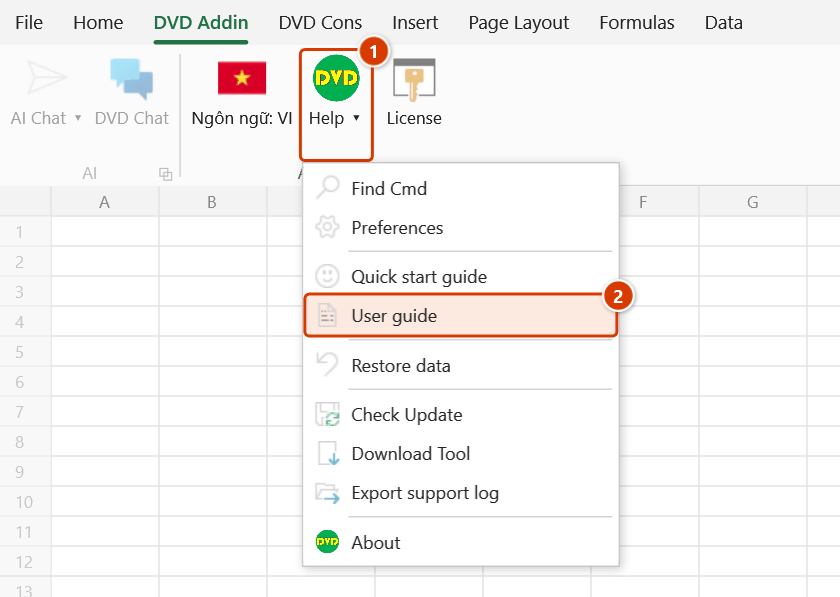
- Go to the DVD Addin tab → About group → Help menu → User guide.
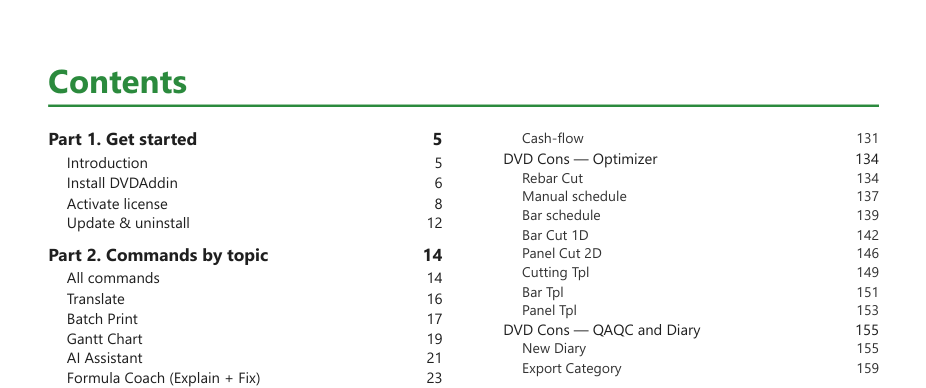
- The book opens in your PDF reader (Edge, Acrobat…). The first pages are a two-column table of contents — click an entry to jump to its page; the bookmark pane on the left lists every part as well.
- Use the PDF reader's Ctrl+F to search for a command name or keyword.
- Already inside a DVD Addin dialog? No need to search: press F1 to open that command's guide page in the browser (in a window with several tabs, the page of the open tab).
Video tutorial
Narrated in Vietnamese, with Vietnamese subtitles. Tìm lệnh nhanh và menu Trợ giúp · 4 min 12 s · 10 cases · Download the video
Commands in this video: Find Cmd · About · Export support log · Quick start guide · User guide · Find Cmd (Help menu)
Chapters (13)
- Giới thiệu
- 1 · Hai tab DVD Addin, DVD Cons
- 2 · Mở Tìm lệnh nhanh
- 3 · Lệnh dùng gần đây
- 4 · Gõ không dấu, gõ theo việc
- 5 · Enter, F1, Esc
- 6 · Menu Trợ giúp
- 7 · Sách PDF, file thực hành
- 8 · Hướng dẫn nhanh
- 9 · Xem phiên bản, bản quyền
- 10 · Gửi nhật ký khi gặp lỗi
- Mẹo
- Kết thúc
Illustrated walkthrough
Step 1. On the ribbon, open the DVD Addin tab → About group → open Help → choose User guide.
Step 2. The book DVDAddin — User Guide opens in the computer's default PDF reader (the English interface opens DVDAddin-UserGuide.pdf). The first pages are a two-column table of contents: click an entry to jump to its page; the bookmark pane on the left lists every part.
Step 3. Press Ctrl+F in the PDF reader and type a command name (for example New Diary) to find it quickly — the book works without internet.
Example
A site team without reliable internet needs to look up how the New Diary command works. The engineer opens Help → User guide, types "diary" into the PDF reader's search box and reads the illustrated page straight away, without going online.
Notes
- The command needs no open workbook and no license.
- Switching the interface language (the Language button) makes the next click open the matching book. If only one book is present on the computer, that one opens.
- On a computer set up with an older installer that did not include the book, the command says it was not found and offers to open the online guide. Reinstalling the current build (Help → Download Tool) adds it.
- If no program on the computer can open PDF files, the command opens the folder with the file selected so you can open it in a browser.
- The book can also be opened from Start → DVDAddin Excel → User Guide (PDF).
Related
- Quick start guide — overview window of the feature groups.
- Find Cmd — type a command name to run it directly (Ctrl+Shift+Q).
- Lang: EN — switch the interface language, which is also the language of the book that opens.
- Download Tool — download the latest installer (includes the PDF user guide).