
Export support log
Ribbon location: DVD Addin tab → About group → Help menu → Export support log
Command ID: btnExportSupportLog
What it does
When something goes wrong, what support needs is a trace, not a screenshot. This command bundles into one .zip:
- the activity log of your 10 most recent Excel sessions (the add-in writes to
%LocalAppData%\DVDAddin\Logs, one file per Excel session); - machine info: add-in version, Windows, .NET, Excel version and bitness, Excel UI language, your locale and decimal separator, calculation mode, number of open workbooks, licence state.
How to use it
- Go to the DVD Addin tab → About group → Help menu → Export support log.
- A file named
DVDAddin-hotro-<date>-<time>.zipis created on your Desktop. - Email it with a description of the problem to
[email protected].
The add-in's error dialog also carries an Export support log button, so you can do this the moment an error appears.
Video tutorial
Narrated in Vietnamese, with Vietnamese subtitles. Tìm lệnh nhanh và menu Trợ giúp · 4 min 12 s · 10 cases · Download the video
Commands in this video: Find Cmd · About · Export support log · Quick start guide · User guide · Find Cmd (Help menu)
Chapters (13)
- Giới thiệu
- 1 · Hai tab DVD Addin, DVD Cons
- 2 · Mở Tìm lệnh nhanh
- 3 · Lệnh dùng gần đây
- 4 · Gõ không dấu, gõ theo việc
- 5 · Enter, F1, Esc
- 6 · Menu Trợ giúp
- 7 · Sách PDF, file thực hành
- 8 · Hướng dẫn nhanh
- 9 · Xem phiên bản, bản quyền
- 10 · Gửi nhật ký khi gặp lỗi
- Mẹo
- Kết thúc
Illustrated walkthrough
Step 1. On the ribbon, open the DVD Addin tab → About group → open Help → choose Export support log.
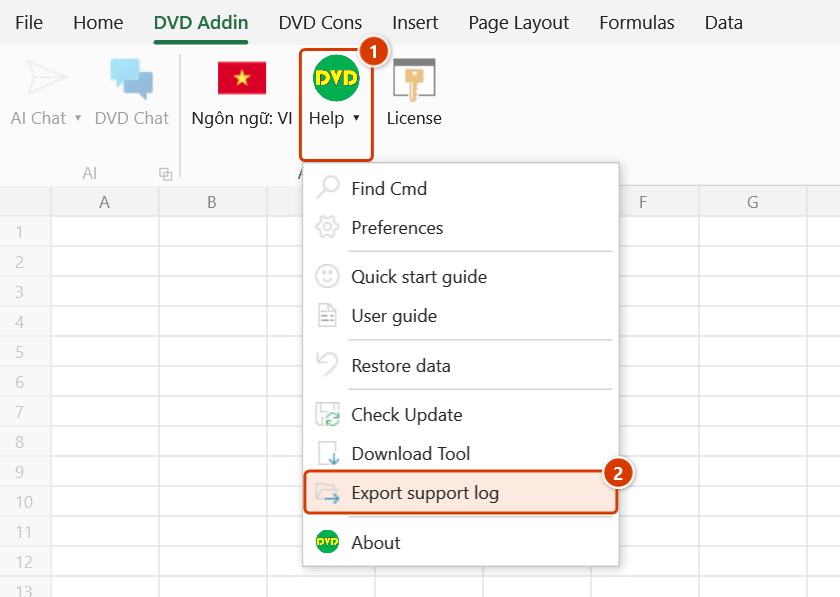
Step 2. The command immediately creates DVDAddin-hotro-20261008-0930.zip (named after the current date and time) on your Desktop and shows a message with the file path. The bundle holds thong-tin-may.txt (add-in version, Windows, .NET, Excel version and bitness, locale, calculation mode, licence state) and a logs folder with the logs of up to 10 recent Excel sessions.
Step 3. The bundle does not contain your workbooks; API keys and session tokens are masked in the logs. You can open the .zip to review it, then send it with a description of the problem to the support address given in the message.
About privacy
- The bundle does not include your spreadsheets — only logs and the environment listing.
- API keys, session tokens and email addresses are masked in the log before it is written to disk.
- You can open the
.zipand read it before sending — it is plain text.