
Mirror margins
Location on ribbon: Tab DVD Addin → Group File and Print → the arrow next to Batch print
Command ID: btnPrintMirrorMargins
License required
This command needs an active DVDAddin account (Standard or PRO). During the trial period it is fully available.
What it does
The command exports the active sheet to a PDF with mirrored margins: odd pages keep the left/right margins you configured, and even pages have those two swapped. When the document is printed double-sided and bound, the inner edge is equally wide on both sides, so no text disappears into the binding.
Excel has no mirror-margin option the way Word does, so the add-in exports each page separately with its own margin set and then merges the pages into a single PDF using the PdfSharp library — no external tool to install.
How to use
- Set the sheet's page setup as usual, making the left margin wider than the right by the binding allowance (for example left 30 mm, right 15 mm).
- Open the sheet you want to export — the command works on the active sheet.
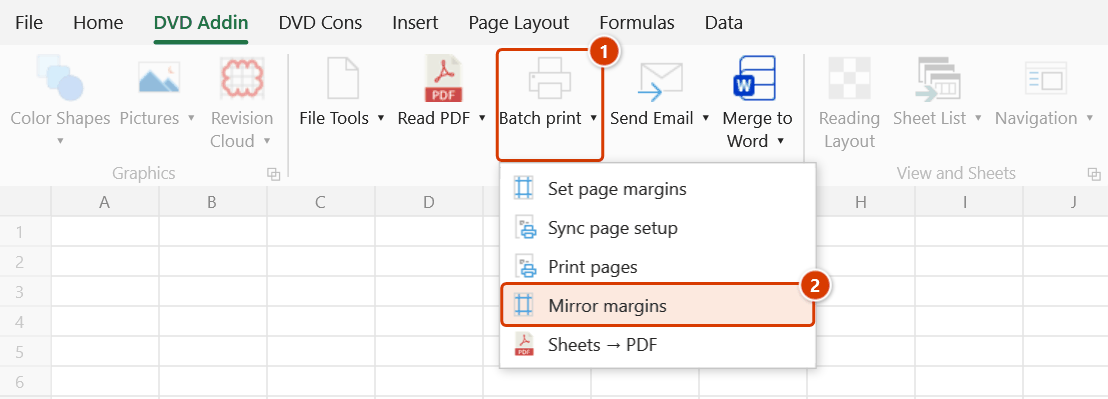
- Go to tab DVD Addin → group File and Print → the arrow next to Batch print → click Mirror margins.
- A save dialog opens with the suggested name
MirrorMarginsOutput.pdf. Choose a folder and file name, then click Save. - The add-in walks through every page: odd pages use the original margins, even pages swap left and right, and each page is written to a temporary file.
- When it finishes, the temporary pages are merged into a single PDF at the path you chose, the worksheet margins are restored, and a message reports how many pages were exported.
Video tutorial
Narrated in Vietnamese, with Vietnamese subtitles. Trang in và xuất PDF · 7 min 13 s · 16 cases · Download the video · Practice workbook for the video
Commands in this video: Set page margins · Mirror margins · Print pages · Sheets → PDF · Sync page setup
Chapters (20)
- Giới thiệu
- Mở lệnh
- 1 · Đặt lề cho nhóm sheet
- 2 · Nhóm khác: A3 ngang
- 3 · Gõ lề: số lẻ, lỗi nhập
- 4 · Lưu mặc định
- 5 · Bẫy sheet biểu đồ
- 6 · Đồng bộ từ sheet mẫu
- 7 · Chọn phần cần chép
- 8 · In lại vài trang
- 9 · Trang lẻ, trang chẵn
- 10 · Xuất từng trang ra PDF
- 11 · Nhập sai và hủy
- 12 · PDF lề gương
- 13 · Bẫy lề gương
- 14 · Sheet → PDF từng tệp
- 15 · Gộp thành một tệp
- 16 · Khi xuất PDF lỗi
- Mẹo
- Kết thúc
Illustrated walkthrough
Step 1. Set up the sheet's page as usual, with the left margin wider than the right by the binding allowance — e.g. left 30 mm, right 15 mm (you can use Set page margins). Open the sheet to export, e.g. a 46-page method statement.
Step 2. On the ribbon, open the DVD Addin tab → File and Print group → open Batch print → choose Mirror margins.
Step 3. A save box opens with the suggested name MirrorMarginsOutput.pdf: choose the folder and name, e.g. D:\DuAn\NhaVanPhong9Tang\BienPhapThiCong_MirrorMargins.pdf, and click Save.
Step 4. The add-in exports page by page: odd pages keep the original margins, even pages swap left ↔ right, then joins them into one PDF and reports Exported 46 pages into: with the path. Printed double-sided, every inner edge is 30 mm. The sheet's margins are restored afterwards; hold ESC to stop early (pages already exported are still joined).
Example
A 46-page method statement is to be printed double-sided and spiral-bound on the left edge.
You set the sheet margins to left 30 mm and right 15 mm, run Mirror margins, and save as MethodStatement_MirrorMargins.pdf. In the resulting file, pages 1, 3, 5… have a 30 mm left margin while pages 2, 4, 6… have a 30 mm right margin. Printed double-sided, every inner edge is 30 mm, so the text stays balanced and clear of the binding holes.
Notes
- The command exports from the open sheet; it does not take an existing PDF as input — use the PDF manager for that.
- If the sheet has nothing printable, the add-in reports that it has 0 pages and stops.
- The sheet's left and right margins are changed temporarily while the run proceeds, then restored immediately afterwards, including on the error path.
- Hold ESC to stop early; the pages already exported are still merged and saved.
- On a long sheet the export-and-merge cycle takes a while because each page is a separate Excel PDF export — run it when you are not doing anything else.
- Only the left and right margins are mirrored; top, bottom, header and footer stay the same on every page.
Related
- Set page margins — establish the base margins before building the mirrored version.
- Print pages — print odd and even sides separately when the printer has no duplex unit.
- Sheets → PDF — a plain PDF export with no margin flipping.
- PDF Manager — merge, split and rotate PDF files you already have.