
Upper letters
Location on ribbon: Tab DVD Addin → Group Text and Number → arrow on Numbering
Command ID: btnUpperLettersSerial
What it does
Writes the uppercase sequence A, B, C, … into the selected cells, continuing past Z with AA, AB, AC… There is no options window; only the Confirm data change box asks before anything is written.
Construction paperwork is full of uppercase letter references: building grid lines, item groups A/B/C in a bill of quantities, annexes A/B/C attached to an acceptance record. This command fills them in order while skipping hidden rows and respecting merged cells.
How to use
- Select the cells that need the letter references.
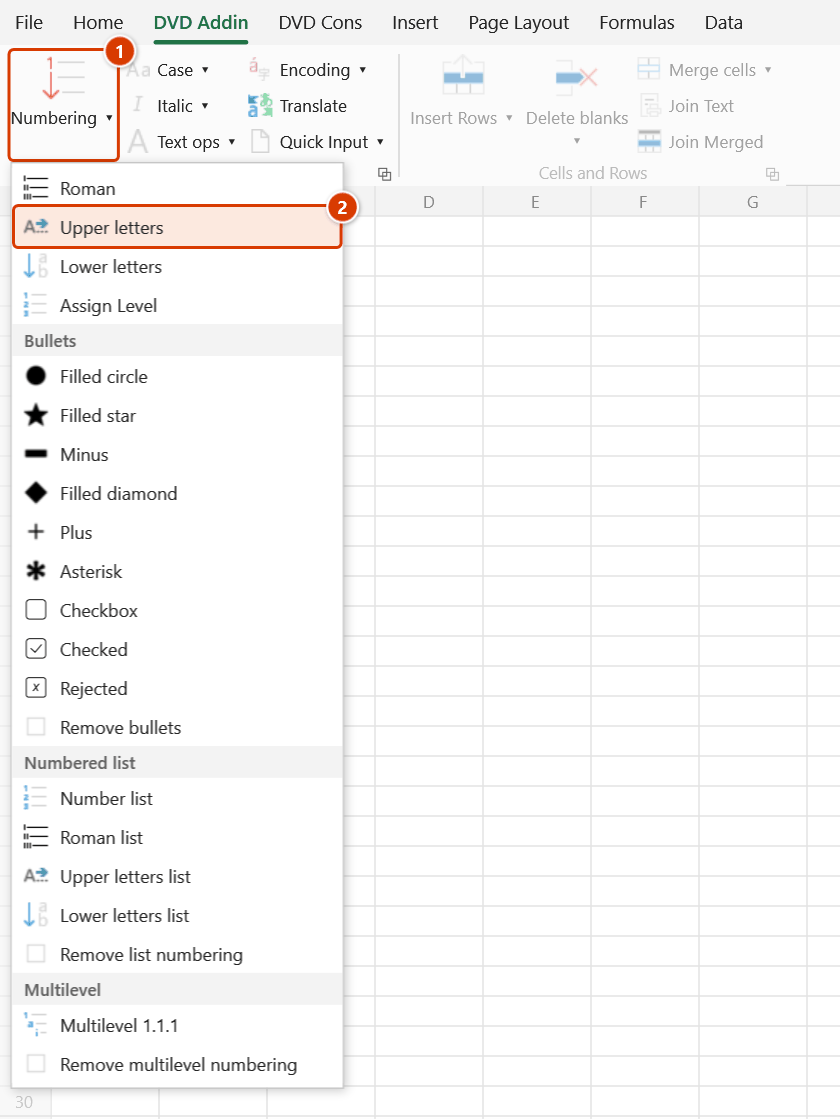
- Go to the DVD Addin tab → Text and Number group → arrow on Numbering → choose Upper letters.
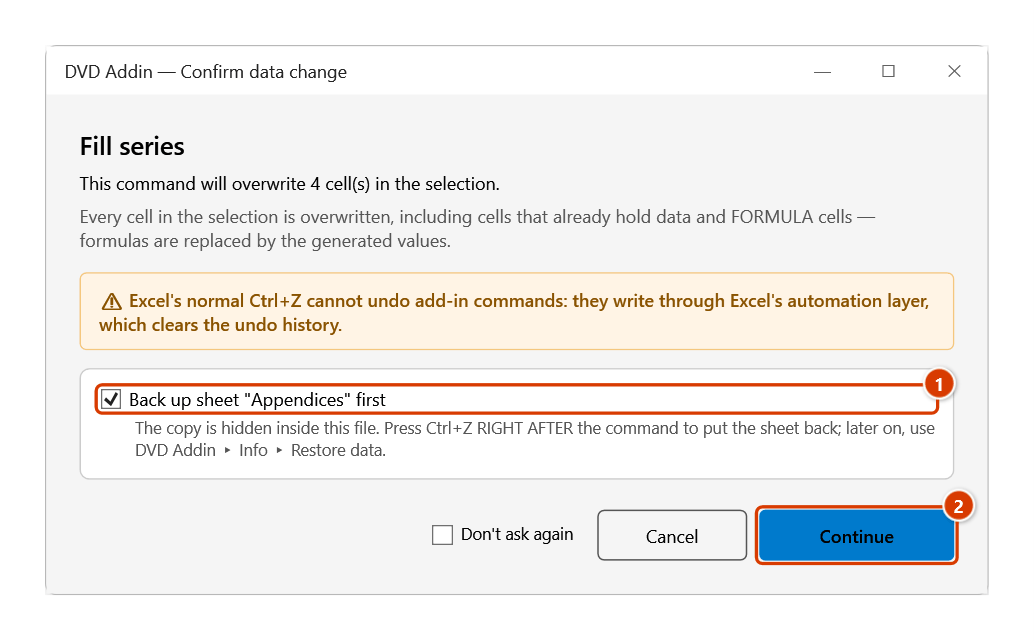
- The Confirm data change box appears; keep Back up sheet ticked and click Continue. The A, B, C… sequence is then written into the selection left→right, top→bottom.
Video tutorial
Narrated in Vietnamese, with Vietnamese subtitles. Số La Mã, Chữ HOA, Chữ thường · 4 min 41 s · 9 cases · Download the video · Practice workbook for the video
Commands in this video: Roman · Lower letters · Upper letters
Chapters (13)
- Giới thiệu
- Mở lệnh
- 1 · Số La Mã cho hạng mục lớn
- 2 · Chữ HOA và ô gộp
- 3 · Chữ thường cho mục chi tiết
- 4 · Nhiều vùng rời (Ctrl)
- 5 · Dòng đang ẩn
- 6 · Mỗi nhóm một dãy mới
- 7 · Nhiều cột, quá chữ Z
- 8 · Ghi đè và hoàn tác
- 9 · Khi lệnh không điền
- Mẹo
- Kết thúc
Illustrated walkthrough
Practice
Download this command's sample workbook — the data matches the pictures below (sheet Appendices), so you can follow each step right away.
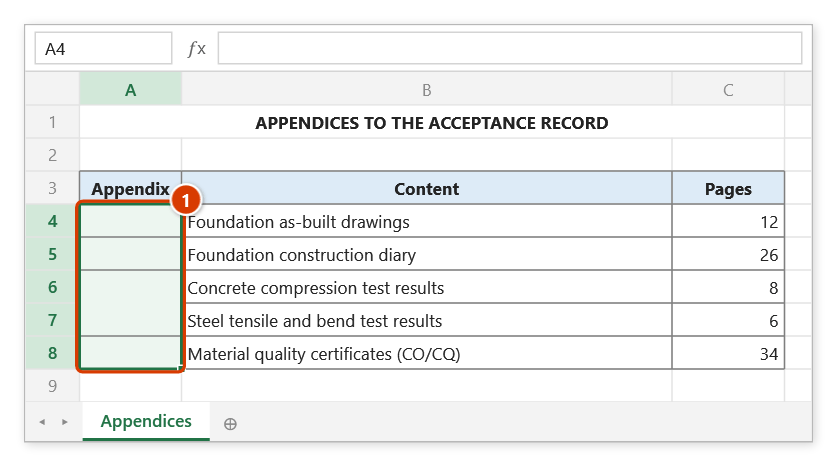
Step 1. Select the column to fill with letters (1). The merged cell A6:A7 (one appendix holding two documents) counts as one cell.
Step 2. On the ribbon, open the DVD Addin tab → Text and Number group → open Numbering → choose Upper letters.
Step 3. The Confirm data change box warns that every selected cell is overwritten, formula cells included. Keep Back up sheet ticked (1) and click Continue (2).
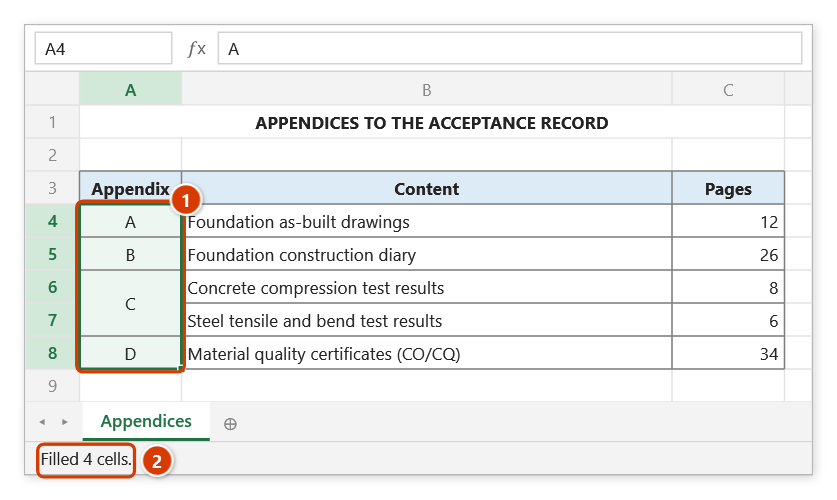
Step 4. The series A, B, C, D is written; the merged cell takes a single letter and hidden rows/columns are skipped (1). The status bar reports how many cells were filled (2).
Example
An item summary has a "Group" column that needs letter references; the "Substructure" group spans 3 merged rows and one row is hidden by a filter.
| Before (column B) | After |
|---|---|
| B4:B6 (merged) empty | A |
| B7 empty | B |
| B8 (hidden row) empty | skipped |
| B9 empty | C |
Notes
- You must select a range first; with no selection the add-in prompts "Please select a data range".
- Hidden rows and columns are skipped, and a merged cell receives one letter no matter how many rows it spans.
- The output is text, not a formula — inserting a row in the middle breaks the order, so rerun the command.
- The command overwrites existing content. Ctrl+Z right after the command puts the sheet back as it was (thanks to the backup); see Restore data.
- Selections longer than 26 cells continue with AA, AB, AC… rather than stopping at Z.
Related
- Lower letters — same behaviour, producing a, b, c…
- Upper letters list — A, B, C as a bulleted-list style instead.
- Numbering — use this when you need a custom start value and step.
- Roman list — I, II, III references for dossier chapters and parts.