
Update Status
Location on ribbon: Tab DVD Cons → Group Schedule
Command ID: btnUpdateStatus
License required
This command needs an active DVDAddin account (Standard or PRO). It is fully available during the trial period.
What it does
Adds seven status-analysis columns to the active schedule sheet, complete with formulas and conditional formatting: Schedule % (planned % as of the workbook's data date), Forecast (on-time/late forecast from the actual progress rate), PV (Planned Value as of the data date), SV (Schedule Variance = EV − PV), SPI (EV ÷ PV), Δ Finish (days late + / early −, once an Actual Finish exists) and Status (emoji badge: 🚀 not started, ⏳ in progress, 🟢 on time/early, 🟡 1–5 days late, 🔴 more than 5 days late; the Status and Forecast texts are always written in Vietnamese). A sheet with a baseline also gets BL Start / BL Finish columns.
It is the fastest way to answer "are we behind or on programme?" in a site meeting without building a separate dashboard. Run it before each weekly or monthly report.
How to use
- Select the schedule sheet you want to assess (it must already have Duration / Start / Finish / % complete — if not, run Gantt Chart first).
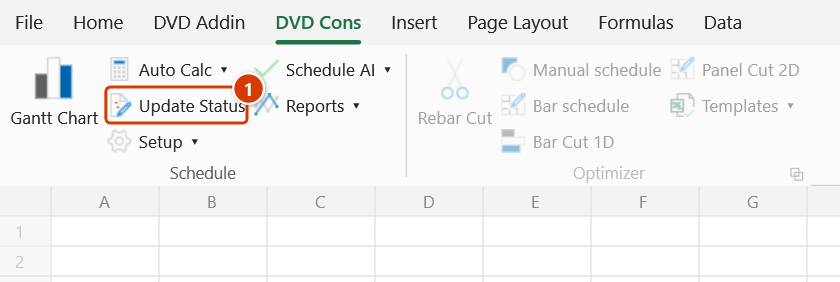
- Go to the DVD Cons tab → Schedule group → click Update Status.
- A prompt asks for the data date (pre-filled with the one stored in the workbook, today if none) → OK. The add-in inspects the sheet, adds any missing columns and fills the formulas down the whole data range. A sheet with a baseline also gets BL Start / BL Finish columns.
- Read the result message:
- First run:
✓ Added N new columns (…) + updated status for M rows. - Later runs: the Confirm data change box appears first (the command overwrites the existing columns) — keep the backup ticked and click Continue; then
✓ Refreshed status for M rows (columns already present). - If the sheet cannot be processed, a warning dialog explains why and nothing is changed.
- First run:
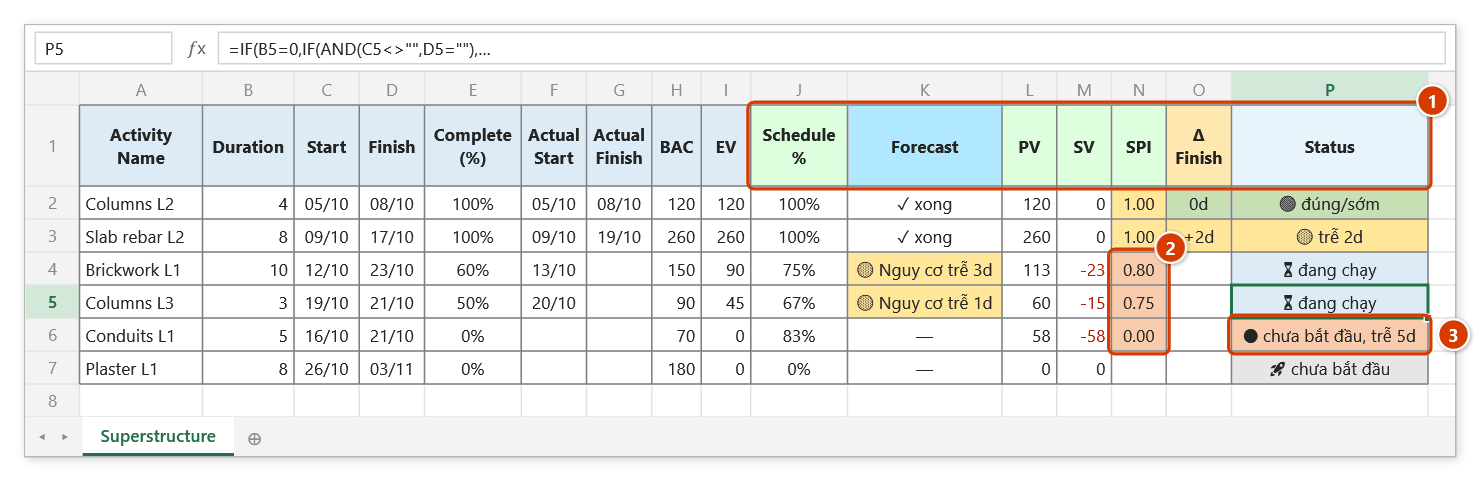
- The seven new columns appear at the end of the table, with SV / SPI / Status already colour-coded by threshold.
Video tutorial
Narrated in Vietnamese, with Vietnamese subtitles. Cập nhật tiến độ và Cập nhật trạng thái · 7 min 20 s · 14 cases · Download the video · Practice workbook for the video
Commands in this video: Update schedule (data date) · Update Status
Chapters (20)
- Giới thiệu
- Mở lệnh
- 1 · Cập nhật theo thực tế
- 2 · Thực tế lệch kế hoạch
- 3 · Việc chưa làm, việc tương lai
- 4 · Cột Thời lượng còn lại
- 5 · Tự điền theo kế hoạch
- 6 · Nhập sai thực tế
- 7 · Gõ nhầm ngày dữ liệu
- Chế độ ngày dữ liệu
- 8 · Biểu đồ Gantt vẽ lại
- 9 · Sheet khoá và Ctrl+Z
- Cập nhật trạng thái
- 10 · Bảy cột trạng thái
- 11 · Chạy lại, tiêu đề tiếng Việt
- 12 · Cột Trạng thái có sẵn
- 13 · So với baseline
- 14 · Bảng thiếu cột
- Mẹo
- Kết thúc
Illustrated walkthrough
Practice
Download this command's sample workbook — the data matches the pictures below (sheet Superstructure), so you can follow each step right away.
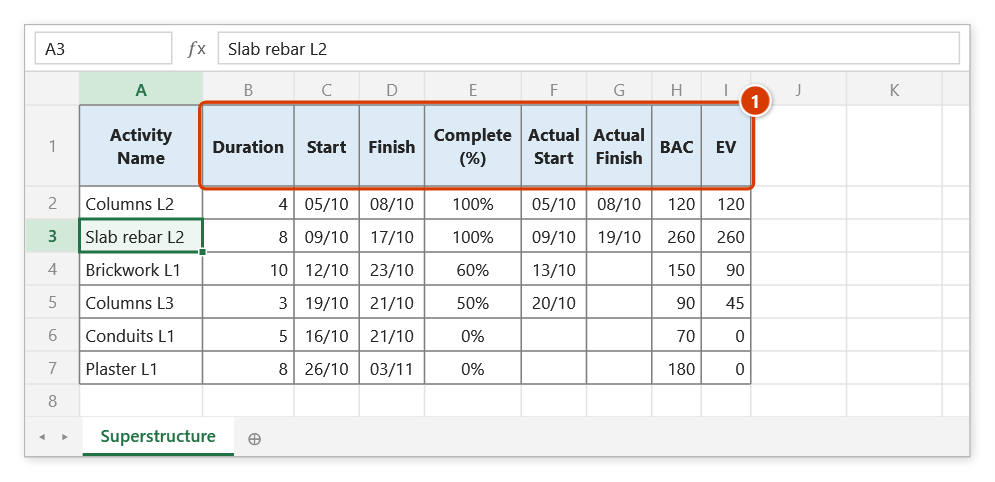
Step 1. Open the schedule sheet to assess. It needs Duration / Start / Finish / Complete columns (1); with Actual Start / Actual Finish you also get Δ Finish, Status and Forecast; with BAC / EV (here in million VND) you also get PV, SV and SPI.
Step 2. On the ribbon, open the DVD Cons tab → Schedule group → click Update Status.
Step 3. A prompt asks for the data date — pre-filled with the date stored in the file (name dvdDataDate), or today if there is none. Type 21/10/2026 → OK. The formulas use this date rather than TODAY(), so the figures do not change when the file is opened the next day.
Step 4. On the first run the add-in appends 7 columns at the end of the table (1): Schedule % (planned %), Forecast, PV, SV, SPI, Δ Finish and Status, with formulas and threshold colours — SPI below 0.9 turns red (2), and Status flags a task that has not started although it is already late (3) (the Status and Forecast texts are always written in Vietnamese). The message reads ✓ Added 7 new columns (Schedule %, Forecast, PV, SV, SPI, Δ Finish, Status) + updated status for 6 rows. Later runs only refresh, never duplicating columns — since they overwrite existing columns, the Confirm data change box appears and offers to back up the sheet.
Example
Schedule for the Site office building package, cut off at 22 August.
| Task | Start | Finish | % done | → SV | → SPI | → Δ Finish | → Status |
|---|---|---|---|---|---|---|---|
| Level 3 slab concrete | 01/08 | 15/08 | 100% | 0 | 1.00 | 0 | 🟢 on time/early |
| Level 2 blockwork | 05/08 | 20/08 | 45% | −0.3 | 0.80 | — | 🔴 overdue 2d |
| Aluminium/glass doors | 25/08 | 10/09 | 0% | — | — | — | 🚀 not started |
One glance at the Status column shows that Level 2 blockwork is the bottleneck to raise in the meeting.
Notes
- To re-plan the schedule from the data date (push not-started tasks, re-plan in-progress ones) run Update schedule (data date) first, then this command.
- The command is idempotent: run it as often as you like — later runs refresh the values instead of duplicating columns.
- The active sheet must be a valid schedule worksheet; on a chart sheet or an empty sheet the command warns and stops.
- Formulas use the name
dvdDataDate(the data date), notTODAY()— a file sent today shows the same figures tomorrow. To change the date, re-run the command or edit the name in Formulas ▸ Name Manager — every column recalculates. The command asks for the data date (pre-filled with the stored one, today if none); a sheet with a baseline also gets BL Start / BL Finish columns. - Measured against the baseline: when this sheet has a baseline, the plan comes from the current baseline (matched by Activity ID) instead of the current Start/Finish — CPM moves Start/Finish with the actuals, so measured against them delays "vanish" (a task started 10 days late still looks on time). Rows without an ID or missing from the baseline keep using the current Start/Finish.
- Planned % = (data date − Start) ÷ (Finish − Start + 1), both in calendar days (it used to divide by the working-day Duration, reaching 100% too early and dragging SPI down).
- Status flags delays before completion: 🔴 not started, late Xd (the data date is past the planned start) and 🔴 overdue Xd (in progress past the planned finish).
- The first run (adding the new columns and the conditional formatting) cannot be undone with Ctrl+Z. Later runs overwrite existing columns, so the add-in backs the sheet up first: Ctrl+Z right after the command puts the sheet back as it was; see Restore data.
- SV and SPI need real % complete values; rows with no progress entered will not produce a meaningful index.
Related
- Gantt Chart — create or normalise the schedule sheet before running this.
- Schedule Recovery — once you see the slippage, build a recovery plan.
- Auto Calc — make sure dates are recalculated before assessing status.
- Constraints — pin contractual milestones so Δ Finish reflects the real commitment.