
SMART case (AI)
Location on ribbon: Tab DVD Addin → Group Text and Number → Menu Case
Command ID: btnSMARTCase
What it does
Sends the content of each selected cell to the configured AI service to fix capitalization in context, then writes the answer back into the cell. The model is instructed to change nothing but letter case: proper nouns, company names, places and sentence starts are capitalized, while wording and grammar stay exactly as written. The add-in also checks the answer itself: any result that differs from the original cell in anything other than letter case is not written.
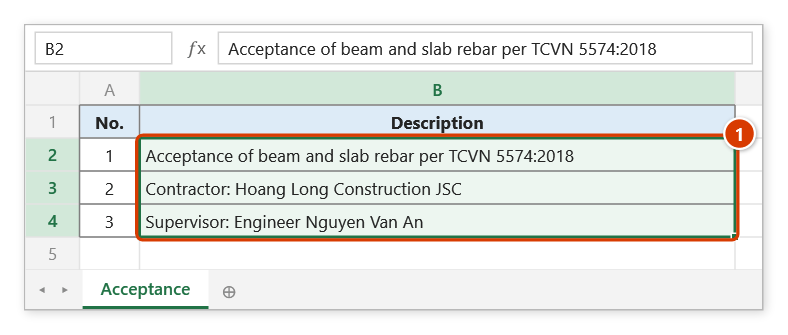
Proper Case and Sentence case follow fixed rules, so names and abbreviations typed in lowercase (tcvn, jsc, nguyen van an) cannot be recognized. SMART case uses the context to capitalize TCVN, JSC, a company name and a person's name correctly within the same line.
How to use
- Configure the AI service in Preferences (Gemini / OpenAI / Groq / NVIDIA) together with its API key.
- Select the text cells whose capitalization needs fixing.
- Go to tab DVD Addin → group Text and Number → open the Case menu → click SMART case (AI), or press Ctrl+Shift+S.
- The command works asynchronously, area by area, so Excel does not freeze while waiting on the network.
- A cell is written only when the AI's answer differs from the original in letter case alone; if the AI changes words, translates or adds an explanation, the result is rejected and the cell is kept, and cells the service fails on keep their original text too.
- When the run finishes and some cells were rejected or failed, the command reports once for the whole selection: how many cells were written, how many were rejected and how many failed. If every cell was written, no message appears.
Video tutorial
Narrated in Vietnamese, with Vietnamese subtitles. Đổi chữ hoa thường · 5 min 21 s · 12 cases · Download the video · Practice workbook for the video
Commands in this video: Sentence case · Proper Case · SMART case (AI) · UPPERCASE · lowercase
Chapters (17)
- Giới thiệu
- Mở lệnh
- Năm kiểu chữ
- 1 · Hoa đầu câu
- 2 · HOA TOÀN BỘ
- 3 · thường toàn bộ
- 4 · Hoa Đầu Mỗi Từ
- 5 · Chữ viết tắt, ô toàn chữ HOA
- 6 · Ô nhiều dòng
- 7 · Chọn cả bảng: số, công thức
- 8 · Danh sách đang lọc
- 9 · Hoa theo ngữ cảnh (AI)
- 10 · Khi AI báo lỗi
- 11 · Ghi đè và hoàn tác
- 12 · Khi không ô nào đổi
- Mẹo
- Kết thúc
Illustrated walkthrough
Practice
Download this command's sample workbook — the data matches the pictures below (sheet Acceptance), so you can follow each step right away.
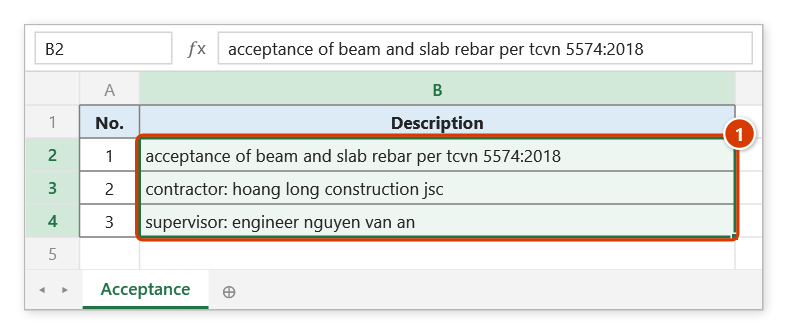
Step 1. The command needs an AI service and API key set in Preferences. Select the text cells that were typed without proper capitals (1).
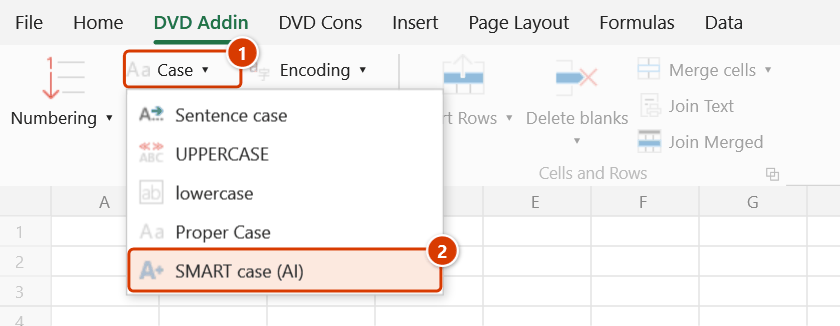
Step 2. On the ribbon, open the DVD Addin tab → Text and Number group → open Case → choose SMART case (AI) (or press Ctrl+Shift+S).
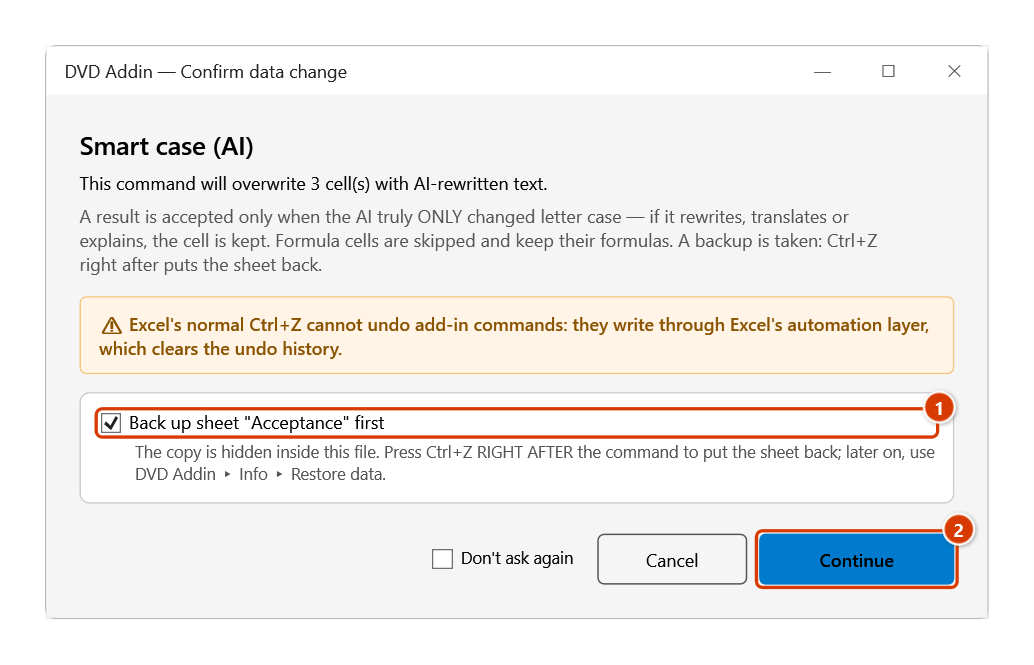
Step 3. The add-in explains how AI results are checked and asks before overwriting. Keep the sheet backup ticked (1), then click Continue (2).
Step 4. The command runs in the background, so Excel does not freeze while waiting on the network. As answers arrive, each cell is rewritten with sentence starts, people, companies and abbreviations capitalized from context (1). If some cells are rejected (the AI changed the wording) or fail, a message box reports how many.
Example
The description column of an acceptance record, typed without regard to case:
| Before | After |
|---|---|
| inspection of beam and slab rebar to tcvn 5574:2018 | Inspection of beam and slab rebar to TCVN 5574:2018 |
| contractor: hoang long construction jsc | Contractor: Hoang Long Construction JSC |
| supervisor: engineer nguyen van an | Supervisor: Engineer Nguyen Van An |
Notes
- An internet connection and a valid API key are required; without them the cells are simply left unchanged, with no per-cell warning.
- Formula cells and empty cells are skipped — only cells holding text are sent. Formula cells in the selection keep their formulas and are never replaced by values.
- A large selection means many API calls and can hit the provider's rate limit, so work in batches of a few dozen cells.
- Cell content leaves your machine for an external AI service; do not use it on confidential project data.
- Results overwrite the cells directly. The add-in backs the sheet up before calling the AI (if you keep the backup ticked), but the results arrive after the network round-trip, so Ctrl+Z cannot undo them — get the old version back from Restore data.
Related
- Proper Case — the offline alternative, based on fixed rules.
- Sentence case — rule-based normalization with no AI call.
- AI Chat — the hub for the add-in's other AI commands.
- Preferences — where the AI service and API key for this command are set.