
lowercase
Location on ribbon: Tab DVD Addin → Group Text and Number → Menu Case
Command ID: btnlowercase
What it does
Converts every text character in the selection to lowercase, handling Vietnamese diacritics correctly through the current system culture. Values are read and written one contiguous area at a time, so it stays fast on large tables.
It is often an intermediate step: data arrives typed entirely in capitals, you flatten it to lowercase and then run Sentence case or Proper Case for a clean result. Units, member marks and abbreviations inside the text are kept as they are, so you do not have to fix them by hand afterwards.
How to use
- Select the cells you want converted.
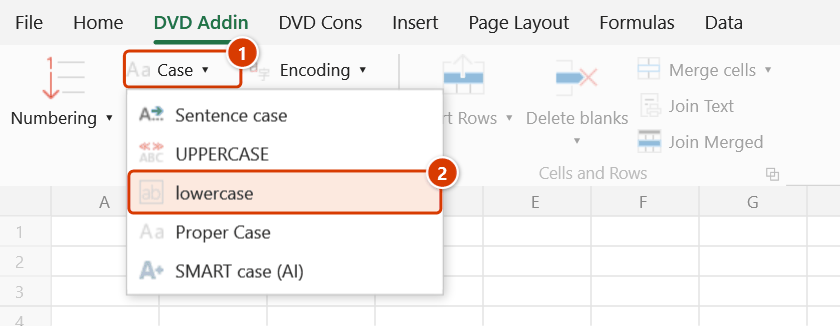
- Go to tab DVD Addin → group Text and Number → open the Case menu → click lowercase.
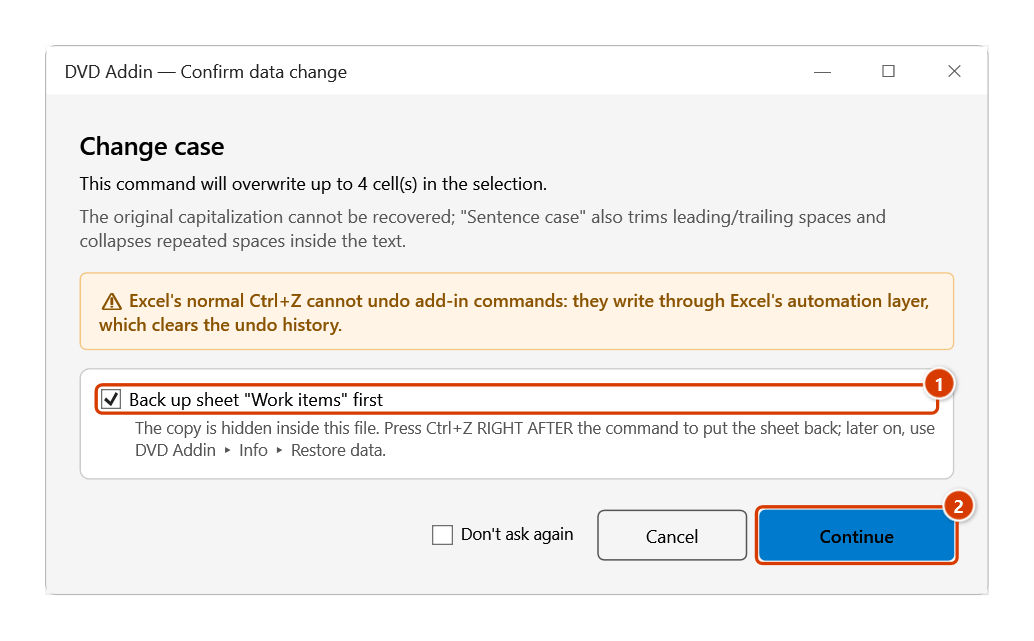
- The Confirm data change box appears before anything is overwritten; keep Back up sheet ticked and click Continue.
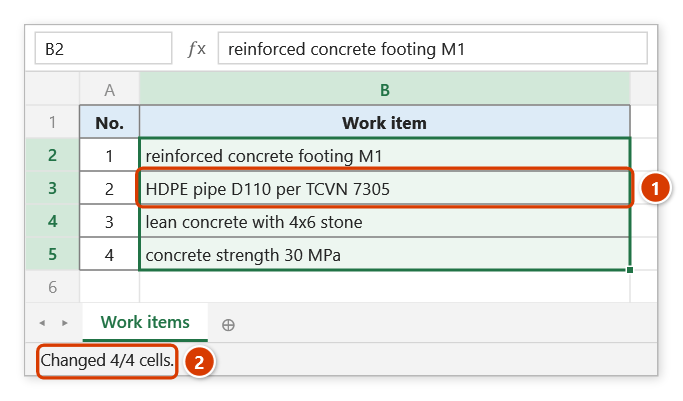
- The Excel status bar reports "Changed N/M cells". If nothing changed, a message box explains why.
Video tutorial
Narrated in Vietnamese, with Vietnamese subtitles. Đổi chữ hoa thường · 5 min 21 s · 12 cases · Download the video · Practice workbook for the video
Commands in this video: Sentence case · Proper Case · SMART case (AI) · UPPERCASE · lowercase
Chapters (17)
- Giới thiệu
- Mở lệnh
- Năm kiểu chữ
- 1 · Hoa đầu câu
- 2 · HOA TOÀN BỘ
- 3 · thường toàn bộ
- 4 · Hoa Đầu Mỗi Từ
- 5 · Chữ viết tắt, ô toàn chữ HOA
- 6 · Ô nhiều dòng
- 7 · Chọn cả bảng: số, công thức
- 8 · Danh sách đang lọc
- 9 · Hoa theo ngữ cảnh (AI)
- 10 · Khi AI báo lỗi
- 11 · Ghi đè và hoàn tác
- 12 · Khi không ô nào đổi
- Mẹo
- Kết thúc
Illustrated walkthrough
Practice
Download this command's sample workbook — the data matches the pictures below (sheet Work items), so you can follow each step right away.
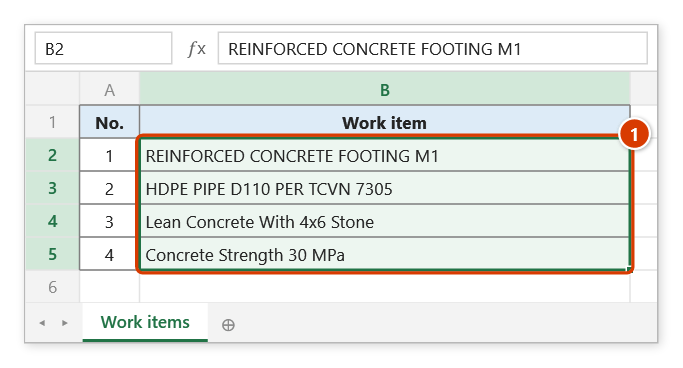
Step 1. Select the cells to convert to lower case, for example a list of work items received in ALL CAPS or mixed case (1).
Step 2. On the ribbon, open the DVD Addin tab → Text and Number group → open Case → choose lowercase.
Step 3. The add-in asks before overwriting. Keep the sheet backup ticked (1) so that Ctrl+Z right after the command puts the sheet back, then click Continue (2).
Step 4. The text is lowered, while abbreviations, codes and units (HDPE, D110, TCVN, MPa) keep exactly what was typed (1). The status bar reports how many cells changed (2).
Example
A list of work items received from a contractor, typed in all capitals or with inconsistent capitalization:
| Before | After |
|---|---|
| CONCRETE GRADE B25 FOR FOOTING F1 | concrete grade B25 for footing F1 |
| HDPE PIPE D110 TO TCVN 7305 | HDPE pipe D110 to TCVN 7305 |
| Blinding Concrete Under Footing M1 | blinding concrete under footing M1 |
Notes
- The command keeps the following exactly as typed:
- units of measure:
MPa,kN,kg,mm,m2,m3…; - marks that mix letters and digits:
C1,D12,P66,M250…; - common abbreviations:
TCVN,QCVN,UBND,BTCT,HDPE…; - in a cell that also contains lowercase text, every ALL-CAPS word of 2 or more letters (treated as an abbreviation). In a cell typed entirely in capitals, only the common abbreviations above are kept.
- units of measure:
- Because of these rules, capitalized parts of an email address or a file path may be kept rather than lowered.
- Formula cells are preserved — they are never overwritten with their values.
- Numbers and dates come out unchanged, since the lowercase form of a digit is the digit itself.
- Hold ESC while it runs to stop early; areas already written stay written.
- The selection is clamped to the UsedRange so whole-column selections are still fast, and empty cells are skipped.
- Content is overwritten in place. Ctrl+Z right after the command puts the sheet back as it was (thanks to the backup); see Restore data.
Related
- UPPERCASE — the opposite conversion.
- Sentence case — the natural next step after flattening to lowercase.
- Proper Case — capitalizes each word for names and item titles.
- Remove accents — strips Vietnamese diacritics for codes and file names.