
Check Update
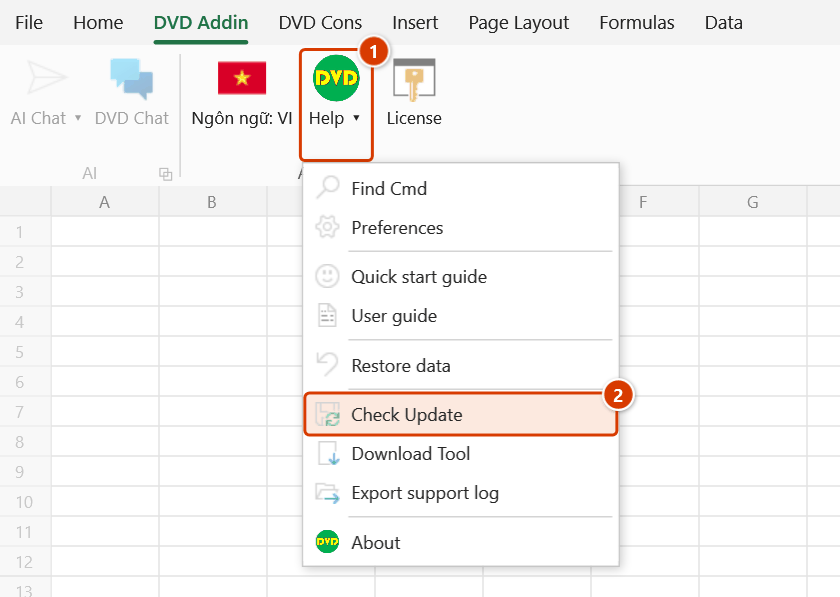
Location on ribbon: Tab DVD Addin → Group About → Menu Help
Command ID: btnCheckUpdate
What it does
Asks the server whether a DVDAddin build newer than the one you are running is available. If there is one, the window shows the new version number with its release notes and reveals a download button; if not, it tells you that you are already up to date. Worth running regularly, because updates usually fix the heavier commands — batch printing, Gantt drawing, quantity calculations — directly.
How to use
- Go to tab DVD Addin → group About → Help menu → Check Update.
- The window opens and the line under the heading shows "Checking…" while the add-in queries the server.
- The message panel in the middle shows the outcome: either a confirmation that you are on the latest build, or the new version number with its release notes.
- If an update exists, a Download button appears at the bottom right — click it to open the installer download page.
- Click Close to exit.
Video tutorial
Narrated in Vietnamese, with Vietnamese subtitles. Cài đặt, cập nhật và gỡ DVD Addin · 4 min 39 s · 12 cases · Download the video
Commands in this video: Check Update · Download Tool
Chapters (15)
- Giới thiệu
- 1 · Máy cần gì
- 2 · Tải và giải nén bộ cài
- 3 · Cảnh báo của Windows
- 4 · Chế độ cài, quyền quản trị
- 5 · Thư mục cài, bấm Install
- 6 · Máy chưa có .NET 8
- 7 · Mở Excel: hai tab mới
- 8 · Sách hướng dẫn cài sẵn
- 9 · Kiểm tra cập nhật
- 10 · Cài bản mới đè bản cũ
- 11 · Gỡ cài đặt
- 12 · Không thấy tab DVD Addin
- Mẹo
- Kết thúc
Illustrated walkthrough
Step 1. On the ribbon, open the DVD Addin tab → About group → open Help → choose Check Update.
Step 2. The Check for updates window opens and queries the server (Internet required); the line under the title shows Checking… while it waits.
Step 3. If you already run the latest version, the middle box says “Congratulations on using the latest version of DVDAddin!”. If a newer version exists, it shows the version number with release notes and a Download button that opens the installer download page in your browser.
Step 4. The command does not install anything itself: close every Excel window before running the installer. The add-in never checks for updates on its own when Excel starts — run this command now and then.
Example
Before submitting the stage 3 payment application, the project manager asks the whole team to run the same add-in build so the spreadsheets do not drift in formatting. Each engineer opens Check Update: machines reporting "you are on the latest version" are left alone, while those showing a new build with a "batch print fix" release note click Download, install over the top and restart Excel. The team is aligned within ten minutes.
Notes
- An Internet connection is required; a locked-down site network will simply return no result.
- The Download button is hidden unless an update actually exists.
- The command only checks and opens the download page — it does not install anything; you still run the installer and restart Excel.
- Close every Excel window before installing over the top, otherwise the loaded XLL file is locked and the installer fails.
- The add-in does not check for updates by itself when Excel starts and shows no reminders — run this command to find out whether a new version exists (do it regularly, especially before the whole team needs the same version).
Related
- Download Tool — go straight to the latest installer link.
- About — see which version is currently installed.
- Preferences — the add-in's other settings.
- License — renew the license if the update reports your support period has ended (the Renew / Upgrade to Pro button in the License box).