
Filled star
Location on ribbon: Tab DVD Addin → Group Text and Number → arrow on Numbering → section Bullets
Command ID: btnBlackStar
What it does
Prepends a filled-star bullet ★ plus a space to every line inside the selected cells. The star reads as emphasis, which makes it a good fit for items that must stand out: mandatory client requirements, hold points in an ITP, or safety cautions inside a method statement.
Before inserting, the command runs the bullet-strip step itself, so switching a range from ● or ◆ to ★ takes one click and never leaves two stacked symbols.
How to use
- Select the cells you want to emphasise.
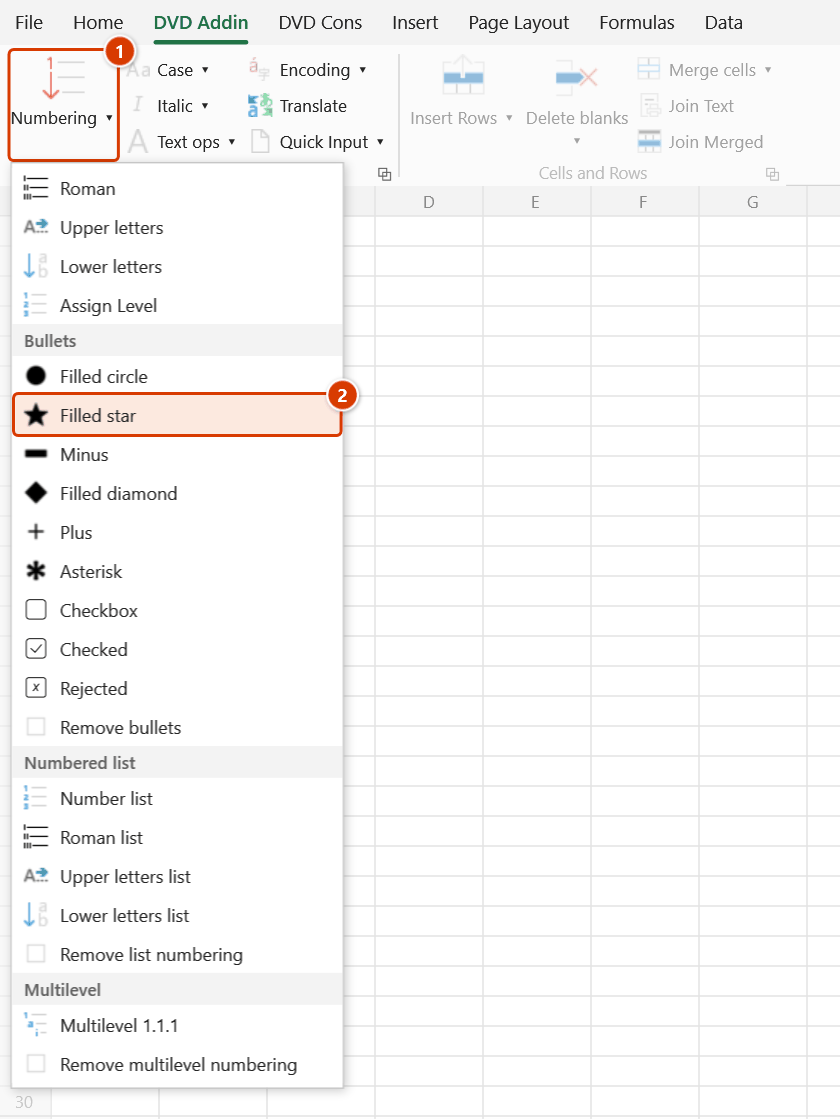
- Go to the DVD Addin tab → Text and Number group → arrow on Numbering → Bullets section → choose Filled star.
- The add-in handles each eligible cell:
- Text cell —
★is added at the start of every line. - Empty cell — just
★is written, ready for you to type after it. - Formula cell — the formula is wrapped as
=""&"★ "&(original formula), so the star shows in the result while the formula stays live.
- Text cell —
- The status bar reports
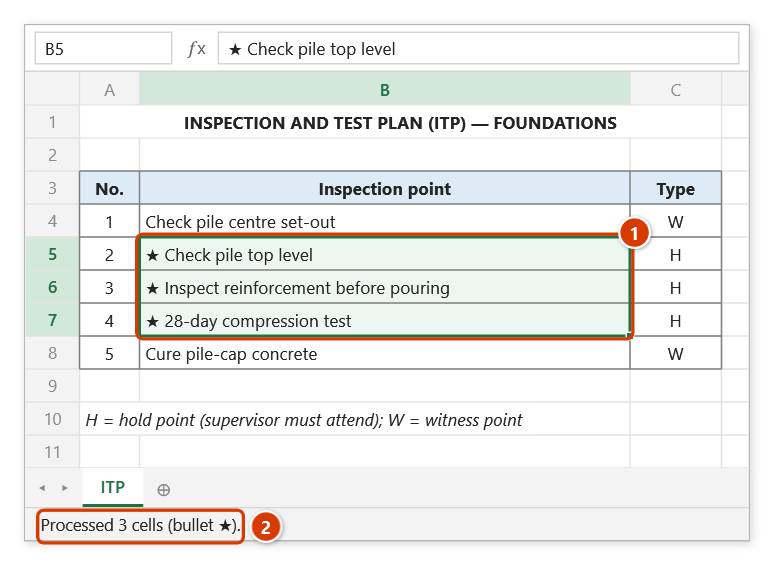
Processed N cells (bullet ★).
Video tutorial
Narrated in Vietnamese, with Vietnamese subtitles. Dấu đầu dòng · 5 min 03 s · 9 cases · Download the video · Practice workbook for the video
Commands in this video: Filled circle · Asterisk · Filled diamond · Filled star · Checkbox · Minus · Remove bullets · Plus · Checked · Rejected
Chapters (14)
- Giới thiệu
- Mở lệnh
- Chín ký hiệu
- 1 · Ô nhiều dòng
- 2 · Đổi ký hiệu, chọn rời
- 3 · Danh mục kiểm tra đang lọc
- 4 · Ô trống – mẫu in sẵn
- 5 · Ô số, ngày tháng
- 6 · Ô công thức
- 7 · Ô gộp
- 8 · Bỏ ký hiệu đầu dòng
- 9 · Ghi đè và hoàn tác
- Mẹo
- Kết thúc
Illustrated walkthrough
Practice
Download this command's sample workbook — the data matches the pictures below (sheet ITP), so you can follow each step right away.
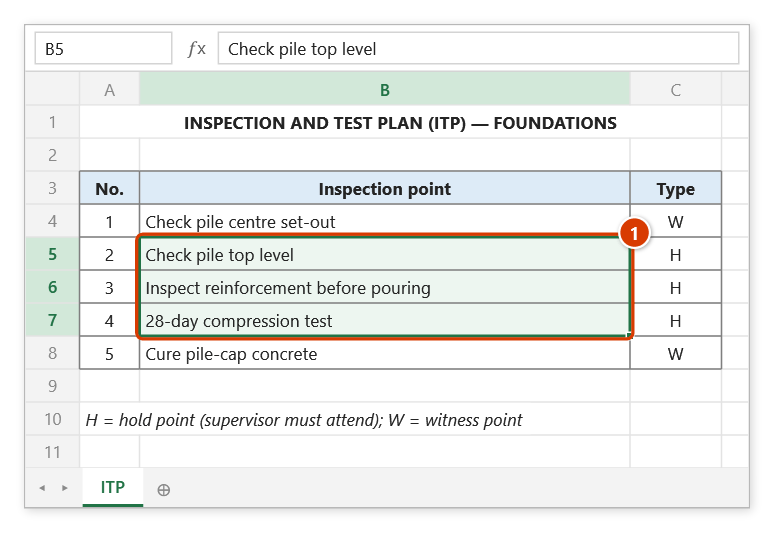
Step 1. Select the cells to highlight — here the three hold points (H) of the ITP (1).
Step 2. On the ribbon, open the DVD Addin tab → Text and Number group → open Numbering → choose Filled star.
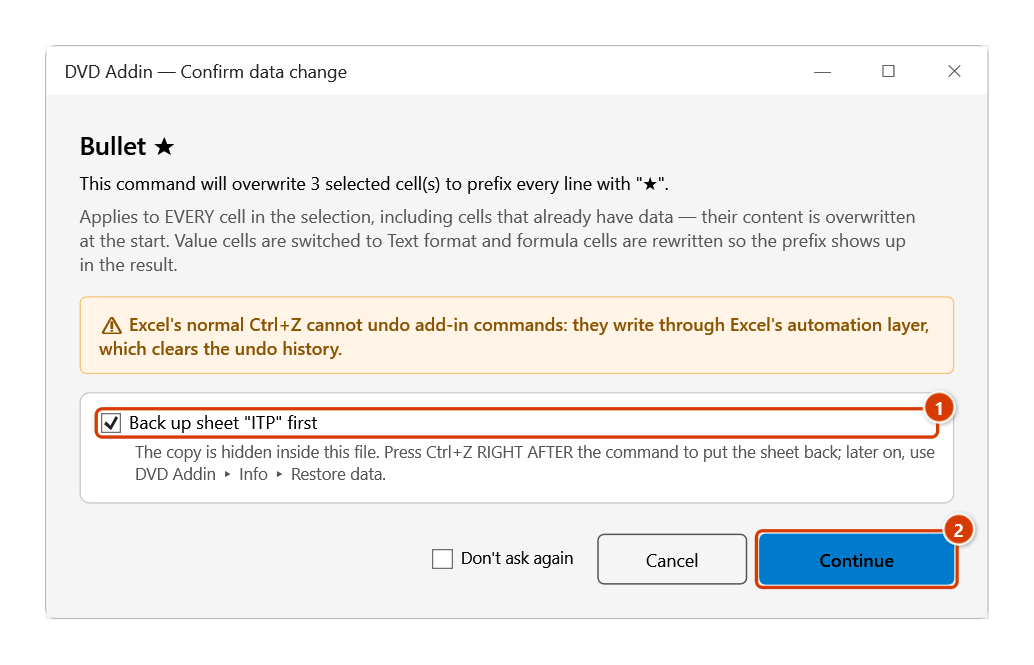
Step 3. The Confirm data change box tells you how many cells will be overwritten. Keep Back up sheet ticked (1) so that Ctrl+Z right after the command restores the sheet, then click Continue (2).
Step 4. Each cell now starts with ★ (1); any old bullet is removed first, so symbols never stack. The status bar reports how many cells were processed (2).
Example
The "Remarks" column of an ITP, flagging the hold points that require the supervision consultant on site:
| Before | After |
|---|---|
| Rebar inspection before concrete pour | ★ Rebar inspection before concrete pour |
| 28-day cube compression test | ★ 28-day cube compression test |
| Pile head level survey | ★ Pile head level survey |
Reserving ★ for hold points and Filled circle for routine activities makes a printed ITP far quicker to scan on site.
Notes
- Cells holding numbers, dates, or TRUE/FALSE are skipped so numeric and date data stays intact.
- Text cells are switched to Text format (
@) before writing; formula cells keep their existing format. - Applied by mistake?
Ctrl+Zright after the command puts the cells back (it backs the sheet up first); later on, use Remove bullets to remove the bullets. - Hidden rows and columns are skipped, and each merged area is processed once, at its top-left cell.
- The
★glyph needs a Unicode-capable font — Times New Roman, Arial, and Calibri all print it correctly.
Related
- Filled circle — the neutral bullet for routine items.
- Filled diamond — another emphasis marker, a little softer than the star.
- Remove bullets — strip every bullet in the selection.
- Checked — mark items as done rather than as needing attention.