
Work Record Tpl
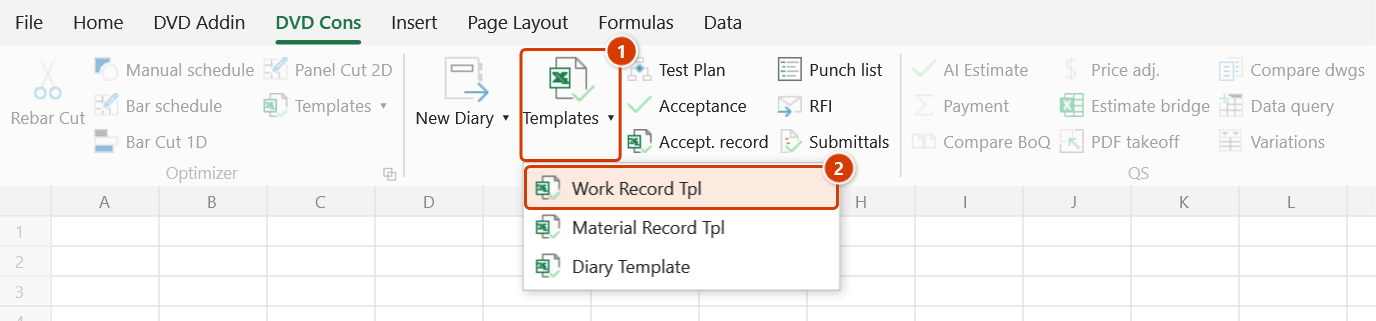
Location on ribbon: Tab DVD Cons → Group QAQC and Diary → Menu Templates
Command ID: btnWorkRecordTpl
What it does
Opens FormNTCV.xlsx, the work acceptance record template shipped with DVDAddin. The form already contains the header block (project, package, attending parties), the acceptance content section and the signature block, laid out in the standard format used in Vietnamese construction quality files.
Use it to raise an acceptance record quickly, without hunting for an old copy on your drive or in a group chat.
How to use
- Click Templates ▸ Work Record Tpl in the QAQC and Diary group.
- The add-in looks for
Template\FormNTCV.xlsxin the add-in install folder (C:\DVDAddin\Template\), then in aTemplate\folder next to the active workbook. - The template opens in Excel.
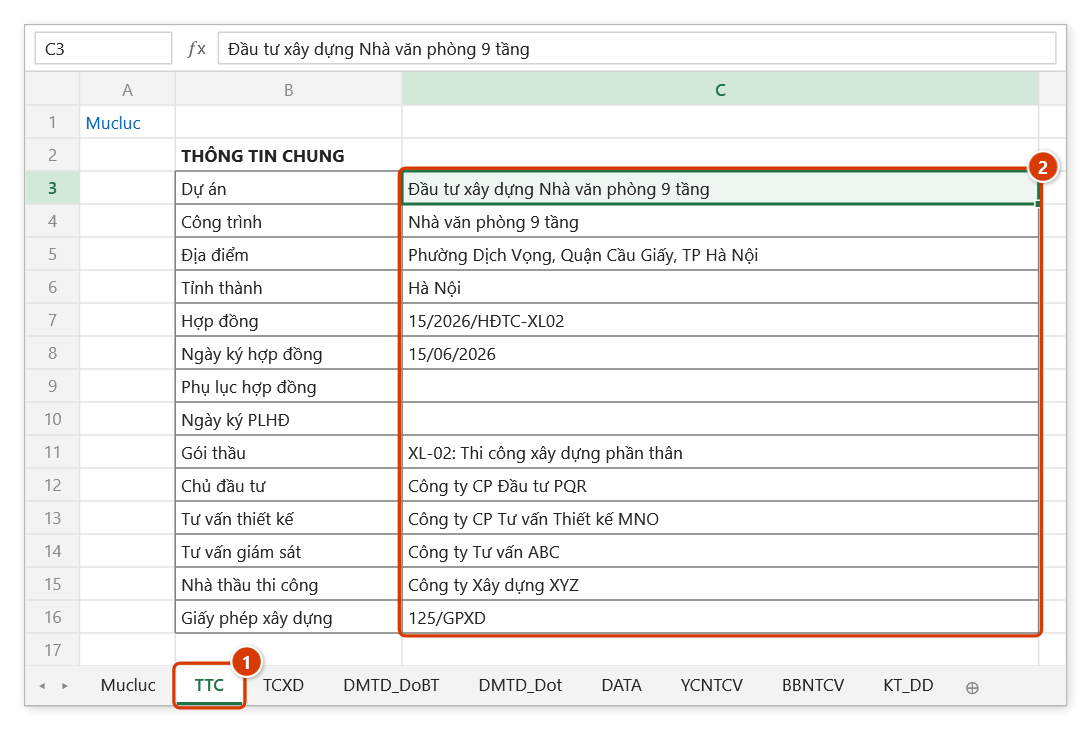
- Fill in the general information (project, works, location, province, contract, package, parties) on sheet TTC. Enter one row per acceptance on sheet DATA (work code, building element, member, location, item accepted, times, signatories), then type the number of the row to print in cell B9 of DATA — the request form YCNTCV, the record BBNTCV and the KT_… checklist for that work code fill themselves from that row.
- Save As with a record-specific name so the shipped template stays untouched.
Video tutorial
Narrated in Vietnamese, with Vietnamese subtitles. Kế hoạch và Biên bản nghiệm thu · 6 min 59 s · 12 cases · Download the video · Practice workbook for the video
Commands in this video: Acceptance Plan · Acceptance Record · Material Record Tpl · Work Record Tpl
Chapters (17)
- Giới thiệu
- Mở lệnh
- 1 · Lập kế hoạch từ tiến độ
- 2 · Tiêu đề phải cùng một dòng
- 3 · Dòng tổng, cột Cấp, chạy lại
- 4 · Mốc và ngày nghiệm thu
- 5 · Rà cột Tiêu chuẩn áp dụng
- Lệnh Biên bản NT
- 6 · Biên bản cho một công việc
- 7 · Không đạt – nghiệm thu lại
- 8 · Nhiều việc, một biên bản
- 9 · Kèm chỉ tiêu thí nghiệm
- 10 · Mỗi việc một biên bản
- 11 · Mẫu NT công việc, vật liệu
- 12 · Khi nhập sai
- Mẹo
- Kết thúc
Illustrated walkthrough
Practice
Download this command's sample workbook — the data matches the pictures below (sheet TTC), so you can follow each step right away.
Step 1. On the ribbon, open the DVD Cons tab → QAQC and Diary group → open Templates → choose Work Record Tpl.
Step 2. The add-in opens the template FormNTCV.xlsx from the add-in folder C:\DVDAddin\Template\ (failing that, from a Template\ folder next to the open workbook; if neither exists it lists the paths it searched). Go to sheet TTC (1) and fill in the general information (2): every form in the file takes the project, works, package and parties from here, and Tỉnh thành (province) starts the "…, ngày … tháng … năm …" date line of the records.
Step 3. On sheet DATA each row is one work acceptance: work code, building element, member, location, item accepted, construction dates, request / inspection times and signatories. Type the number of the row to print in cell B9: the request form YCNTCV, the record BBNTCV and the KT_… checklist for that work code fill themselves from that row. Sheet TCXD holds the applicable standards per work code.
Step 4. Use Save As with your own name, for example D:\DuAn\VP9T\BBNT-CongViec-PhanThan.xlsx — the file you opened is the original in the install folder, and editing it directly spoils the shared template. The forms are a starting point; check them against the client's / supervision consultant's own formats.
Example
Accepting beam and slab reinforcement on level 4 before the concrete pour: click Work Record Tpl, fill in the project details on sheet TTC, add a row on sheet DATA with building element "Superstructure – Level 4" and item accepted "Beam and slab rebar fixing, grids 1–5", type that row's number in cell B9 of DATA so the BBNTCV record picks it up, check the drawing references and applicable standards, then save it as BBNT-CT-T4-01.xlsx for printing and signing on site.
Notes
- If the file is not found the add-in shows a warning listing the paths it searched — usually a sign the
Template\folder is missing from the installation. - For workbooks on OneDrive or SharePoint the add-in also checks for a
Template\folder beside the locally synced copy. - The file that opens is the master copy in the install folder — always Save As before editing.
- The form is a starting point; check it against the specific record format your client or supervision consultant requires.
Related
- Material Record Tpl — acceptance record for incoming materials.
- Diary Template — the daily construction diary form.
- Export Category — exports the acceptance record catalog into a form layout.