
Export Category
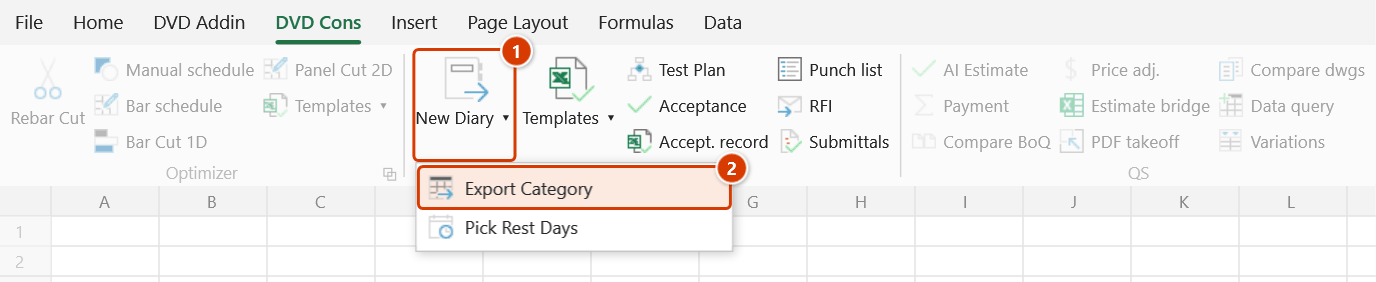
Location on ribbon: Tab DVD Cons → Group QAQC and Diary → the ▾ arrow of New Diary
Command ID: btnExportCategory
License required
This command needs an active DVDAddin account (Standard or PRO). During the trial period it is fully available.
What it does
Pulls selected columns out of an acceptance-record catalog and writes them to a target sheet in a fixed layout starting at cell B6. You choose up to 10 columns to export and nominate one "base column" that tells the add-in which rows actually contain data.
Use it when your internal tracking table is wide — notes, dates, signatories — but the form you submit to the client needs only a handful of columns. The command extracts exactly those, skipping blank rows and, if you want, rows currently hidden by a filter.
How to use
- Click the ▾ arrow of New Diary ▸ Export Category. The Export category window opens.
- Set the Source data range — type the address or click the ⤴ button and select it on the worksheet. Take data rows only: a header row inside the range that has text in the base column is exported like a data row.
- In the Columns to export (1–10) card, enter the columns you want, in the order you want them — any one cell of each column is enough; leave unused slots blank.
- Choose the Base column (row picker) — a number from 1 to 10 pointing at one of the columns you just listed. A row is exported only if that column holds data.
- Choose the Target sheet from the list (the box also accepts a typed name).
- Tick Skip hidden rows if the source table is filtered and you only want the visible part.
- Click Export. The window closes and the data is written to the target sheet starting at cell B6 (a missing target sheet is created at the end of the workbook).
Video tutorial
Narrated in Vietnamese, with Vietnamese subtitles. Nhật ký công trình · 7 min 50 s · 14 cases · Download the video · Practice workbook for the video
Commands in this video: New Diary · Diary Template · Export Category · Pick Rest Days
Chapters (18)
- Giới thiệu
- Mở lệnh
- 1 · Tạo nhật ký từ danh mục
- 2 · Chọn ngày nghỉ trên lịch
- 3 · Sửa ngày nghỉ đã có
- 4 · Nghỉ chung nhiều công tác
- 5 · Công tác vắt qua kỳ
- 6 · Dòng chỉ có ngày nghiệm thu
- 7 · Ngày gõ dạng chữ
- 8 · Quên dòng tiêu đề
- 9 · Chạy lại: ghi đè và Ctrl+Z
- 10 · Xuất danh mục hồ sơ
- 11 · Bảng lọc, xuất lại
- 12 · Mẫu Nhật ký và in A4
- 13 · Sheet đang bảo vệ
- 14 · Khi nhập sai
- Mẹo
- Kết thúc
Illustrated walkthrough
Practice
Download this command's sample workbook — the data matches the pictures below (sheet Acceptance log), so you can follow each step right away.
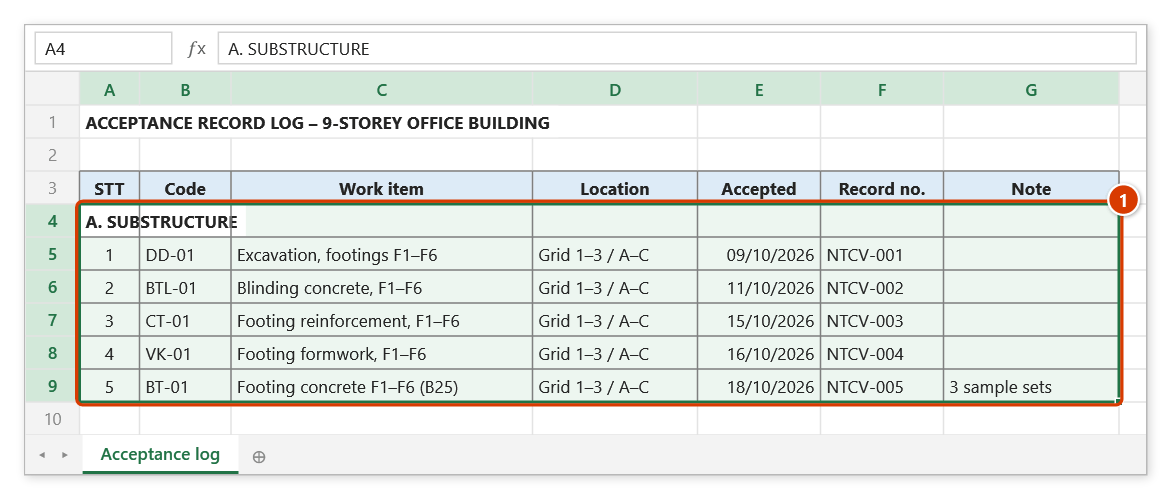
Step 1. The acceptance log has many columns, but the form for the supervision consultant needs only work item, location, date and record number. Identify the data range (1) — data rows only, not the header row (every row with text in the base column is exported). A group row such as "A. SUBSTRUCTURE" has an empty work-item cell, so it is not exported.
Step 2. On the ribbon, open the DVD Cons tab → QAQC and Diary group → click the ▾ arrow of the large New Diary button (1) → choose Export Category (2).
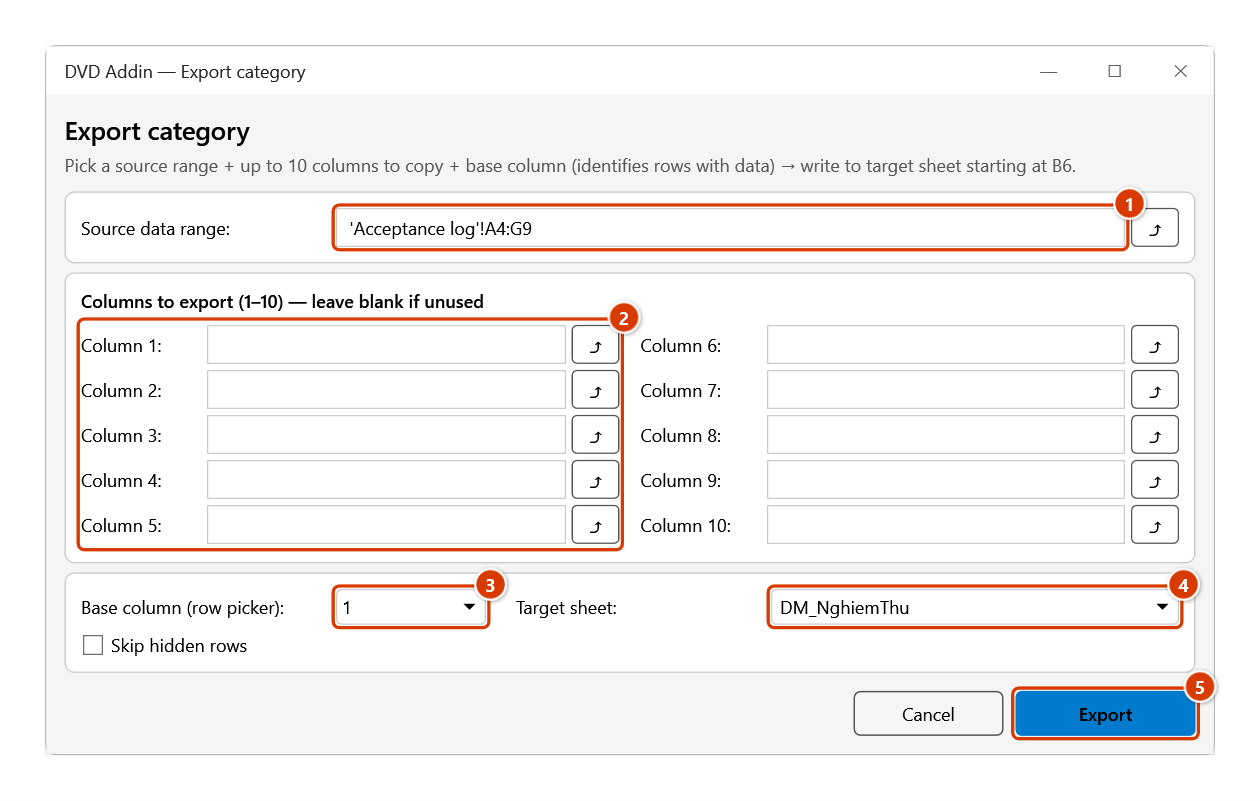
Step 3. In the Export category window, enter the Source data range (1) (click ⤴ to select it). In the Columns to export card (2), list the columns in the order you want — one cell of each column is enough: Column 1 = C5 (work item), Column 2 = D5 (location), Column 3 = E5 (date), Column 4 = F5 (record no.); leave unused slots blank. Set Base column = 1 (3), type or pick the Target sheet (4), tick Skip hidden rows if the log is filtered, then click Export (5).
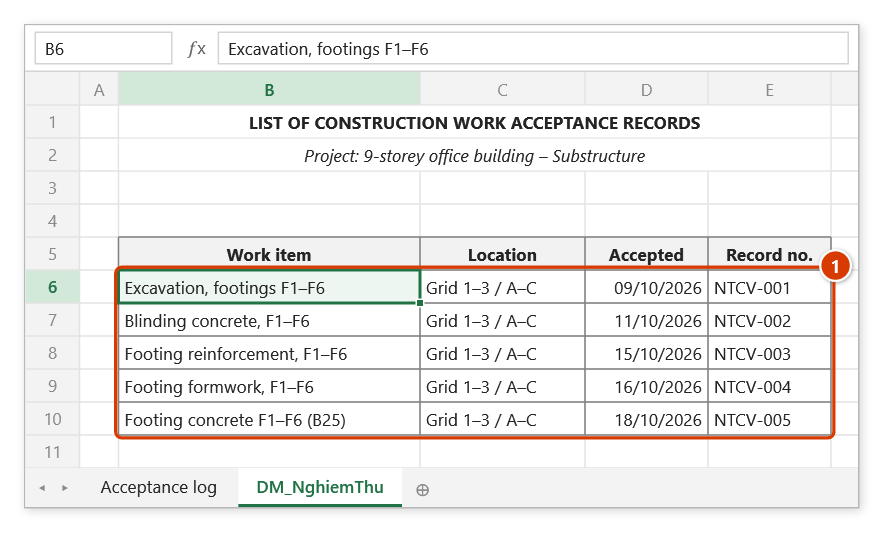
Step 4. The window closes and the target sheet opens: the 5 rows with data in the base column are written one after another from cell B6 (1), with thin borders and the source column widths and number/date formats. Rows 1–5 are left for your form header. A missing target sheet is created at the end of the workbook.
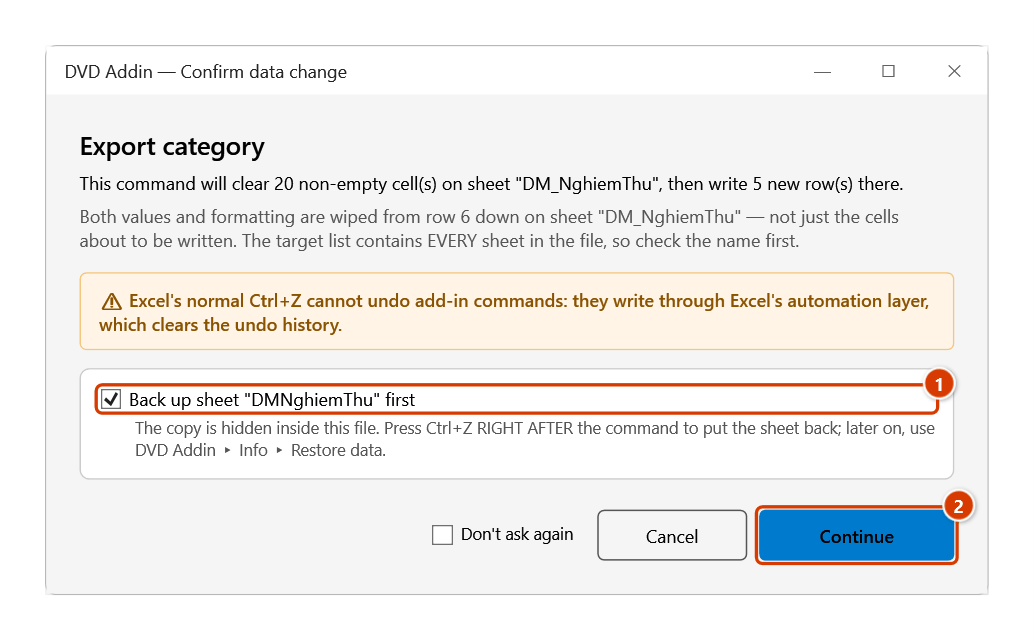
Step 5. Exporting again into a target sheet that already has data from row 6 down (for example after adding records): the Confirm data change window states how many cells will lose both values and formatting. Check the sheet name, keep Back up sheet "DM_NghiemThu" first ticked (1) and click Continue (2). Cancel keeps the Export category window open so you can pick another target.
Example
The substructure acceptance tracker has its data in A8:N320 (the header row sits above and is left out of the range), with 14 columns. The form for the supervision consultant needs only work item, location, acceptance date and record number.
Set Source data range to A8:N320, list those four columns in order, set Base column to 1 (the work-item column — a row without a work item is not a real record), pick DM_NghiemThu as the Target sheet, and tick Skip hidden rows because the tracker is filtered to the foundation package. Click Export and the target sheet receives a clean four-column list from B6 down, ready to print.
Notes
- Output always begins at cell B6 of the target sheet — rows 1 to 5 are left for your form header.
- On an existing target sheet everything from row 6 down loses both values and formatting before the write, not just the cells about to be written; export to a dedicated sheet. When that part holds data, the Confirm data change window appears: with the backup ticked, Ctrl+Z right after the command restores the target sheet, and later you can still get it from Restore data; Cancel keeps the Export category window open so you can pick another target.
- Fill the column slots one after another from Column 1: with a blank slot in between, the values are still written side by side, but the column widths and formats on the target sheet shift onto the neighbouring column.
- Only rows with content in the base column are exported, so a wrong base column either drops real rows or pulls in blank ones.
- A maximum of 10 columns per run; for more, run the command twice into two target sheets.
- With Skip hidden rows unticked, hidden and filtered-out rows are exported as well.
- The ⤴ pick button opens a range picker that does not lock Excel: this window steps aside while you pick, and you can scroll, switch sheets or switch workbooks. Click OK or press Enter on the sheet to fill the box; Cancel or Esc leaves it unchanged. If the box already holds an address, the picker starts from it.
Related
- New Diary — expands the work-item catalog into a day-by-day diary.
- Pick Rest Days — fills the rest-days column of the diary catalog.
- Work Record Tpl — the acceptance record form the exported list feeds.
- Diary Template — the standard construction diary form.