
Auto Draw
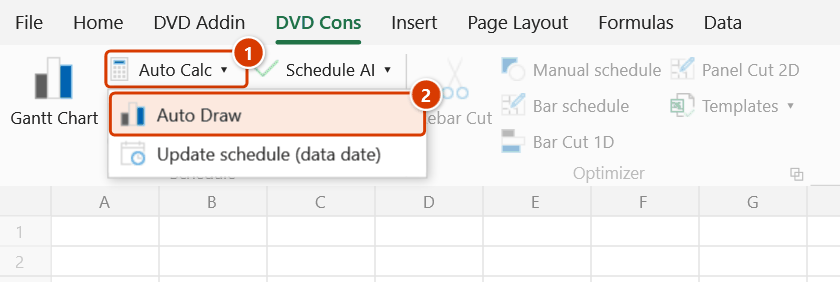
Location on ribbon: Tab DVD Cons → Group Schedule → the arrow next to Auto Calc
Command ID: ToggleAutoDraw
What it does
Controls whether the Gantt chart is redrawn automatically after each recalculation. ON: the add-in waits about 0.7 seconds after you stop typing, then repaints the chart. OFF: dates still recalculate, but the chart stays as it is until you click Gantt Chart.
This separates the cheap work (editing numbers) from the expensive work (repainting). On schedules with a few hundred activities, switching it off makes data entry noticeably smoother.
How to use
- Turn on Auto Calc first — Auto Draw only has an effect while Auto Calc is running.
- Go to the DVD Cons tab → Schedule group → click the arrow next to Auto Calc → Auto Draw.
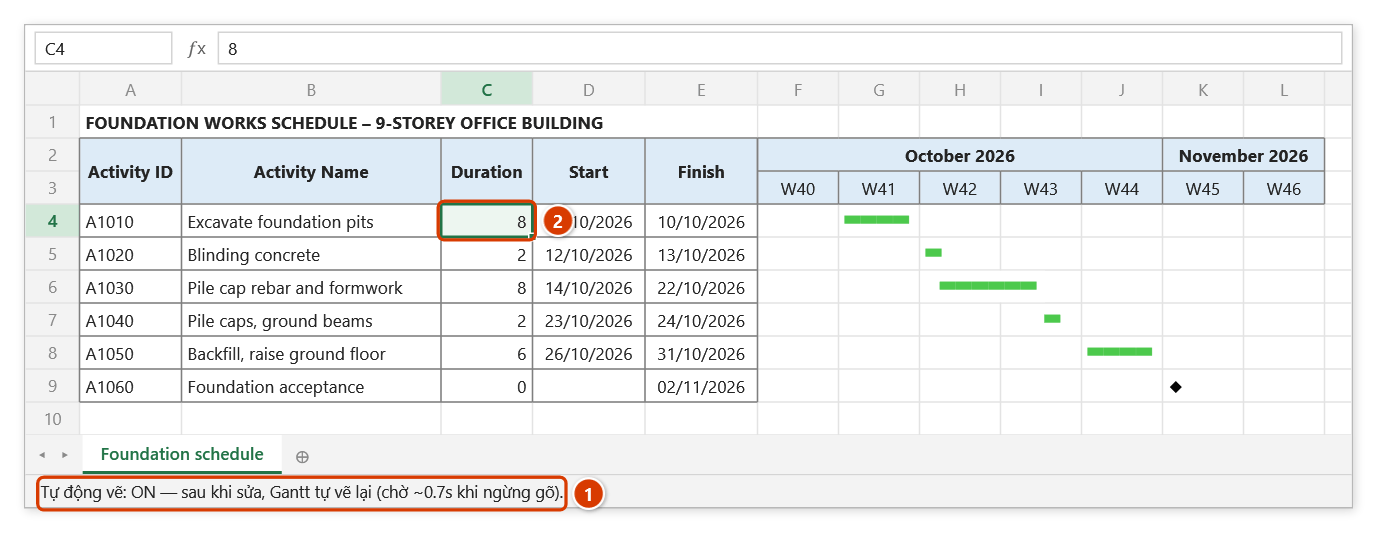
- The button stays highlighted while it is ON, and the Excel status bar confirms it:
Tự động vẽ: ON — sau khi sửa, Gantt tự vẽ lại (chờ ~0.7s khi ngừng gõ).The message clears after about 6 seconds. - Click again to turn it OFF; the status bar then reads
Tự động vẽ: OFF — chỉ tính lại ngày; bấm "Vẽ tiến độ" để cập nhật biểu đồ. - While it is off, refresh the chart whenever you like from Schedule → Gantt Chart.
Video tutorial
Narrated in Vietnamese, with Vietnamese subtitles. Vẽ tiến độ, Tự động tính, Tự động vẽ · 7 min 42 s · 18 cases · Download the video · Practice workbook for the video
Commands in this video: Gantt Chart · Auto Calc · Auto Draw
Chapters (23)
- Giới thiệu
- Mở lệnh
- Cửa sổ Vẽ tiến độ
- 1 · Bảng tiến độ cơ bản
- 2 · Sửa mốc cuối bảng, vẽ lại
- 3 · Bố trí bảng đúng
- 4 · Quan hệ FS, SS, FF, SF
- 5 · Mốc và thang Ngày
- 6 · Công tác nhóm theo cấp
- 7 · % hoàn thành, nhân lực
- 8 · Đường găng
- 9 · Thang Tháng
- 10 · Cột bắt đầu vẽ
- 11 · Bảng lớn, dừng bằng ESC
- 12 · Tự động tính
- 13 · Tắt tự động tính / vẽ
- 14 · Công tác trước theo dòng
- 15 · Ngày trống, ngày sai
- 16 · Vòng lặp quan hệ
- 17 · Sheet đang bảo vệ
- 18 · Hoàn tác Ctrl+Z
- Mẹo
- Kết thúc
Illustrated walkthrough
Practice
Download this command's sample workbook — the data matches the pictures below (sheet Foundation schedule), so you can follow each step right away.
Step 1. Turn Auto Calc on first — Auto Draw only runs after an Auto Calc pass; with Auto Calc off this button does nothing.
Step 2. On the ribbon, open the DVD Cons tab → Schedule group → open Auto Calc → choose Auto Draw.
Step 3. The button lights up while it is ON; the status bar confirms it for about 6 seconds (1). Now edit as usual — e.g. Excavate foundation pits hits groundwater, so its duration goes from 6 to 8 days (2).
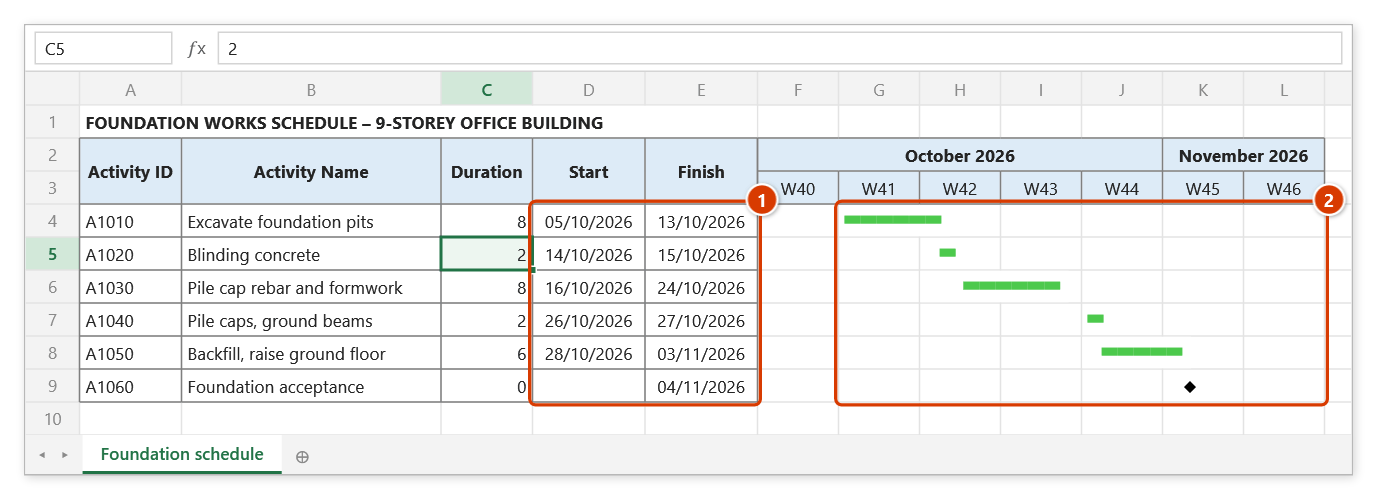
Step 4. Auto Calc shifts the dates of the whole chain (1); about 0.7 s after you stop typing the chart is redrawn on the new dates, at the same scale as the last Gantt Chart run (2). Click the button again to turn it OFF: the status bar reads Tự động vẽ: OFF — chỉ tính lại ngày; bấm "Vẽ tiến độ" để cập nhật biểu đồ. (dates are still recalculated; run the draw command to refresh the chart). An automatic redraw cannot be undone with Ctrl+Z.
Example
A rural road-works programme with 220 activities, charted by week. You need to review the durations across the whole Pavement structure section.
Turn Auto Draw off but leave Auto Calc on. You edit dozens of durations in a row — the dates update instantly, but the chart does not flicker and repaint, so scrolling and typing stay responsive. When you are done, turn Auto Draw back on (or click Gantt Chart once) so the picture matches the new numbers.
Notes
- The toggle does nothing while Auto Calc is off — with no recalculation cycle there is no redraw to gate.
- The state is stored in the registry, so it survives closing and reopening Excel.
- The redraw reuses the scale, column width and start column you chose the last time you ran Gantt Chart.
- The add-in never draws while a cell is in edit mode; if the cursor is still blinking in a cell, the chart updates only once you commit the cell.
- Automatic redraws overwrite the chart area and cannot be undone with Ctrl+Z.
Related
- Auto Calc — the master switch; this toggle is inert without it.
- Gantt Chart — refresh the chart manually and reset the scale / start column.
- Setup — change the working calendar and default scale used on redraw.