Text functions
This group contains 14 string-handling functions: joining the values of a range (with or without conditions), splitting strings and extracting elements, counting words and occurrences, Vietnamese-specific helpers (strip diacritics, VNI/Telex, Unicode strings for VBA) and a quick evaluator for quantity expressions written inside a description cell.
The examples below use a semicolon ; to separate arguments (Excel running on a Vietnamese regional format). If your Excel uses the English (US) format, type a comma , instead of ;.
Quick reference:
| Function | Purpose |
|---|---|
dvdConcatIF | Join the values of a range, with or without a condition. |
dvdConcatIFS | Join the values of a range that meet several conditions. |
dvdJoinIF | Merge values matching one condition, optionally removing duplicates. |
dvdJoinIFS | Merge values matching several range/criteria pairs. |
dvdTextJoin | Join several texts or ranges with one delimiter. |
dvdTextSplitItem | Return the nth item after splitting a string by a delimiter. |
dvdExtractElement | Extract the nth element of a string, keeping empty elements. |
dvdCountOccurrences | Count how often a substring occurs in a string. |
dvdWordCount | Count the words in a string. |
dvdUnDiacriticsVi | Strip Vietnamese diacritics. |
dvdUniConvert | Convert VNI or Telex typing into Vietnamese Unicode. |
dvdUniVba | Turn a Vietnamese string into a VBA string expression. |
dvdSymbol | Insert a check-box symbol (empty / ticked / crossed). |
dvdEvaluate | Evaluate the maths expression written after a colon in a string. |
dvdConcatIF
Joins the values of a range into one string; when a condition range is supplied, only the matching rows are joined.
Syntax:
=dvdConcatIF(Delimiter; ConcatRange; [ConditionRange]; [Condition])| Parameter | Required | Description |
|---|---|---|
Delimiter | Yes | Separator placed between the joined values. |
ConcatRange | Yes | Range of cells whose values are joined. |
ConditionRange | No | Range holding the values compared against the condition. |
Condition | No | Criteria value; accepts operators (">5", ">=2", "<>0") and wildcards ("BT*"). |
Example:
=dvdConcatIF(", "; C6:C40; B6:B40; "Móng")
// → "Bê tông lót M100, Bê tông móng M300, Cốt thép móng"

=dvdConcatIF(" + "; C6:C40)
// → joins every non-empty work item in C6:C40
Notes
ConditionRangeandConditionmust be supplied together; if either is missing the whole range is joined.- Empty value cells are always skipped, with or without a condition, so the result never contains doubled delimiters.
- Decimals in the criteria may use a comma or a dot:
">0,5"and">0.5"both mean "greater than 0.5", and"1.250.000"is 1250000, so joining">"&A1on a Vietnamese-format machine works as is. A single dot/comma followed by exactly three digits with a non-zero integer part ("1.250","12,345") is read as a thousands separator. - Wildcards (
*,?) also work with=and<>, as inCOUNTIF:"=BT*"matches codes starting with BT and"<>BT*"keeps all other rows (blank cells included). Criteria with no operator behave like=.
Illustrated walkthrough
Practice
Download this function's sample workbook — the data matches the pictures below and the cell for the formula is already selected.
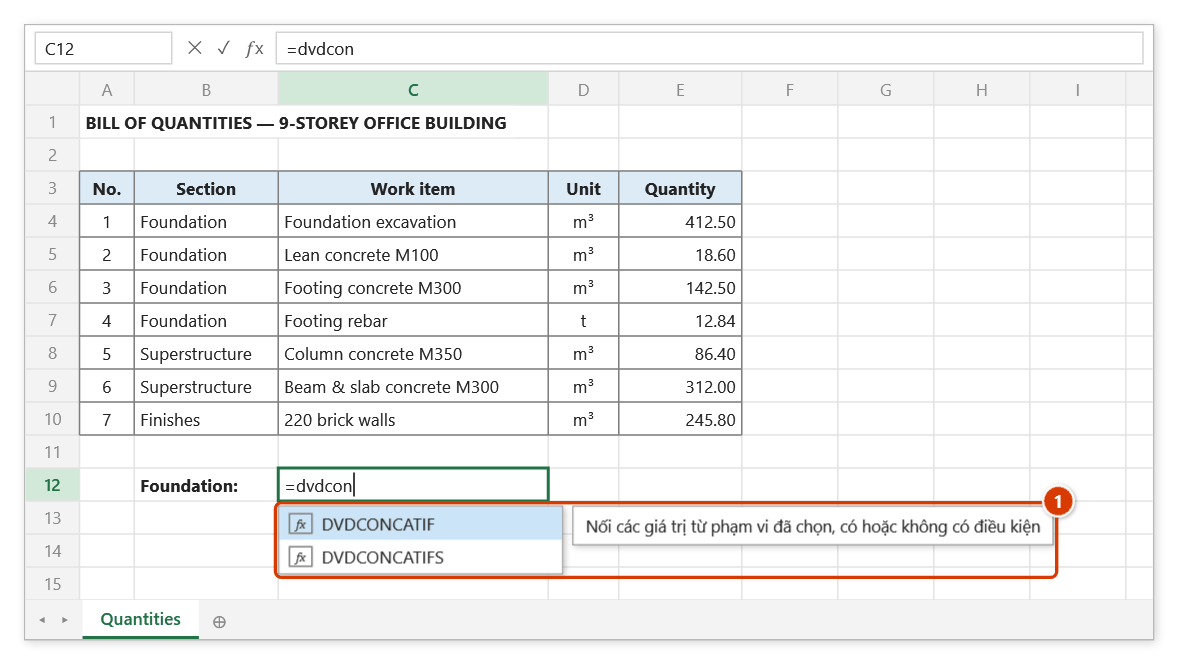
Step 1. Select cell C12 and type =dvdcon — the suggestion list shows DVDCONCATIF with the function description (1). Press Tab to pick it.
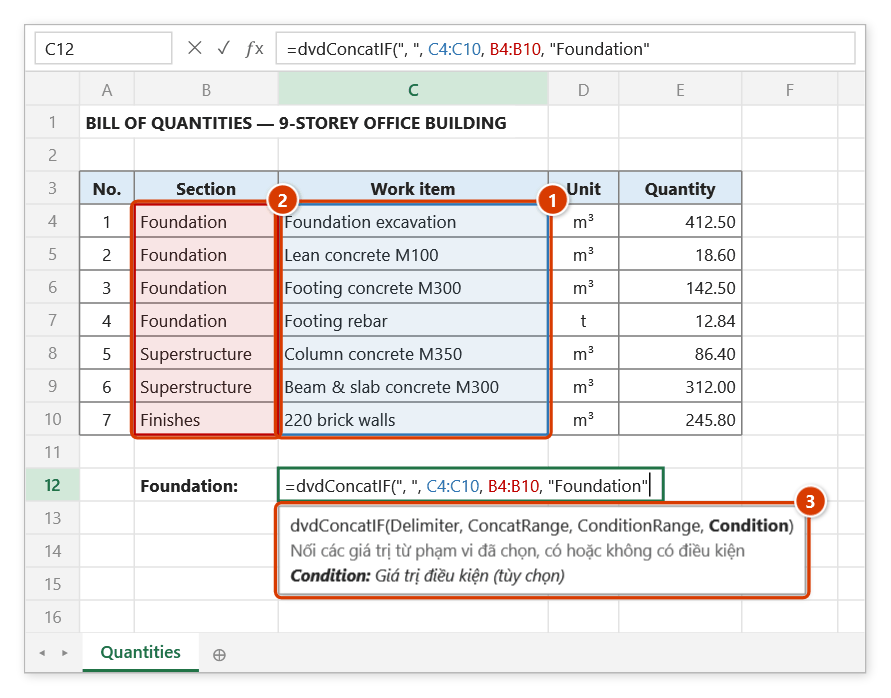
Step 2. Type the delimiter ", ", select the work-item range (1), then the section range (2) and the condition "Foundation". The tip (3) shows the current argument in bold with its meaning.
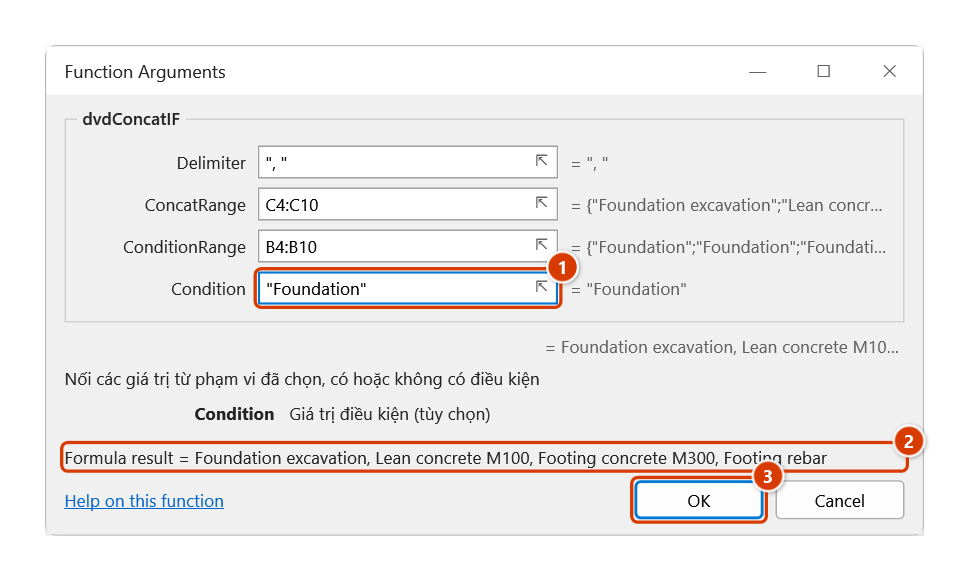
Step 3. To see every argument, press Ctrl+A right after the function name (or the 𝑓x button): the Function Arguments dialog has the condition box (1) — operators such as ">0" and wildcards such as "BT*" work too — and the live result (2). Click OK (3).
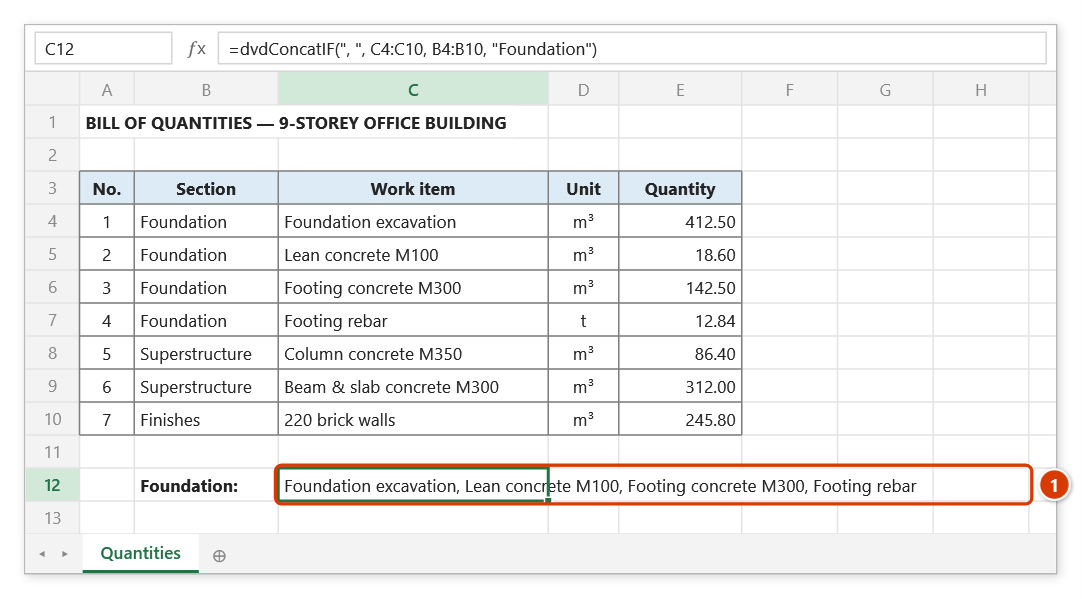
Step 4. Press Enter: C12 joins the work items of the Foundation section (1). Leave out the two condition arguments to join the whole range, skipping empty cells.
dvdConcatIFS
Joins the values of a range that satisfy several conditions at once, each condition being a range/criteria pair.
Syntax:
=dvdConcatIFS(Delimiter; ConcatRange; Conditions…)| Parameter | Required | Description |
|---|---|---|
Delimiter | Yes | Separator placed between the joined values. |
ConcatRange | Yes | Range of cells whose values are joined. |
Conditions | Yes | Range / criteria pairs, listed one after another and repeated as often as needed. |
Example:
=dvdConcatIFS(", "; C6:C60; B6:B60; "Móng"; E6:E60; ">0")
// → "Bê tông móng M300, Cốt thép móng" (foundation items that carry a quantity)
Notes
- Criteria use the same syntax as
dvdConcatIF: comparison operators and wildcards (including"=BT*","<>BT*"); decimals may use a comma or a dot (">0,5"=">0.5"). - Condition ranges should hold as many cells as
ConcatRange; rows beyond the end of a condition range are dropped. - A row that meets every condition but whose value cell is empty is skipped, as in
dvdJoinIFS.
Illustrated walkthrough
Practice
Download this function's sample workbook — the data matches the pictures below and the cell for the formula is already selected.
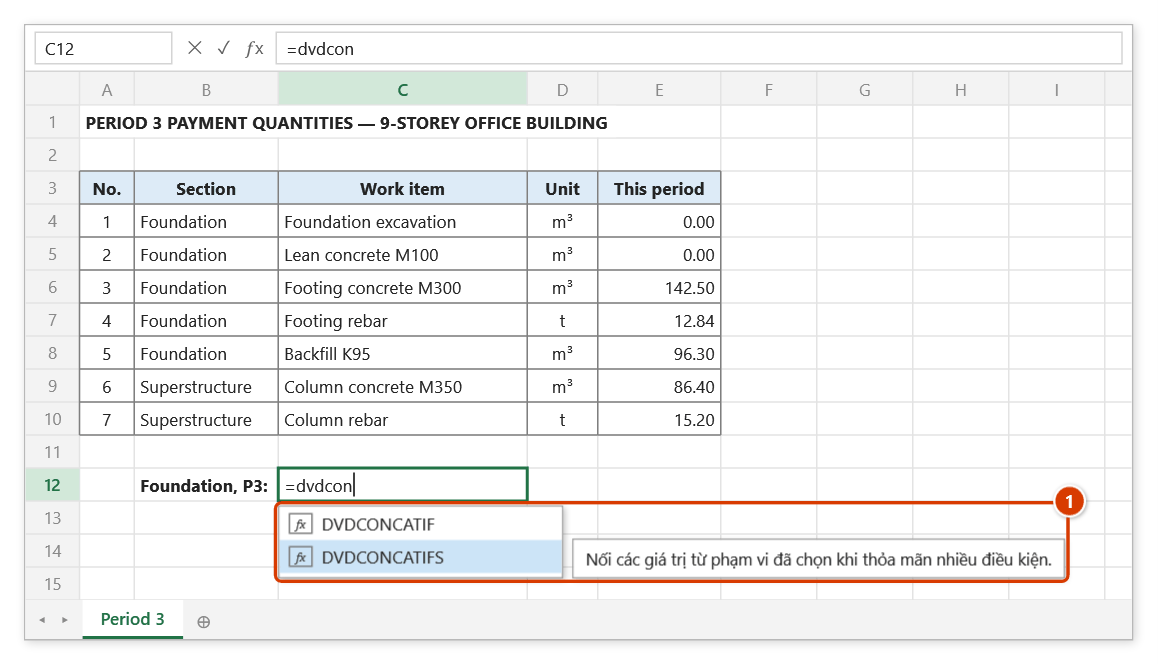
Step 1. Select cell C12, type =dvdcon, press ↓ to highlight DVDCONCATIFS (1), then press Tab.
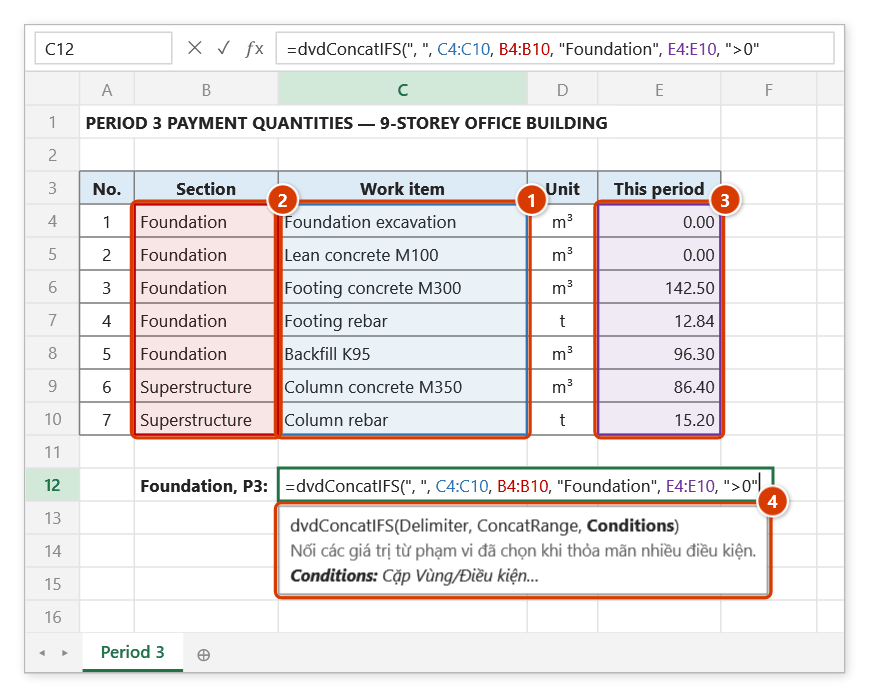
Step 2. Type the delimiter, select the work-item range (1), then each range/criteria pair in turn: section "Foundation" (2) and this-period quantity ">0" (3). The tip (4) explains the Conditions argument.
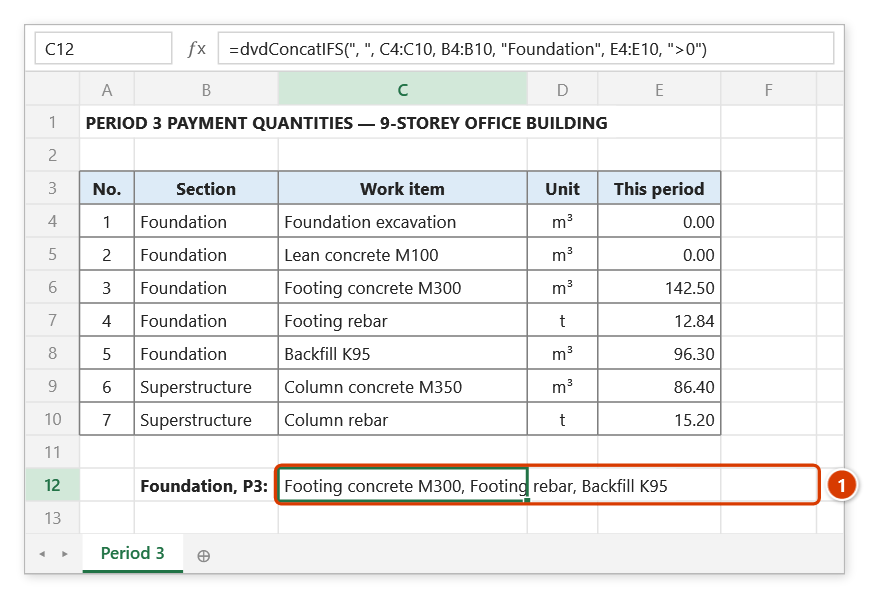
Step 3. Press Enter: only the Foundation items with a period-3 quantity are joined (1) — the two zero-quantity rows are left out.
dvdJoinIF
Merges the values of a range whose criteria column matches a given value, optionally removing duplicates and prefixing the result with the condition.
Syntax:
=dvdJoinIF(CriteriaRange; Condition; ConcatenateRange; [Separator]; [RemoveDuplicate]; [ShowCondition])| Parameter | Required | Description |
|---|---|---|
CriteriaRange | Yes | Range holding the criteria used to filter the data. |
Condition | Yes | Value to filter on. |
ConcatenateRange | Yes | Range of values to merge. |
Separator | No | Separator, ", " by default. |
RemoveDuplicate | No | TRUE removes duplicate values (case-insensitively, keeping the spelling of the first occurrence), FALSE by default. |
ShowCondition | No | TRUE prefixes the result with the condition and a colon. |
Example:
=dvdJoinIF(B6:B60; "Tầng 3"; C6:C60; " + "; TRUE; TRUE)
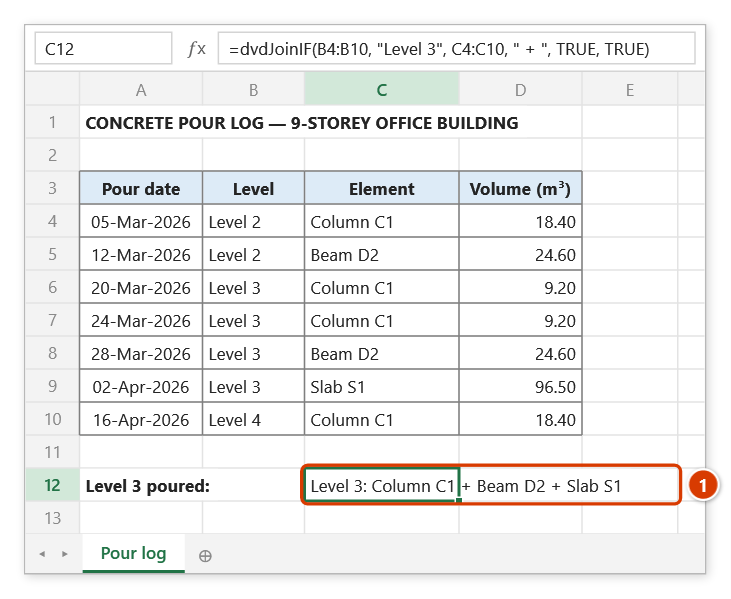
// → "Tầng 3: Cột C1 + Dầm D2 + Sàn S1"

=dvdJoinIF(D6:D60; "Đạt"; A6:A60)
// → "BB-01, BB-04, BB-07" (numbers of the approved acceptance records)
Notes
- The whole value is matched — no operators, no wildcards — but case-insensitively (
"tầng 3"matches"Tầng 3"), and numbers are compared by value (5,"5"and"05"match each other;"0,5"and"0.5"match a numeric 0.5). For">5"or"BT*"style criteria usedvdConcatIF. CriteriaRangeandConcatenateRangemust contain the same number of cells, otherwise the function returns#REF!.
Illustrated walkthrough
Practice
Download this function's sample workbook — the data matches the pictures below and the cell for the formula is already selected.
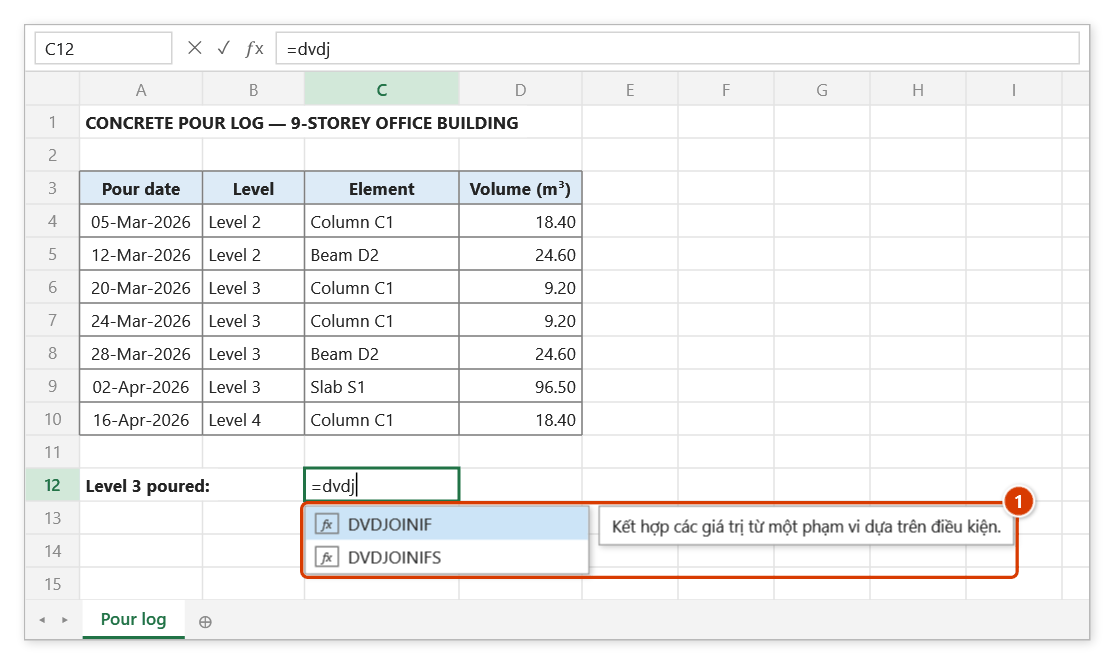
Step 1. Select cell C12 and type =dvdj — the suggestion list shows DVDJOINIF with the function description (1). Press Tab to pick it.
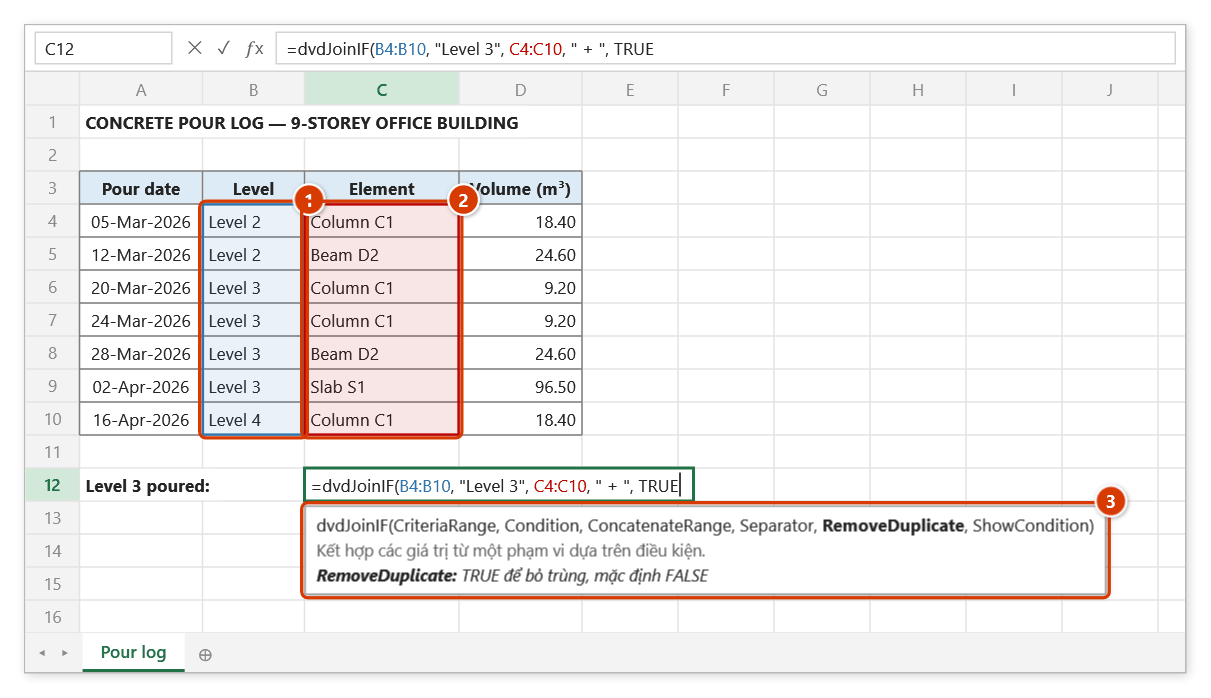
Step 2. Select the level range (1), type the condition "Level 3", select the element range (2), then type the separator " + " and TRUE to remove duplicates. The tip (3) shows the current argument in bold with its meaning.
Step 3. Add , TRUE (prefix the condition) and press Enter: the cell lists the Level 3 elements poured, each once (1). The match is exact; for operators or wildcards use dvdConcatIF.
dvdJoinIFS
Merges the values of a range that satisfy several range/criteria pairs at once.
Syntax:
=dvdJoinIFS(Separator; RemoveDuplicate; ConcatenateRange; Pairs…)| Parameter | Required | Description |
|---|---|---|
Separator | Yes | Separator; leave it empty to use ", ". |
RemoveDuplicate | Yes | TRUE removes duplicate values (case-insensitively). |
ConcatenateRange | Yes | Range of values to merge. |
Pairs | Yes | Range / criteria pairs, listed one after another and repeated as often as needed. |
Example:
=dvdJoinIFS(" + "; TRUE; C6:C60; B6:B60; "Tầng 3"; E6:E60; ">0")
// → "Cột C1 + Dầm D2 + Sàn S1"
Notes
Pairsmust contain an even number of arguments and every criteria range must match the size ofConcatenateRange, otherwise the function returns#REF!.- Criteria accept comparison operators and wildcards, like
dvdConcatIF; decimals may use a comma or a dot (">0,5"=">0.5").
Illustrated walkthrough
Practice
Download this function's sample workbook — the data matches the pictures below and the cell for the formula is already selected.
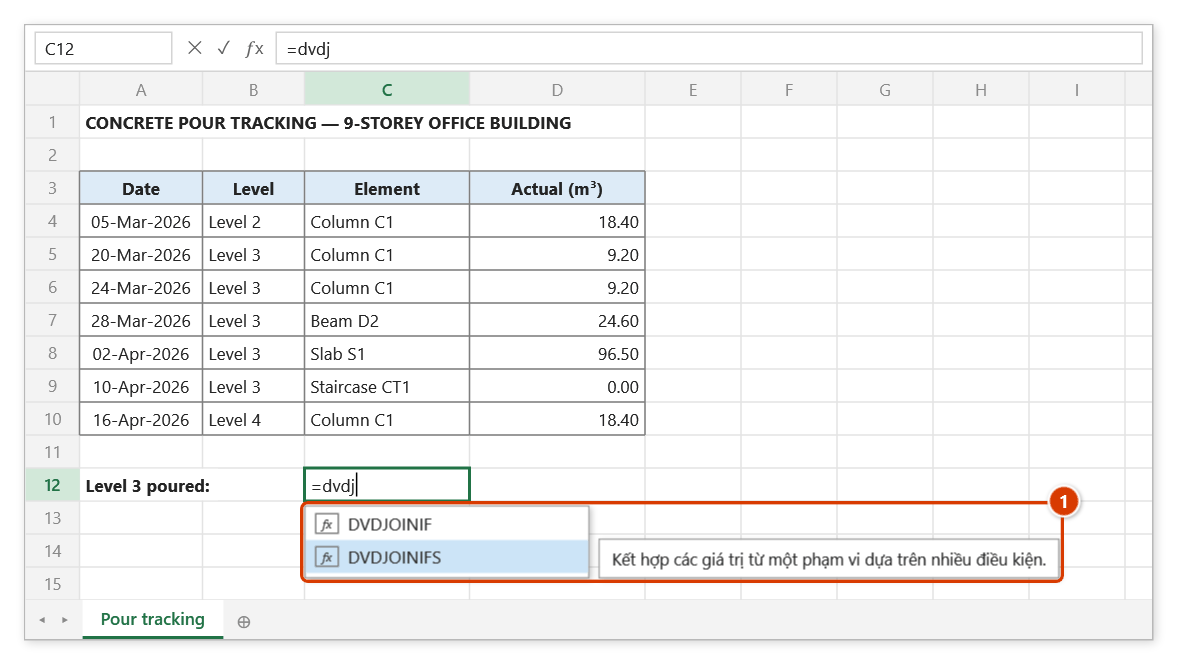
Step 1. Select cell C12, type =dvdj, press ↓ to highlight DVDJOINIFS (1), then press Tab.
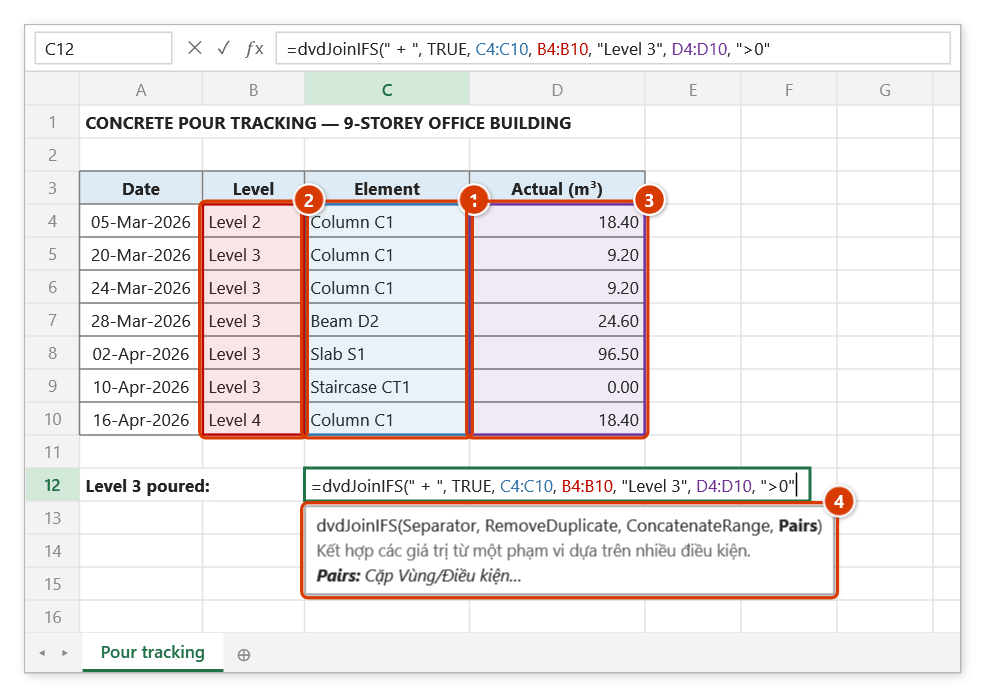
Step 2. Type the separator " + " and TRUE (remove duplicates), select the element range (1), then each range/criteria pair: level "Level 3" (2) and actual volume ">0" (3). The tip (4) explains the Pairs argument.
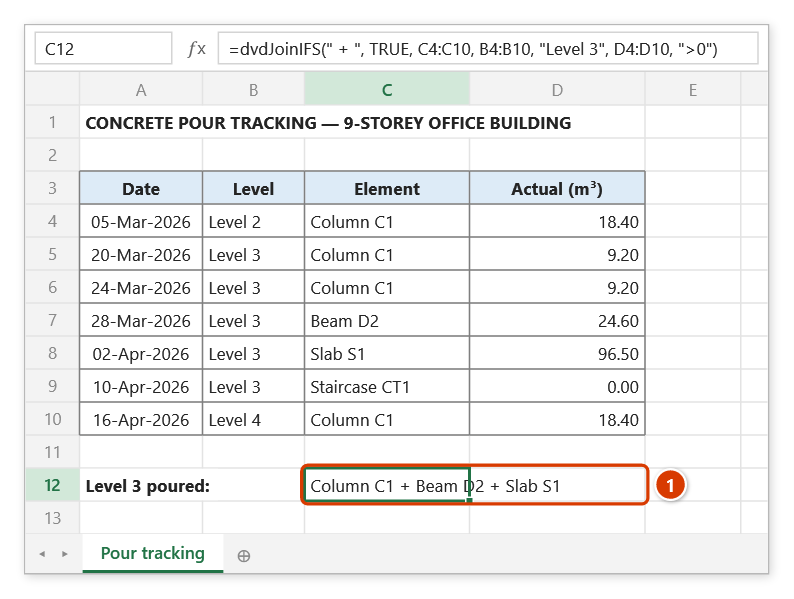
Step 3. Press Enter: the cell lists the Level 3 elements already poured (1) — Column C1 (two pours) appears once, and Staircase CT1 (0 m³, not poured yet) is left out.
dvdTextJoin
Joins several values or ranges with one delimiter, optionally skipping empty cells.
Syntax:
=dvdTextJoin(Delimiter; IgnoreEmpty; Text…)| Parameter | Required | Description |
|---|---|---|
Delimiter | Yes | Separator placed between the text values. |
IgnoreEmpty | Yes | TRUE skips empty values. |
Text | Yes | Values or ranges to join; several arguments may be given. |
Example:
=dvdTextJoin("; "; TRUE; B6:B12; "Phát sinh ngoài hợp đồng")
// → "Cột C1; Dầm D2; Sàn S1; Phát sinh ngoài hợp đồng"
Illustrated walkthrough
Practice
Download this function's sample workbook — the data matches the pictures below and the cell for the formula is already selected.
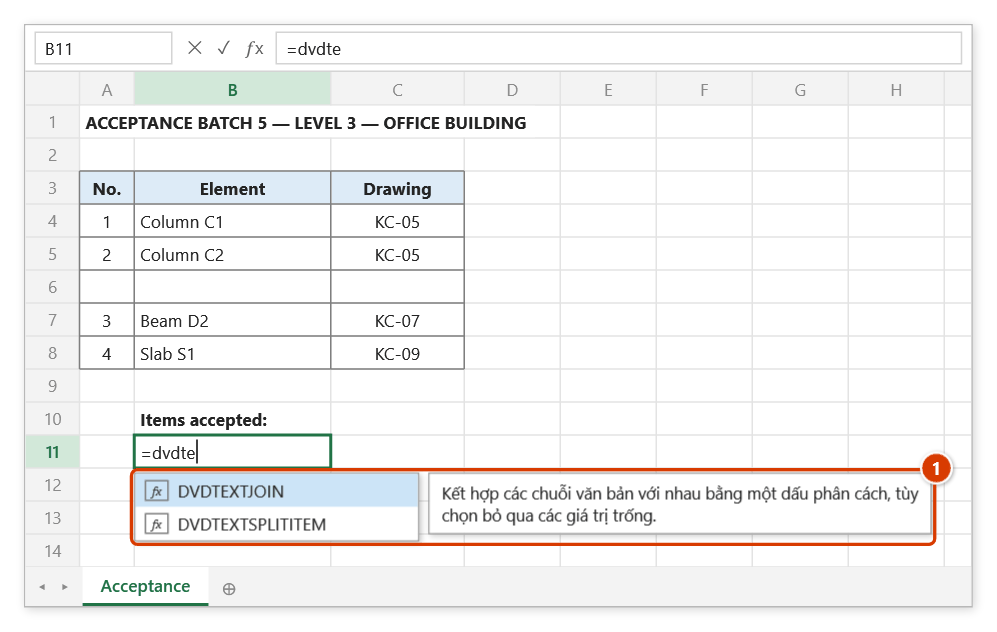
Step 1. Select cell B11 and type =dvdte — the suggestion list shows DVDTEXTJOIN with the function description (1). Press Tab to pick it.
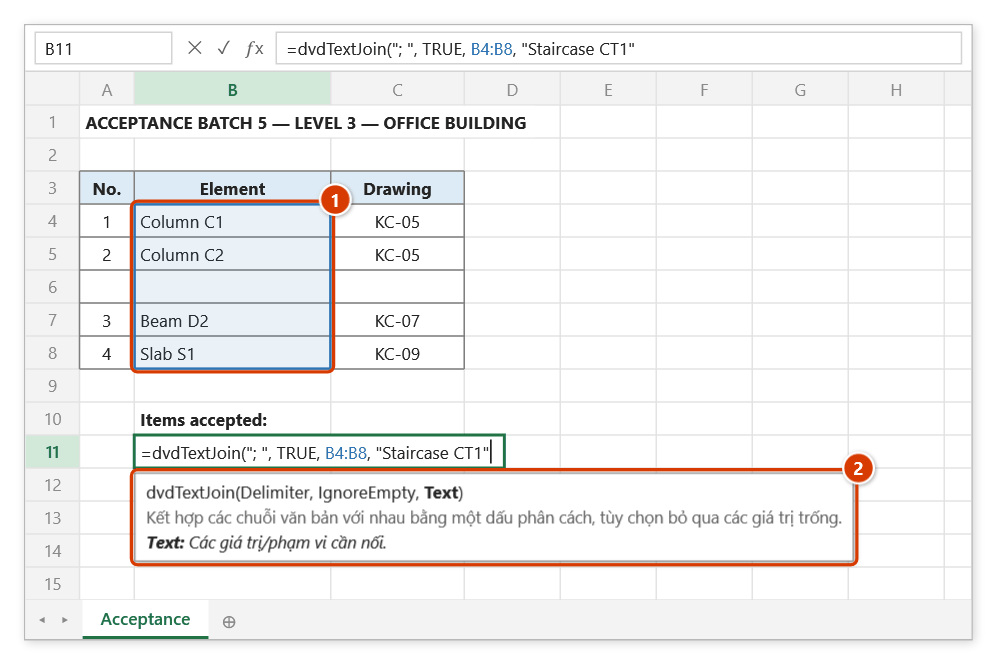
Step 2. Type the delimiter "; ", TRUE to skip empty cells, select the element range (1), then add a typed value "Staircase CT1". The tip (2) shows that Text accepts several values/ranges.
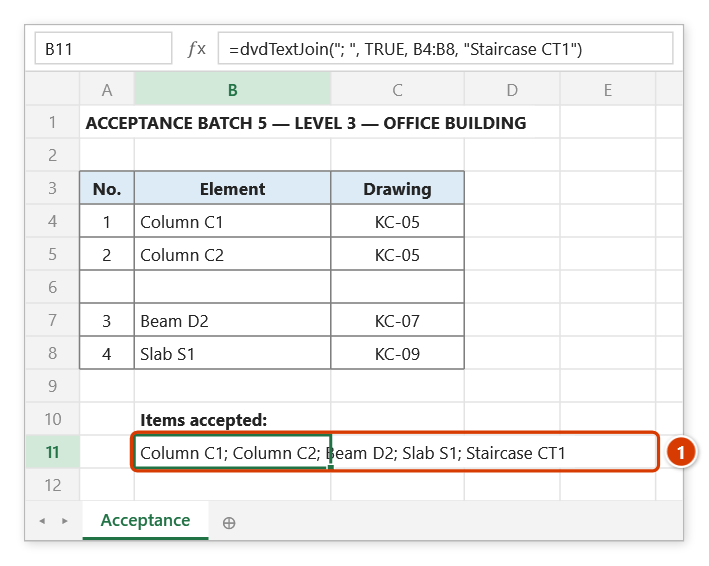
Step 3. Press Enter: B11 joins everything into one line (1); the empty cell B6 is skipped, so there is no doubled ;.
dvdTextSplitItem
Splits a string by a delimiter and returns the item at the given position.
Syntax:
=dvdTextSplitItem(InputText; Delimiter; Index; [IgnoreEmpty])| Parameter | Required | Description |
|---|---|---|
InputText | Yes | Source string to split. |
Delimiter | Yes | Separating character or string. |
Index | Yes | Position of the item, starting at 1. |
IgnoreEmpty | No | Empty items are skipped by default; FALSE or 0 (also as text, "FALSE", "0") keeps them. |
Example:
=dvdTextSplitItem("MB-T3-D1"; "-"; 2)
// → "T3"

=dvdTextSplitItem(A6; "/"; 3)
// → "Móng M1" (from the work code "HM01/BT/Móng M1")
Notes
- A position beyond the last item returns an empty string rather than an error.
Illustrated walkthrough
Practice
Download this function's sample workbook — the data matches the pictures below and the cell for the formula is already selected.
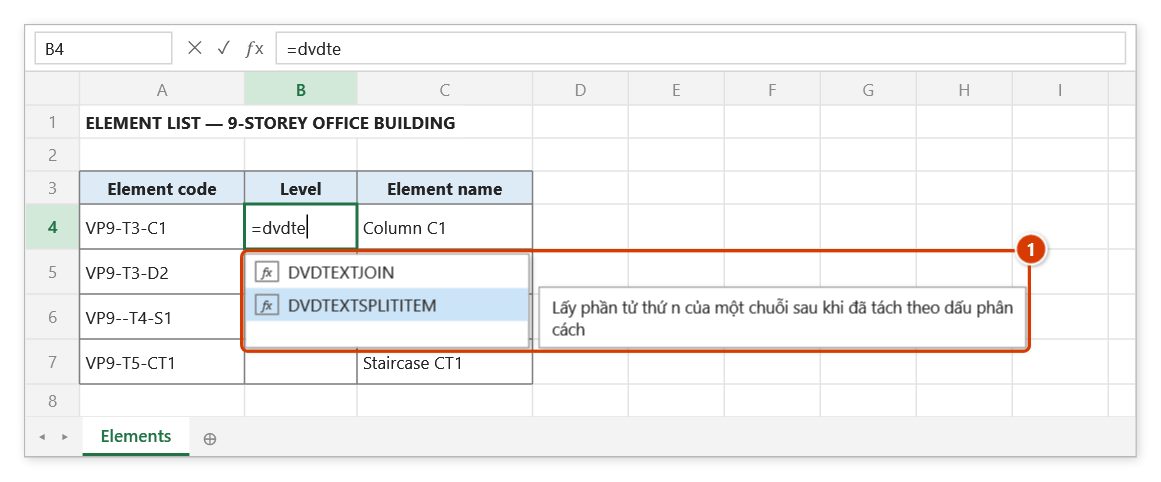
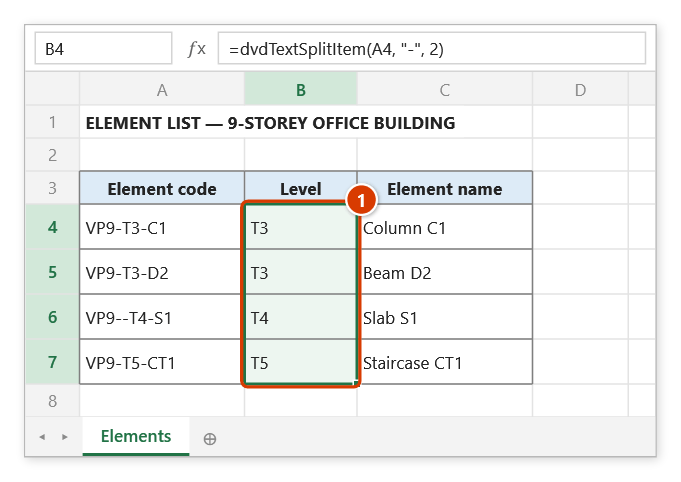
Step 1. Select cell B4, type =dvdte, press ↓ to highlight DVDTEXTSPLITITEM (1), then press Tab.
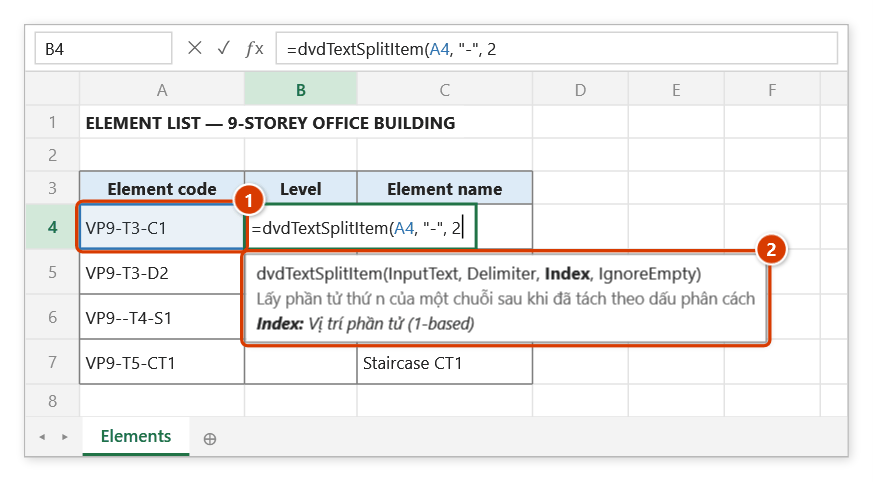
Step 2. Click the element-code cell (1), type the delimiter "-" and position 2 (the second item is the level). The tip (2) shows the current argument in bold.
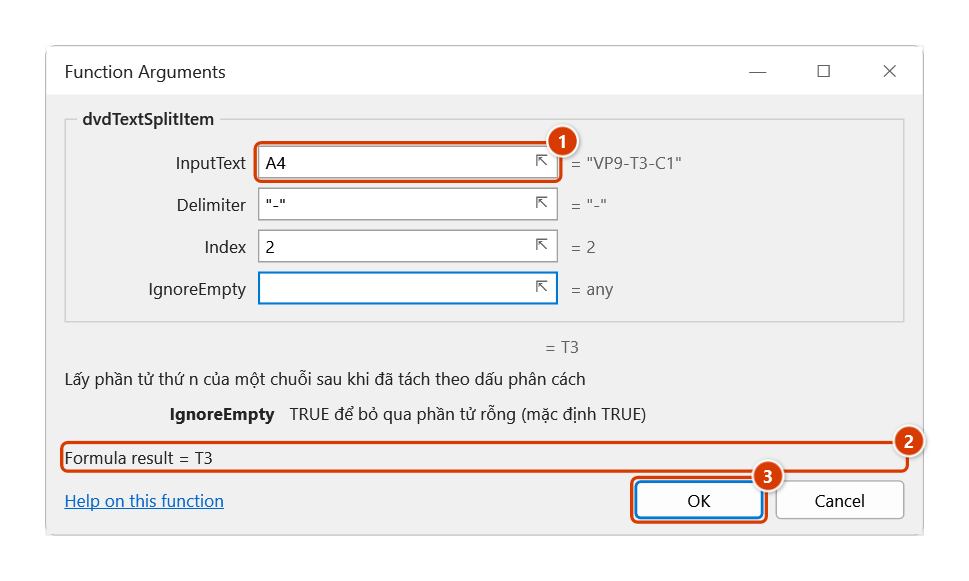
Step 3. The Function Arguments dialog (Ctrl+A after the function name) shows the source text (1) and the live result (2); leave IgnoreEmpty blank and empty items are skipped by default. Click OK (3).
Step 4. Press Enter and fill the formula down to B7 (1). The code typed with a double hyphen VP9--T4-S1 still gives T4 because empty items are skipped.
dvdExtractElement
Extracts the nth element of a string using the given separator, keeping empty elements in the count.
Syntax:
=dvdExtractElement(InputString; ElementNumber; Separator)| Parameter | Required | Description |
|---|---|---|
InputString | Yes | String to extract the element from. |
ElementNumber | Yes | Position of the element, starting at 1. |
Separator | Yes | Separating character or string. |
Example:
=dvdExtractElement("Bê tông/M300/Móng M1"; 2; "/")
// → "M300"

=dvdExtractElement(B6; 1; ",")
// → "Cột C1" (first item of the list stored in B6)
Notes
- Unlike
dvdTextSplitItem, empty elements are counted, so in"A//B"the second element is an empty string.
Illustrated walkthrough
Practice
Download this function's sample workbook — the data matches the pictures below and the cell for the formula is already selected.
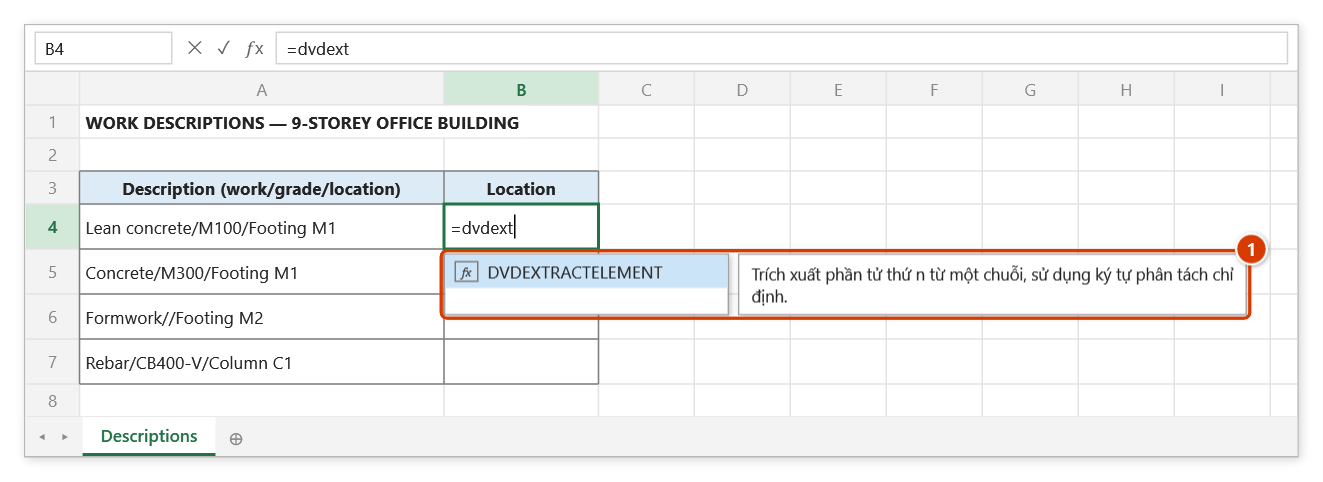
Step 1. Select cell B4 and type =dvdext — the suggestion list narrows to DVDEXTRACTELEMENT (1). Press Tab to pick it.
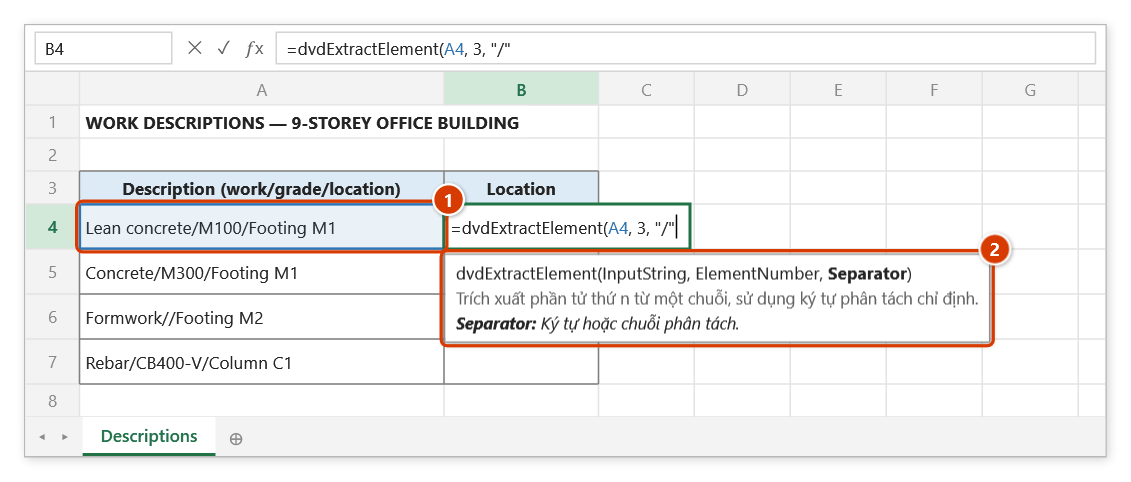
Step 2. Click the description cell (1), type position 3 (the third part is the location), then the separator "/". The tip (2) shows the current argument in bold.
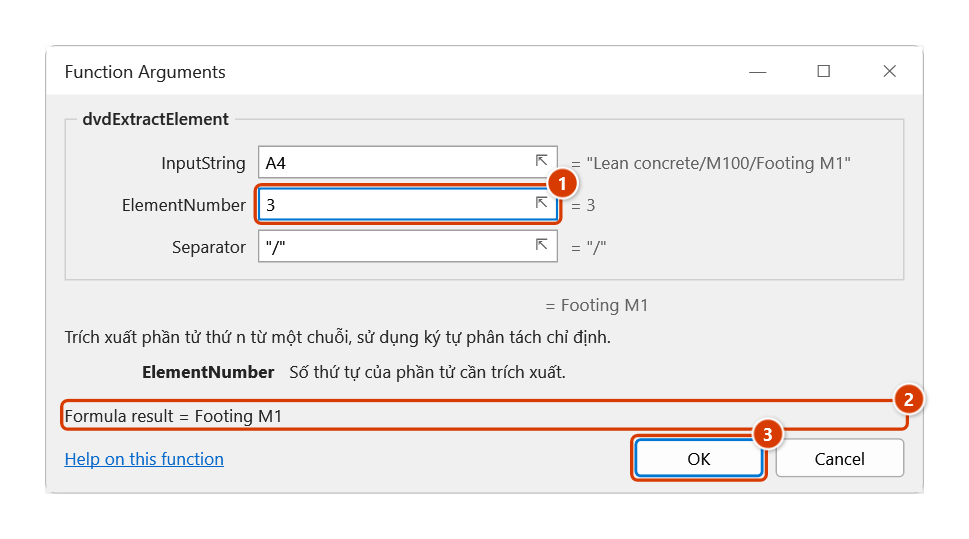
Step 3. In the Function Arguments dialog, ElementNumber (1) is the position counted from 1; the live result appears at (2). Click OK (3).
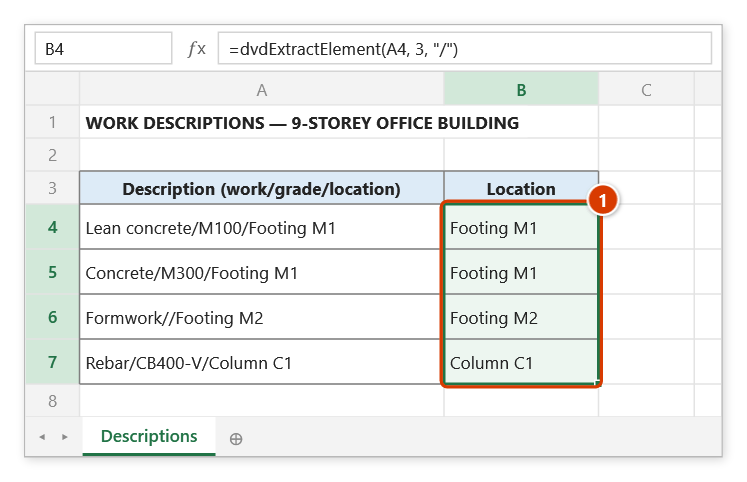
Step 4. Press Enter and fill down to B7 (1). The row Formwork//Footing M2 has no grade yet still gives Footing M2, because empty elements are counted (dvdTextSplitItem would return an empty string).
dvdCountOccurrences
Counts how many times a substring occurs inside a string.
Syntax:
=dvdCountOccurrences(MainText; SubText)| Parameter | Required | Description |
|---|---|---|
MainText | Yes | Text to search in. |
SubText | Yes | Text whose occurrences are counted. |
Example:
=dvdCountOccurrences("Tầng 1;Tầng 2;Tầng 3"; ";") + 1
// → 3 (number of items in a semicolon-separated list)

=dvdCountOccurrences(C6; "D")
// → 4 (number of rebar marks "D" in a member note)
Notes
- The comparison is case-sensitive.
Illustrated walkthrough
Practice
Download this function's sample workbook — the data matches the pictures below and the cell for the formula is already selected.
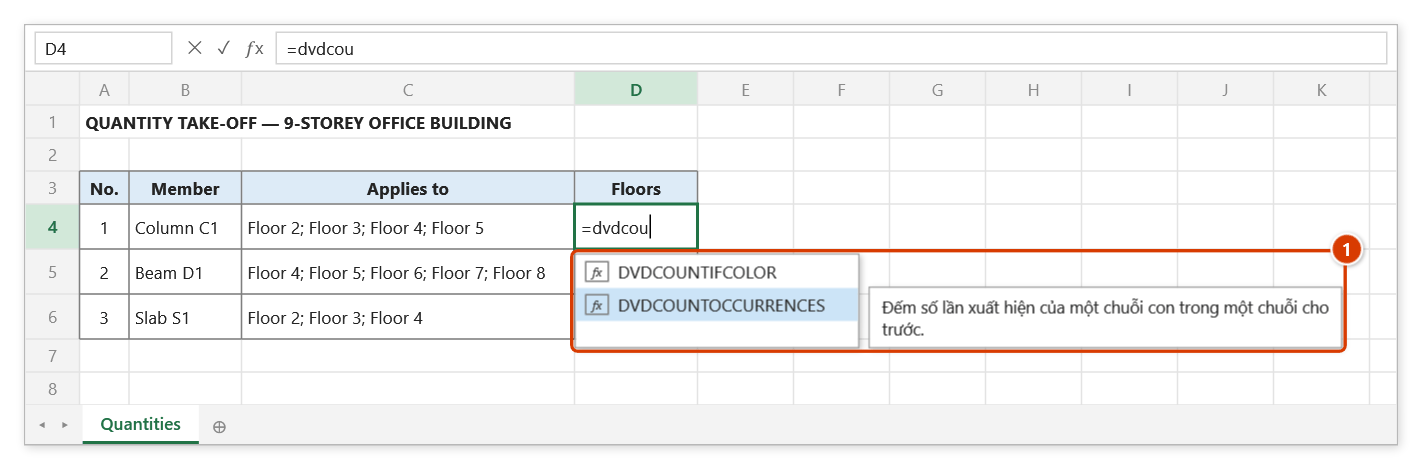
Step 1. Select the cell for the number of repeated floors (D4) and type =dvdcou — the suggestion list shows DVDCOUNTOCCURRENCES with its description (1). Press Tab to pick it.
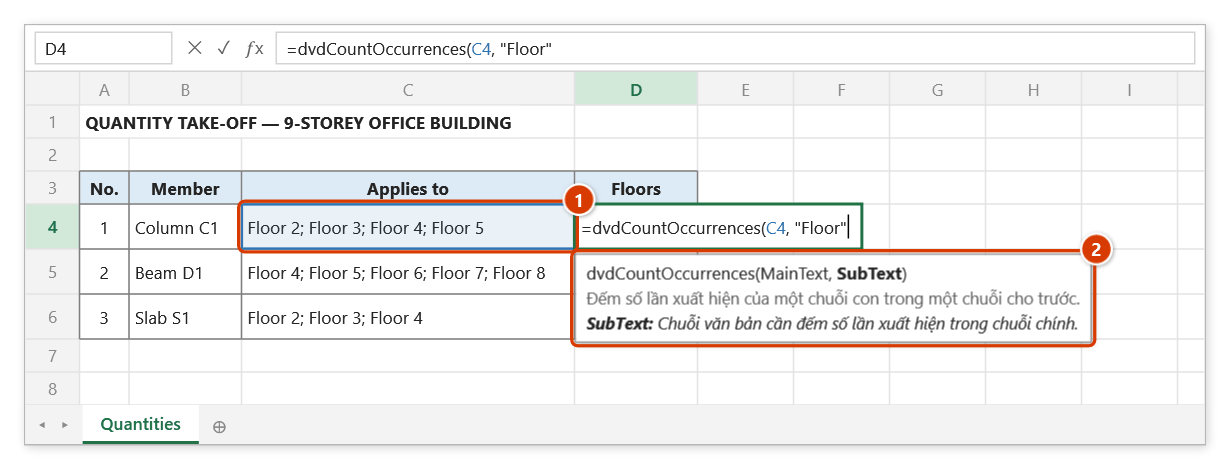
Step 2. Click C4 (1) as the text to search in, then type , and "Floor" as the substring to count. The argument tip (2) shows the current argument in bold with its meaning.
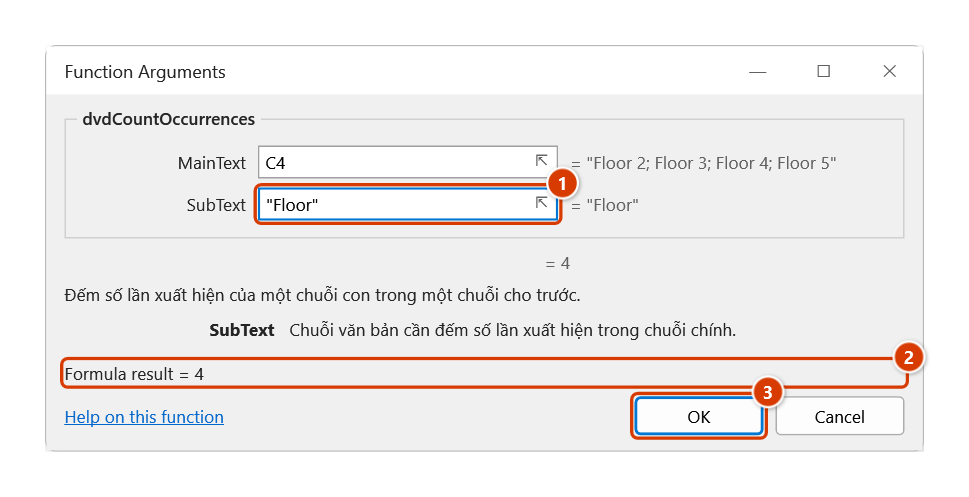
Step 3. Or press Ctrl+A after the function name to open the Function Arguments dialog: one box per argument (1) and a live result (2). Click OK (3).
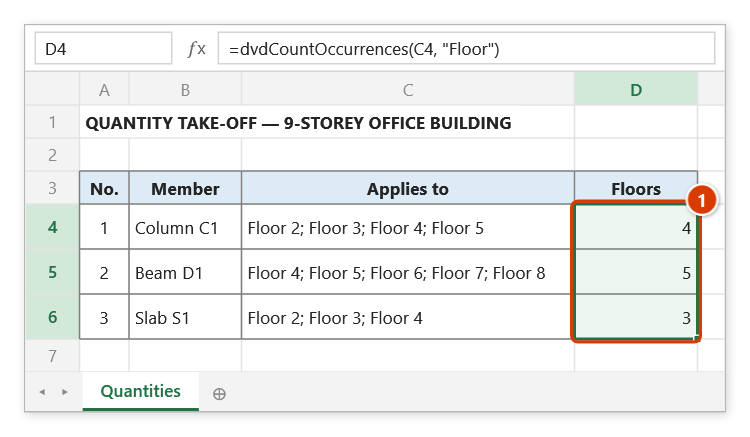
Step 4. Press Enter and fill the formula down to D6: each row gets its number of floors (1). The match is case-sensitive — "floor" (lower-case f) would return 0.
dvdWordCount
Counts the words in a text string.
Syntax:
=dvdWordCount(Text)| Parameter | Required | Description |
|---|---|---|
Text | Yes | Text whose words are counted. |
Example:
=dvdWordCount("Bê tông lót móng M1")
// → 5
Illustrated walkthrough
Practice
Download this function's sample workbook — the data matches the pictures below and the cell for the formula is already selected.
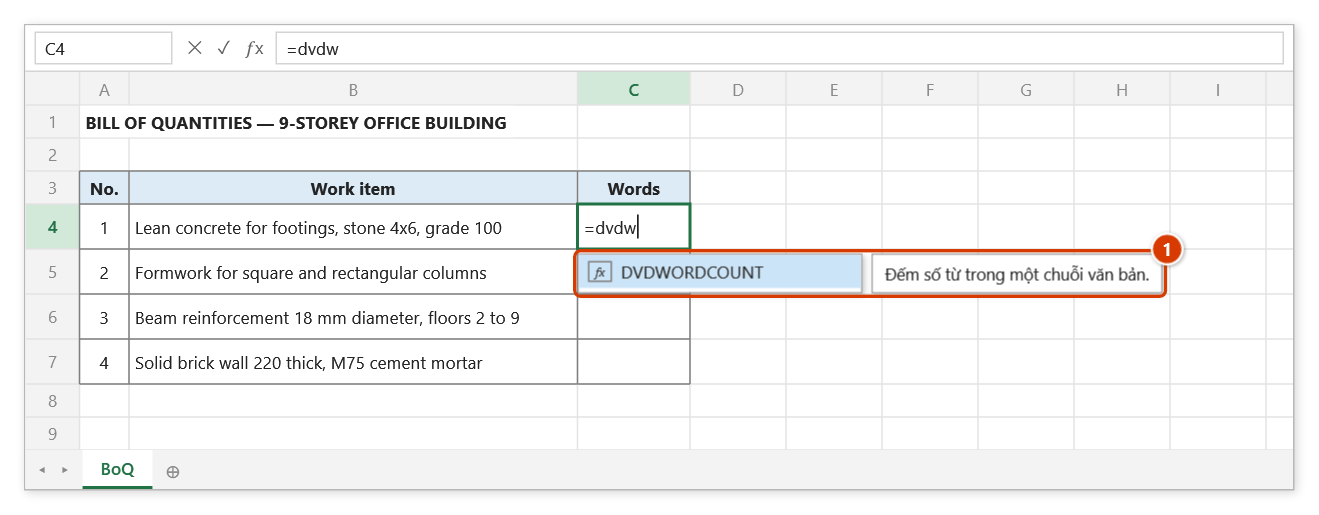
Step 1. Select the cell for the word count (C4) and type =dvdw — the suggestion list shows DVDWORDCOUNT with its description (1). Press Tab to pick it.
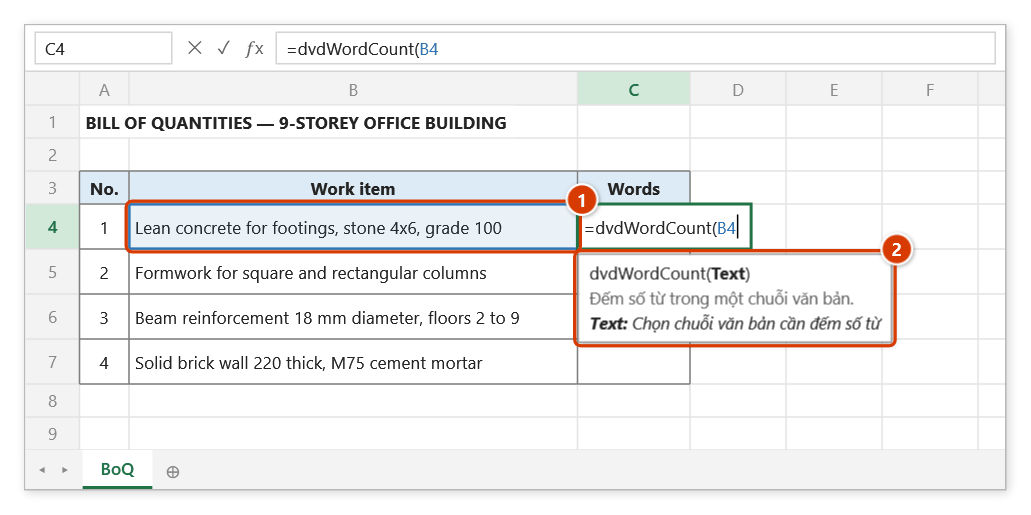
Step 2. Click the work item cell B4 (1) — the function has a single argument, explained in the argument tip (2).
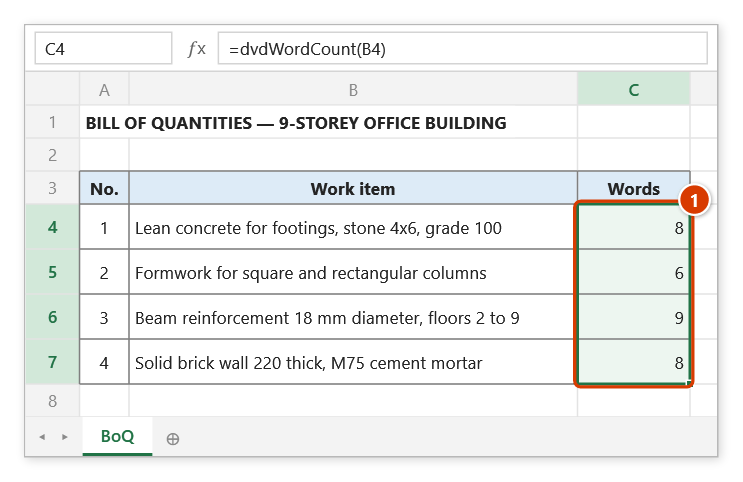
Step 3. Type ), press Enter and fill the formula down to C7 (1). Words are split on spaces, so 4x6 or 100 also count as one word; use this column to spot work items whose names are too long.
dvdUnDiacriticsVi
Strips Vietnamese diacritics from a string, leaving every other character unchanged.
Syntax:
=dvdUnDiacriticsVi(sContent)| Parameter | Required | Description |
|---|---|---|
sContent | Yes | Vietnamese Unicode string to strip. |
Example:
=dvdUnDiacriticsVi("Bê tông cốt thép")
// → "Be tong cot thep"

=dvdUnDiacriticsVi(A6)
// → "Bien ban nghiem thu Mong M1" (useful for document file names)
Illustrated walkthrough
Practice
Download this function's sample workbook — the data matches the pictures below and the cell for the formula is already selected.
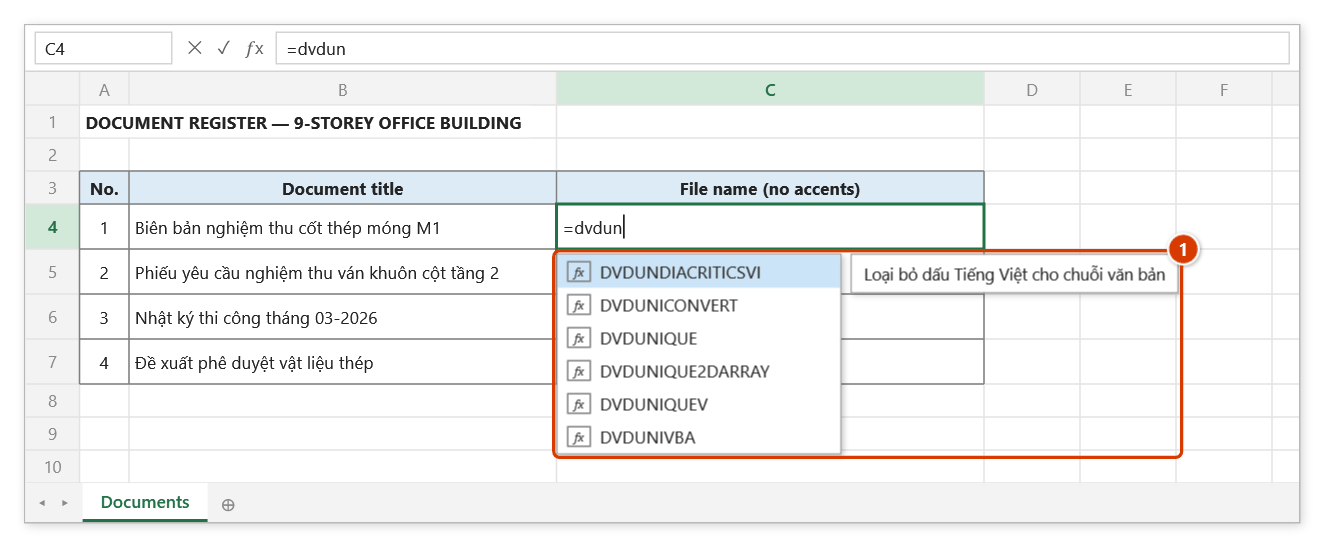
Step 1. Select C4 and type =dvdun — the suggestion list shows the functions starting with DVDUN; pick DVDUNDIACRITICSVI (1) and press Tab.
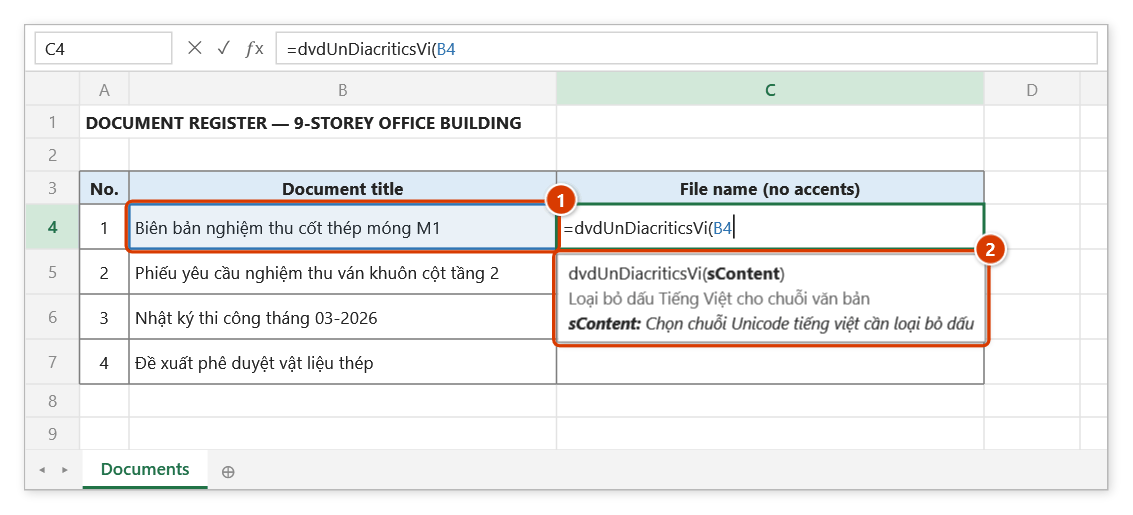
Step 2. Click the document title B4 (1). The argument tip (2) reminds you that the argument is the Vietnamese Unicode text to strip.
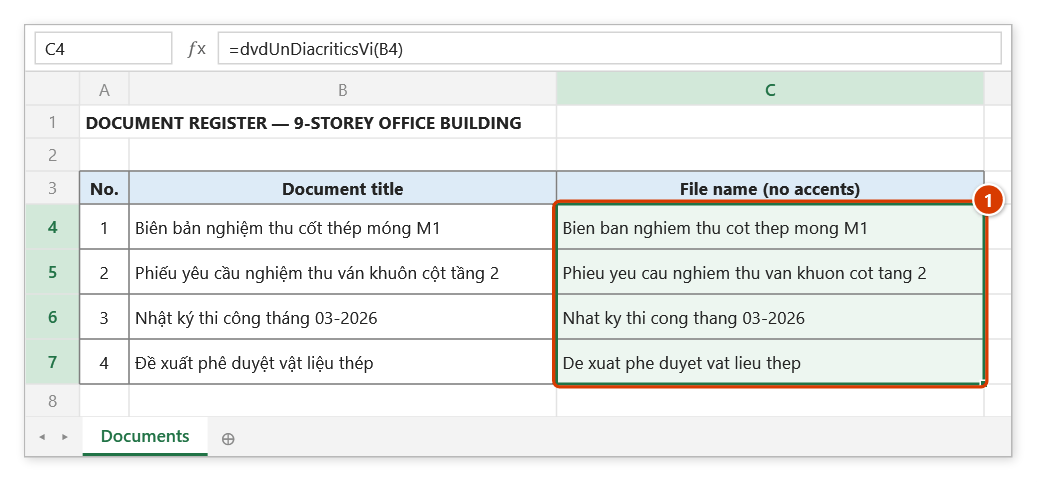
Step 3. Type ), press Enter and fill down to C7: the titles without diacritics (1) — Đ becomes D, digits and - are kept — ready to use as file names.
dvdUniConvert
Converts text typed with the VNI or Telex input method into Vietnamese Unicode.
Syntax:
=dvdUniConvert(Text; InputMethod)| Parameter | Required | Description |
|---|---|---|
Text | Yes | Text to convert. |
InputMethod | Yes | Input method of the source text: "VNI" or "Telex". |
Example:
=dvdUniConvert("Be6 to6ng"; "VNI")
// → "Bê tông"

=dvdUniConvert("Bee toong"; "Telex")
// → "Bê tông"
Notes
InputMethodonly accepts"VNI"or"Telex"; any other value returns the original text unchanged.- A tone key may be typed right after its vowel or at the end of the word:
"mosng","mongs"(Telex) and"mo1ng","mong1"(VNI) all give"móng";"coots"gives"cốt". The mark is placed by Vietnamese spelling rules: inươ,uô,iê,yêit goes on the second vowel ("duwowngf"→"dường"); with a final consonant it goes on the last vowel ("hoafng"→"hoàng");oa,oe,uywithout a final consonant take it on the second letter ("hoaf"→"hoà") unless the key is typed right aftero/u("hofa"→"hòa").quandgicount as initial consonants ("quas"→"quá","giuwax"→"giữa"). - Hat/horn keys (
aa,aw,ee,oo,ow,uw,dd/6,7,8,9) must follow their letter directly, soươneeds the fulluwow(Telex) oru7o7(VNI). Words that are not Vietnamese syllables (foreign words, codes such asM300, already accented words) are converted as before.
Illustrated walkthrough
Practice
Download this function's sample workbook — the data matches the pictures below and the cell for the formula is already selected.
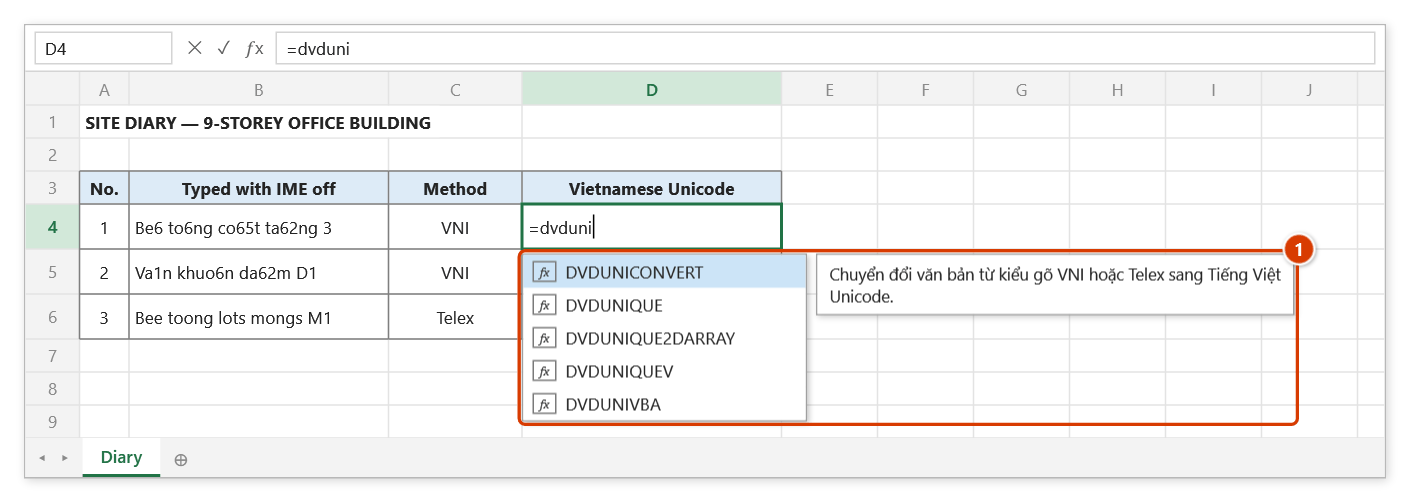
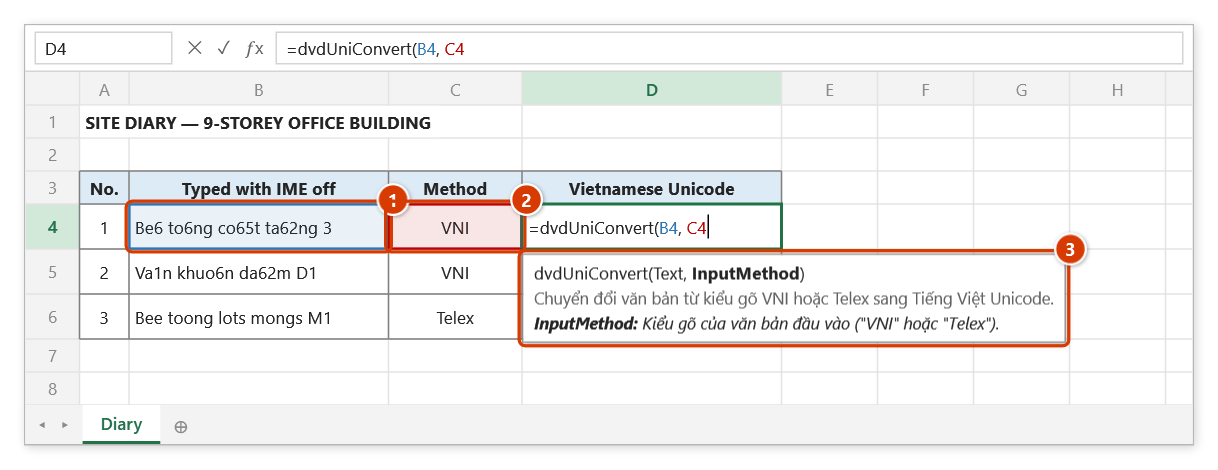
Step 1. Select D4 and type =dvduni — pick DVDUNICONVERT in the suggestion list (1) and press Tab.
Step 2. Click the text cell B4 (1), type , and click the method cell C4 (2) (holding VNI or Telex). The argument tip (3) explains the current argument.
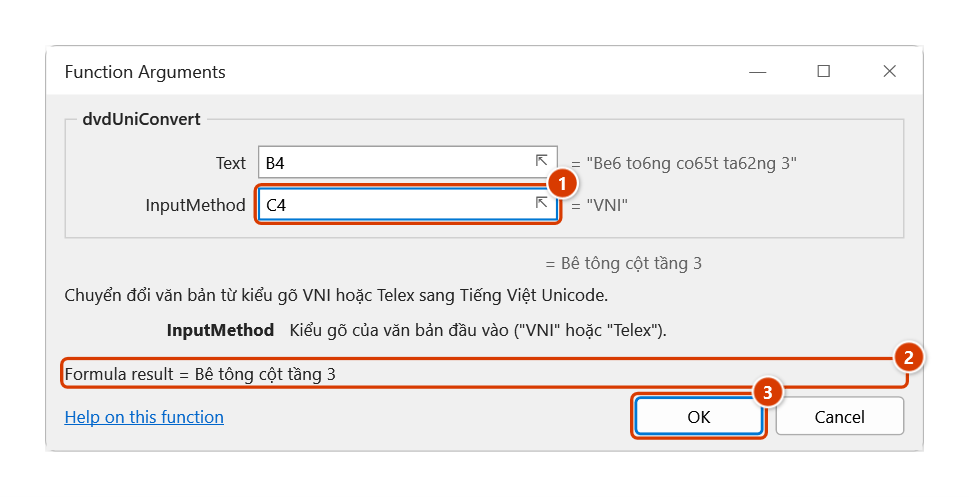
Step 3. In the Function Arguments dialog (Ctrl+A after the function name), the InputMethod box (1) shows "VNI" taken from C4, with the live result (2). Click OK (3).
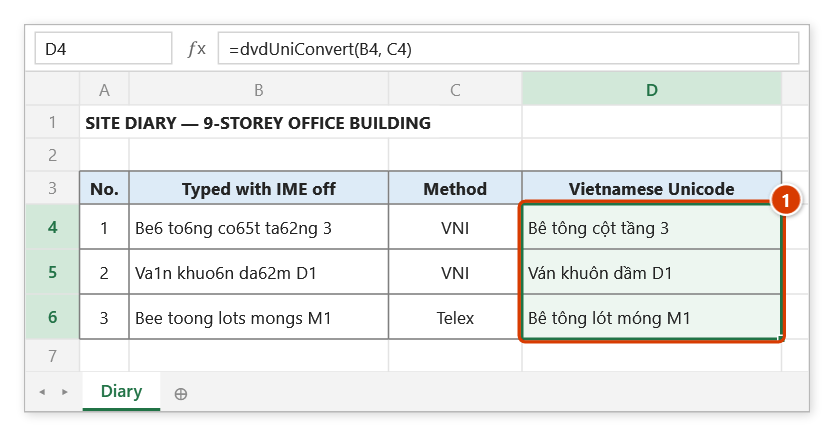
Step 4. Press Enter and fill down to D6: every row is now accented Vietnamese (1). Tone keys work both right after the vowel (co65t) and at the end of the word, the usual Telex habit (lots mongs).
dvdUniVba
Turns a Vietnamese string into a VBA string expression, writing characters above code point 127 (every accented letter) as ChrW(...).
Syntax:
=dvdUniVba(TxtUni)| Parameter | Required | Description |
|---|---|---|
TxtUni | Yes | Vietnamese Unicode string to convert. |
Example:
=dvdUniVba("Nghiệm thu")
// → "Nghi" & ChrW(7879) & "m thu"
Notes
- Handy when writing VBA macros for document templates: paste the result straight into the code so the text survives being saved as a .bas file.
- Every character above code point 127 becomes
ChrW(...), Latin-1 letters such asê,à,ô,ò,ýincluded — the VBA editor on a Vietnamese (code page 1258) machine loses them when they sit inside quotes:=dvdUniVba("Bê tông")returns"B" & ChrW(234) & " t" & ChrW(244) & "ng". - Line breaks (Alt+Enter) and tabs also become
ChrW(...); a"inside the text is doubled, as VBA requires.
Illustrated walkthrough
Practice
Download this function's sample workbook — the data matches the pictures below and the cell for the formula is already selected.
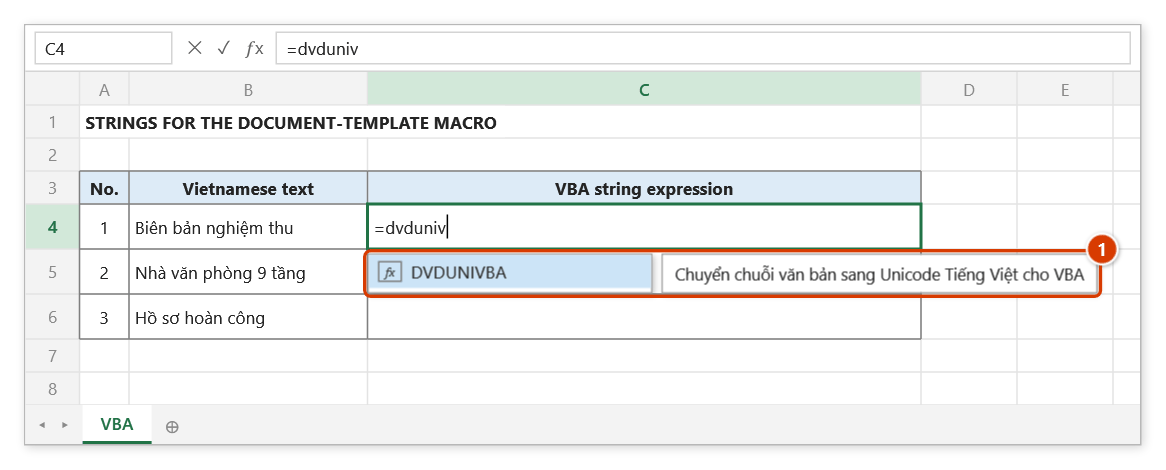
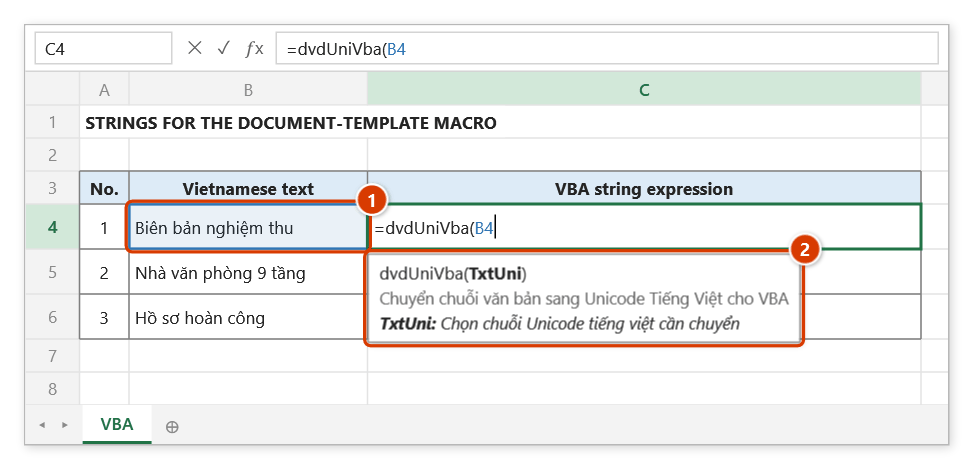
Step 1. Select C4 and type =dvduniv — the suggestion list shows DVDUNIVBA with its description (1). Press Tab to pick it.
Step 2. Click B4, which holds the Vietnamese text (1); the argument tip (2) explains the function's only argument.
Step 3. Type ), press Enter and fill down to C6: each cell is a piece of VBA code (1) — every accented character (code above 127) becomes ChrW(code) and plain letters stay inside the quotes, so the text survives the VBA editor on any machine.
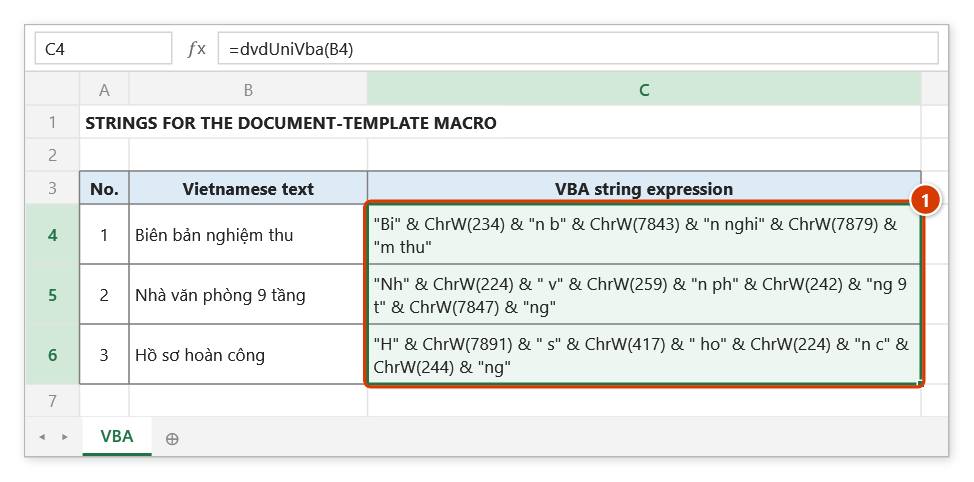
Step 4. Copy the text of C4 into your macro, e.g. Range("A1").Value = "Bi" & ChrW(234) & "n b" & ChrW(7843) & "n nghi" & ChrW(7879) & "m thu" — when the macro runs, A1 receives "Biên bản nghiệm thu".
dvdSymbol
Returns a check-box symbol for inspection and acceptance forms.
Syntax:
=dvdSymbol(value)| Parameter | Required | Description |
|---|---|---|
value | Yes | 1 = empty box, 2 = ticked box, 3 = crossed box. |
Example:
=dvdSymbol(2)
// → ☑

=dvdSymbol(IF(D6="Đạt"; 2; 3))
// → ☑ when the check passed, ☒ when it failed
Notes
- Any value other than 1, 2 or 3 returns an empty string.
Illustrated walkthrough
Practice
Download this function's sample workbook — the data matches the pictures below and the cell for the formula is already selected.
Step 1. Select D4 on the checklist and type =dvdsy — the suggestion list shows DVDSYMBOL with its description (1). Press Tab to pick it.
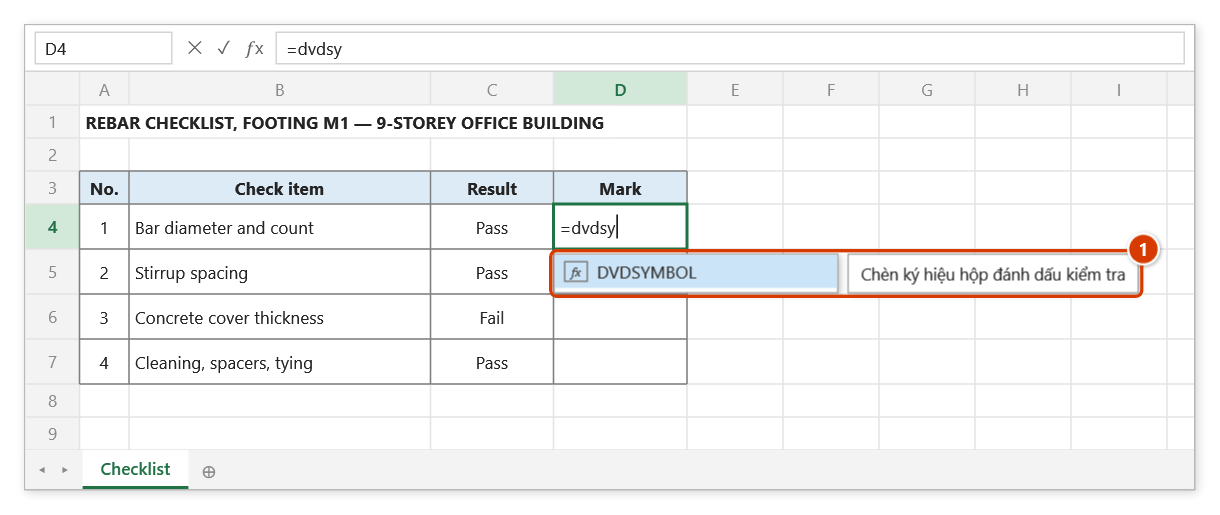
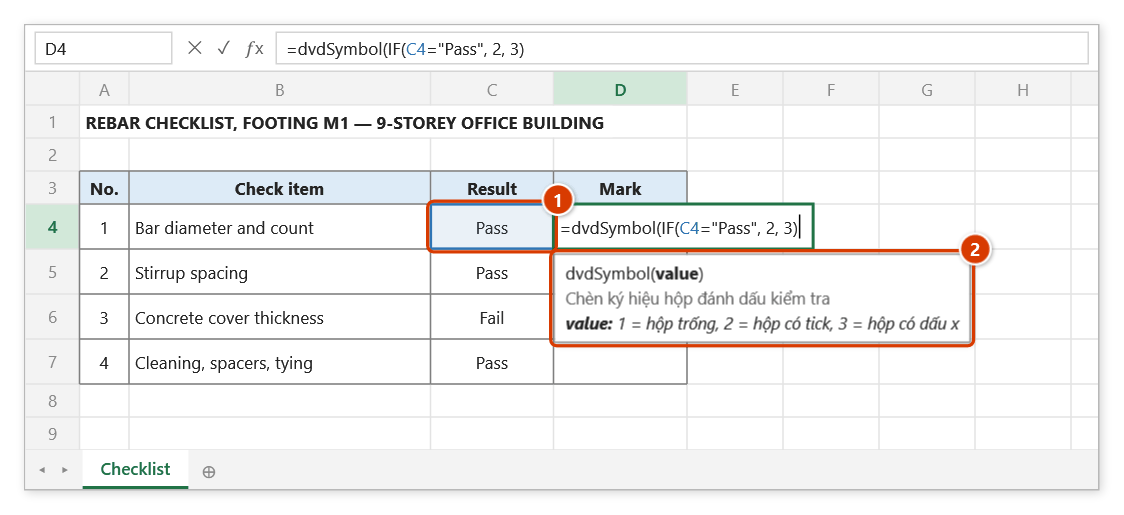
Step 2. Type the argument IF(C4="Pass", 2, 3): when the result in C4 (1) is Pass it gives 2 (ticked box), otherwise 3 (crossed box). The argument tip (2) lists what 1, 2 and 3 mean.
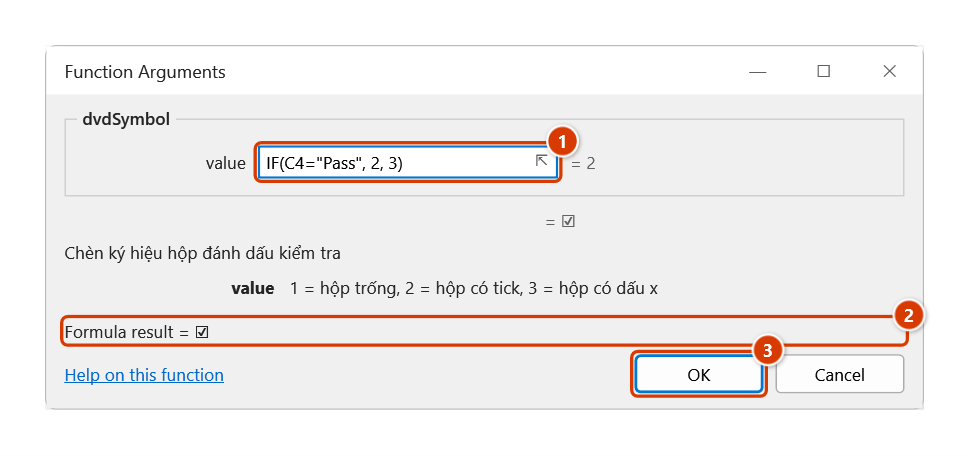
Step 3. In the Function Arguments dialog, the value box (1) evaluates to 2 and the live result is ☑ (2). Click OK (3).
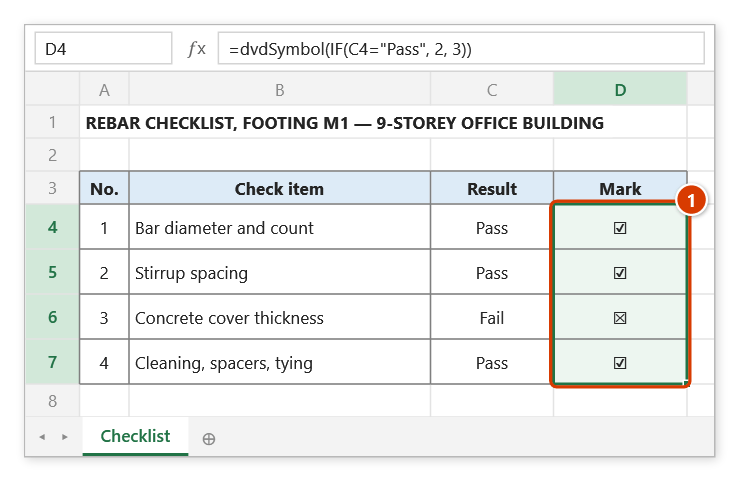
Step 4. Fill the formula down to D7: passed items get ☑ and the failed one ☒ (1). Argument 1 gives the empty box ☐; any value other than 1, 2 or 3 returns an empty string.
dvdEvaluate
Evaluates the maths expression written after a colon inside a quantity description.
Syntax:
=dvdEvaluate(InputString)| Parameter | Required | Description |
|---|---|---|
InputString | Yes | Source string containing the maths expression after a colon. |
Example:
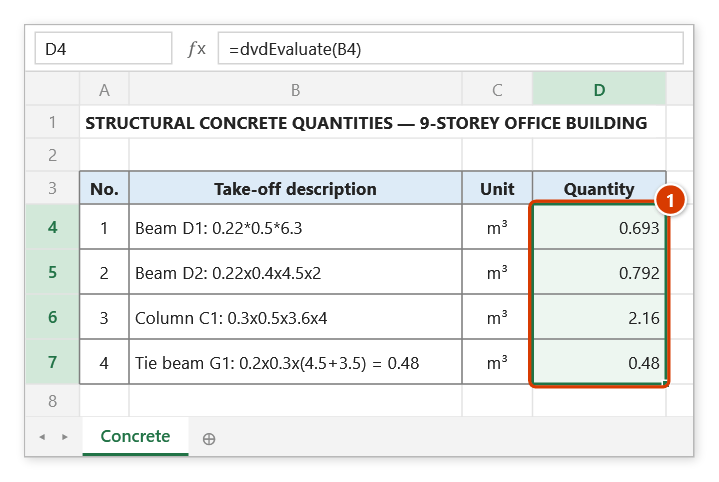
=dvdEvaluate("Móng M1: 2x3x0.8")
// → 4.8

=dvdEvaluate("Dầm D1: 5*0.3*0.5")
// → 0.75
Notes
- Everything from the
=sign onwards is discarded, so a description like"Móng M1: 2x3x0.8 = 4.8"still evaluates correctly. xandXare read as multiplication signs and spaces are removed.- An invalid expression, or a result of zero, returns an empty string.
- Supports
+ - * /, parentheses, powers^and square rootssqrt(...):"KL: 2x3^2"→ 18,"KL: sqrt(16)+1"→ 5. The order of operations matches Excel formulas: powers are evaluated left to right (2^3^2= 64) and a leading minus applies before the power (-2^2= 4).
Illustrated walkthrough
Practice
Download this function's sample workbook — the data matches the pictures below and the cell for the formula is already selected.
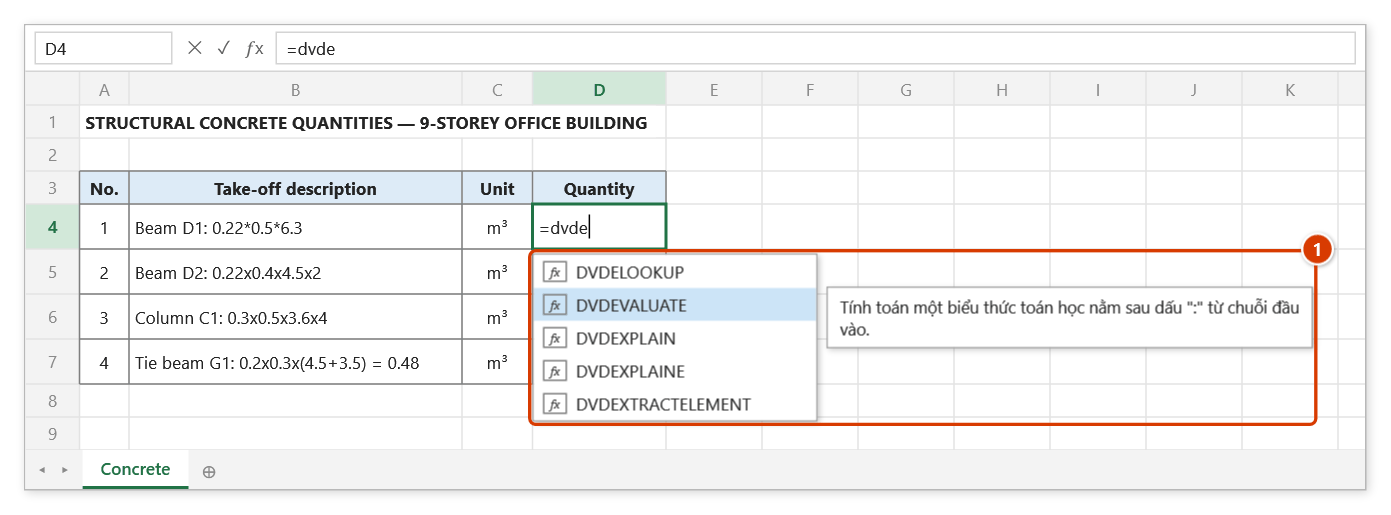
Step 1. Select the quantity cell D4 and type =dvde — pick DVDEVALUATE in the suggestion list (1) and press Tab.
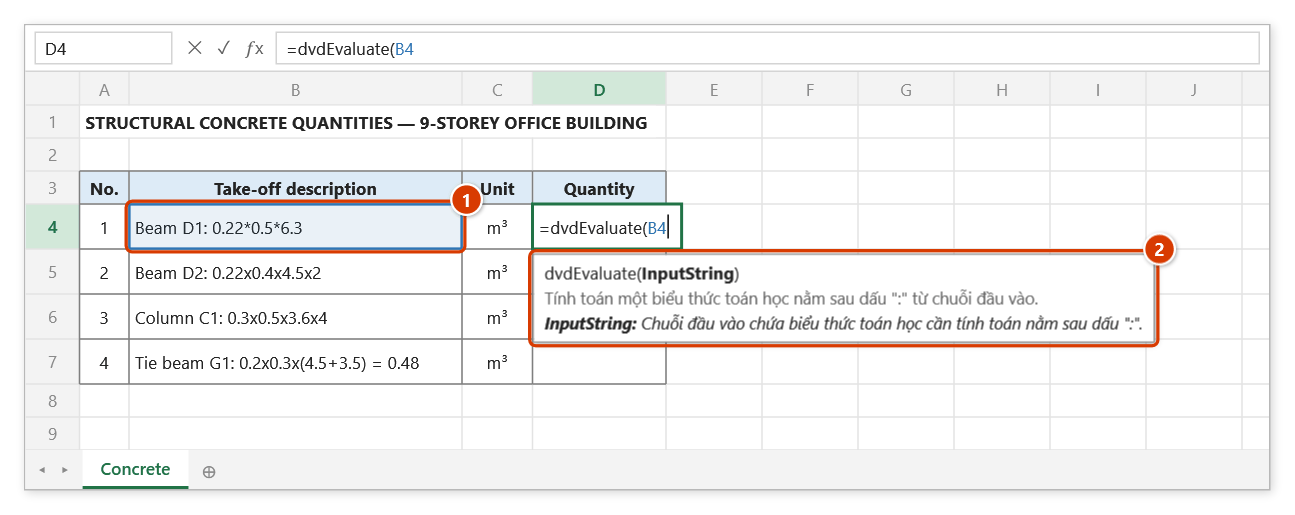
Step 2. Click the description cell B4 (1): the function only evaluates the expression after the :. The argument tip (2) explains the argument.
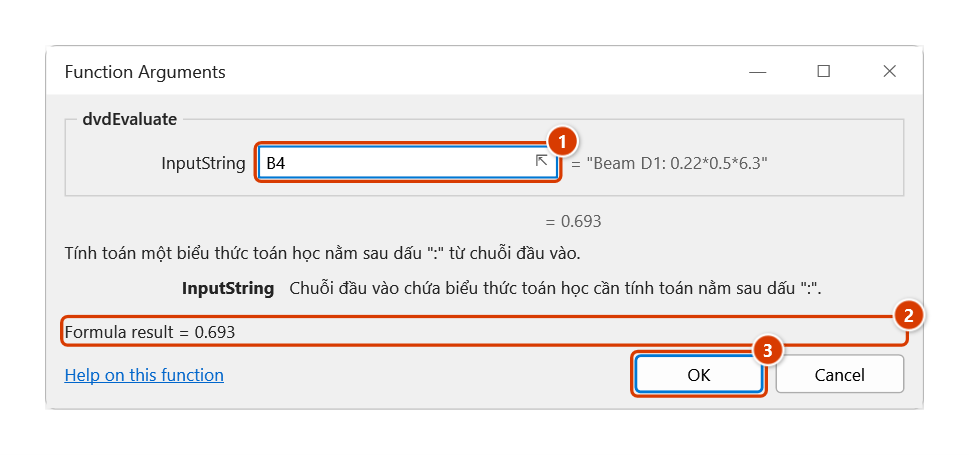
Step 3. The Function Arguments dialog previews the description (1) and the result 0.22 × 0.5 × 6.3 = 0.693 (2). Click OK (3).
Step 4. Fill the formula down to D7 (1). The member name before : is ignored, x means multiply, a decimal comma (0,22) is read as 0.22 too, and everything from = onwards (row 7) is skipped; an invalid or zero result returns an empty string.