
Unprotect Sheet
Location on ribbon: Tab DVD Addin → Group File and Print → Menu File Tools
Command ID: btnUnprotectSheet
License required
This command needs an active DVDAddin account (Standard or PRO). It is fully available during the Trial period.
What it does
Removes sheet protection and workbook-structure protection from an external Excel file without knowing the password. The command works on the .xlsx package, strips the protection tags out of each worksheet and writes a new file — the original is left as it was.
The familiar situation: a cost estimate, a tender bill of quantities or an inspection template inherited from another team is locked, the person who locked it has left, and nobody remembers the password — while you need to fix a formula or insert extra quantity rows.
How to use
- Close the file you want to unlock if it is open in Excel.
- The original is not modified — the result is written to a new file
<file name>_unprotectedin the same folder, keeping the original extension (for example.xlsx; with (2), (3)… if that name is taken). - Go to tab DVD Addin → group File and Print → menu File Tools → click Unprotect Sheet.
- The "Pick xlsx file" dialog opens, filtered to
*.xlsx; *.xlsm; *.xlam→ choose the file → OK. - The command scans every worksheet on a copy, removes the protection tags and saves the copy as the
_unprotectedfile. - A message reports how many sheets were unlocked, whether workbook-structure protection was removed too, and the path of the new file — and offers to open it. If nothing was locked you get "No sheet protection found in file."
- Open the
_unprotectedfile — every sheet is now editable.
Video tutorial
Narrated in Vietnamese, with Vietnamese subtitles. Mở khóa Sheet · 3 min 57 s · 7 cases · Download the video
Chapters (13)
- Giới thiệu
- Mở lệnh
- Chọn file
- 1 · Khoá sheet + cấu trúc workbook
- 2 · Chỉ khoá sheet
- 3 · File vốn không khoá
- 4 · File mới, file gốc giữ nguyên
- 5 · File đang mở
- 6 · Mật khẩu mở file
- 7 · Đuôi .xls cũ
- Dùng đúng mực
- Mẹo
- Kết thúc
Illustrated walkthrough
Step 1. Close the workbook to unlock if it is open in Excel. Use it only on your own files or files you are allowed to edit.
Step 2. On the ribbon, open the DVD Addin tab → File and Print group → open File Tools → choose Unprotect Sheet.
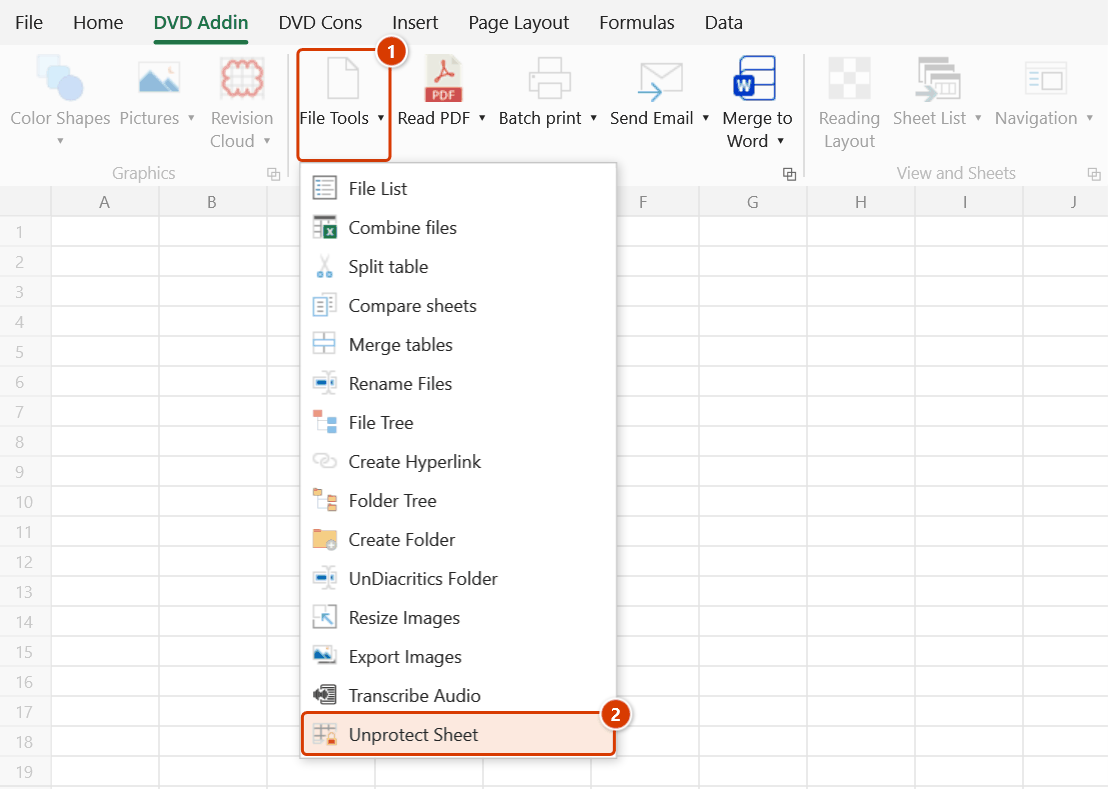
Step 3. In the Pick xlsx file box (filter *.xlsx; *.xlsm; *.xlam) choose the workbook, for example D:\DuAn\NhaVanPhong\TienLuong_MoiThau.xlsx, and click OK.
Step 4. The add-in strips the protection tags on a copy and saves it as a new file TienLuong_MoiThau_unprotected.xlsx in the same folder; the original stays as it was. The message Removed protection from 5 sheet(s) + workbook structure. shows the new path and asks whether to open it — click Yes to open and edit it normally.
Example
You receive Tender_BoQ.xlsx with 8 sheets, 5 of them protected, and the workbook itself locked against adding or deleting sheets.
Close the file, run the command, pick it → "Removed protection from 5 sheet(s) + workbook structure." Open Tender_BoQ_unprotected.xlsx: you can insert new quantity rows, edit the rate formulas, and add an appendix sheet.
Notes
- The original is left untouched (still protected) — the result is the new
_unprotectedfile. Mind which one you send back. (Before the next release the command edited the original directly.) - The file must be closed; if it is still open in Excel the command asks you to close the workbook first.
- Only sheet protection and workbook-structure protection are removed. It does not open an encrypted file that asks for a password on open (the command tells you when it meets one), and it does not unlock a VBA project password.
- Only
.xlsx,.xlsmand.xlamare supported; legacy.xlscannot be processed. - Use it only on your own files or files you are authorised to edit; stripping protection from someone else's document without permission is not appropriate.
Related
- Export Images — same technique of working on an external workbook without opening it.
- Unhide All Sheets — reveal hidden sheets once the workbook is unlocked.
- Sheet List — list every sheet in the workbook for review.
- Delete Cell Styles — clean up an inherited workbook and shrink it.