
Translate
Location on ribbon: Tab DVD Addin → Group Text and Number
Command ID: btnTranslate
What it does
Opens a translation window that converts the content of the selected cells into another language and writes the result straight back into the sheet. It pays off on projects with an international side: translating bills of quantities, material schedules, acceptance records or QA/QC checklists into English for a foreign supervision consultant, or turning a supplier's English specification into Vietnamese for the site team. The window is modeless, so you can still click around the worksheet while it is open.
How to use
- Select the cells you want translated.
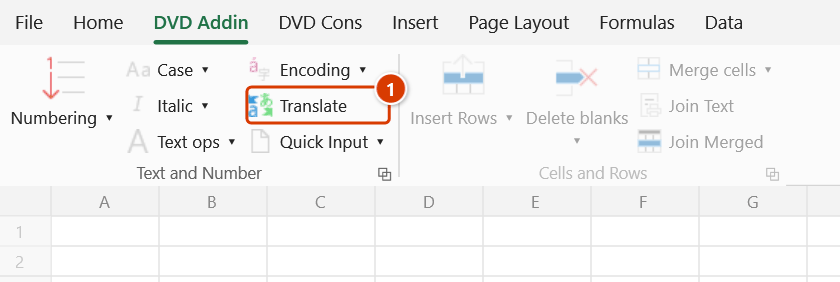
- Go to tab DVD Addin → group Text and Number → click Translate. The Text & Number window opens on the Translate tab (if it is already open it is simply brought to the front).
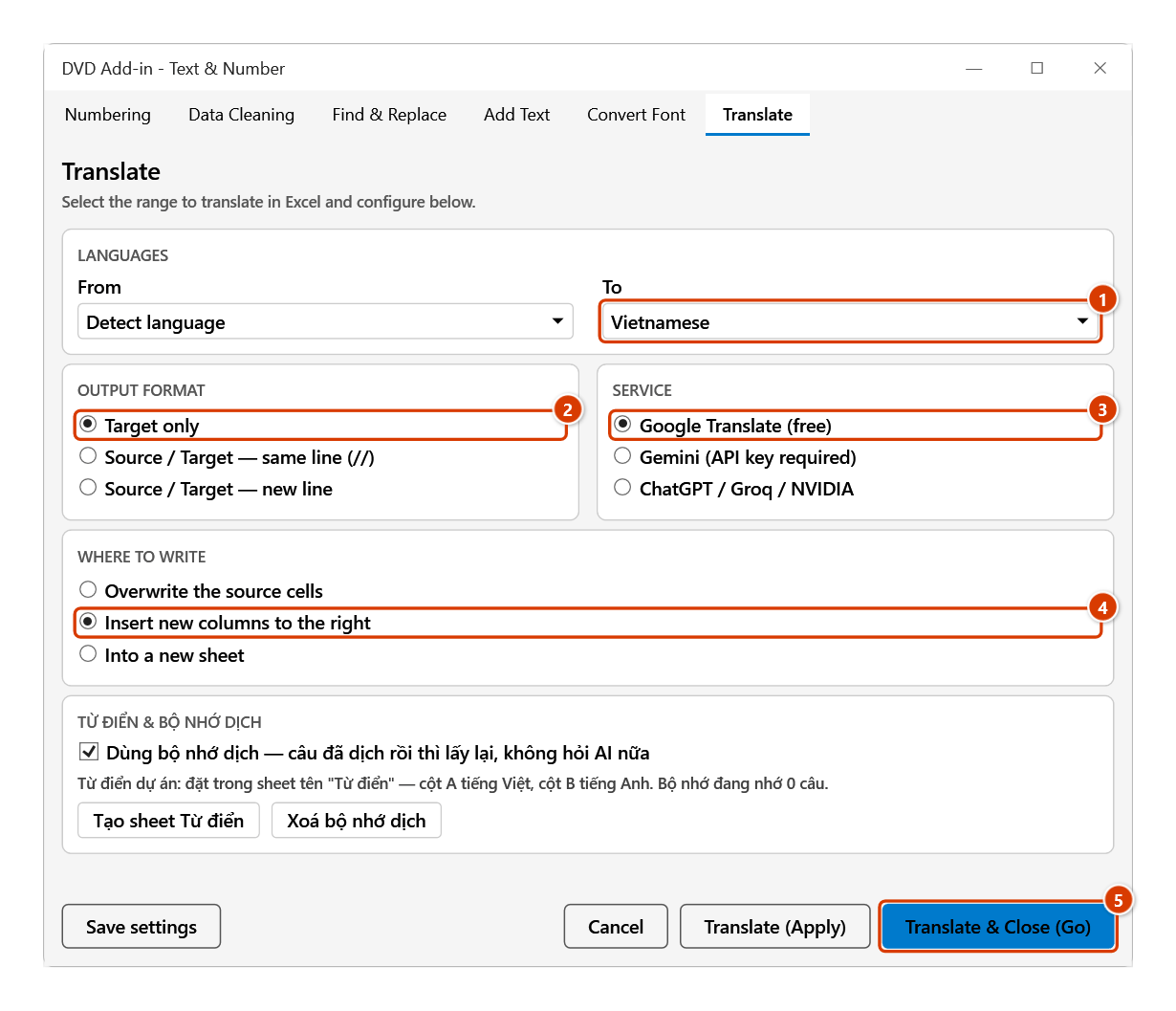
- In the LANGUAGES card, pick the source language in From and the target in To — both boxes are editable, so you can type to find a language quickly.
- In the OUTPUT FORMAT card, choose how the result is written:
- Target only — the translation alone,
- Source / Target — same line (//) — source and translation on the same line,
- Source / Target — new line — source and translation on separate lines inside the same cell.
- In the SERVICE card, choose Google Translate (free), Gemini (API key required) or ChatGPT / Groq / NVIDIA.
- In the WHERE TO WRITE card, choose Overwrite the source cells, Insert new columns to the right or Into a new sheet — the last two leave the source cells untouched.
- The TỪ ĐIỂN & BỘ NHỚ DỊCH card (glossary and translation memory, currently labelled in Vietnamese only): keep Dùng bộ nhớ dịch ticked (the default) so sentences already translated are reused instead of being translated again; Tạo sheet Từ điển creates (or opens) the
Từ điểnsheet for the project glossary — column A Vietnamese, column B English; Xoá bộ nhớ dịch clears the remembered sentences. - Click Translate (Apply) to run and keep the window open, or Translate & Close (Go) to run and then close it. With Overwrite the source cells or Insert new columns to the right, the Confirm data change box asks before anything is written. The status line at the bottom of the window reports progress and any errors.
- Click Save settings before closing if you want the same choices next time.
Video tutorial
Narrated in Vietnamese, with Vietnamese subtitles. Dịch ngôn ngữ · 5 min 42 s · 13 cases · Download the video · Practice workbook for the video
Chapters (18)
- Giới thiệu
- Mở lệnh
- Cửa sổ Dịch thuật
- 1 · Chèn cột mới bên phải
- 2 · Gốc / Đích xuống dòng
- 3 · Gốc / Đích cùng dòng
- 4 · Chọn cả bảng: số, ngày, mã
- 5 · Ô công thức ra chữ
- 6 · Ô nhiều dòng
- 7 · Danh sách đang lọc
- 8 · Nhiều vùng – sheet mới
- 9 · Gemini và từ điển dự án
- 10 · Bộ nhớ dịch
- 11 · Vùng lớn – nút Dừng
- 12 · Ghi đè và hoàn tác
- 13 · Khi dịch không được
- Mẹo
- Kết thúc
Illustrated walkthrough
Practice
Download this command's sample workbook — the data matches the pictures below (sheet BOQ), so you can follow each step right away.
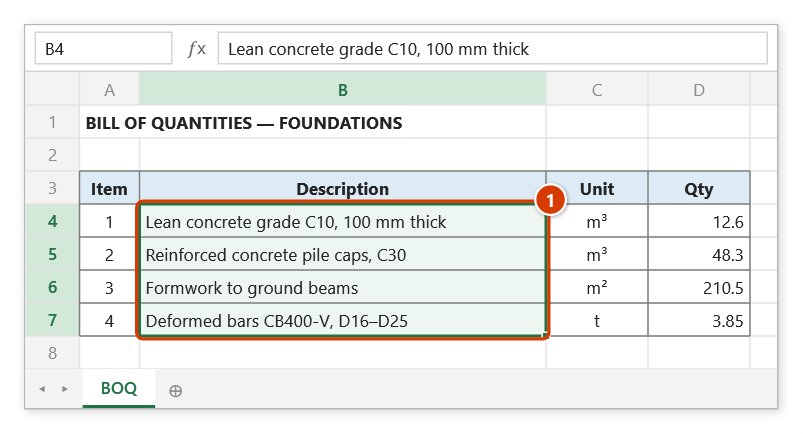
Step 1. Select the cells to translate (1) — here the description column of a bill of quantities written in English by a foreign consultant.
Step 2. On the ribbon, open the DVD Addin tab → Text and Number group → click Translate.
Step 3. The Translate tab opens. Leave From on Detect language and To on Vietnamese (1); choose Target only under OUTPUT FORMAT (2), Google Translate (free) under SERVICE (3) and Insert new columns to the right under WHERE TO WRITE (4) so the source stays intact, then click Translate & Close (Go) (5).
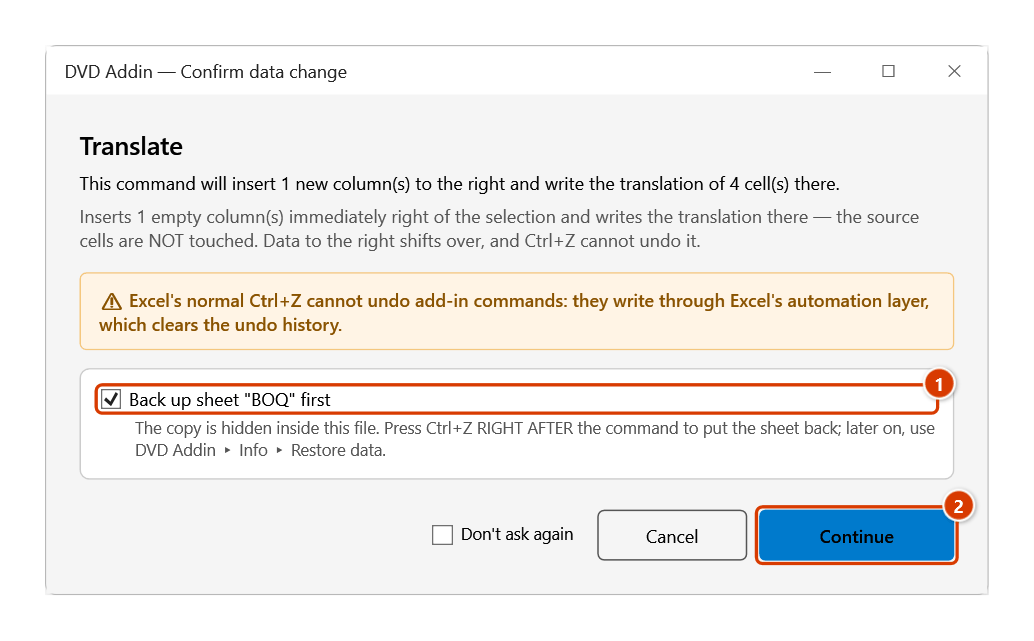
Step 4. Because the new column shifts everything to its right, the add-in asks before inserting: keep the sheet backup ticked (1) and click Continue (2).
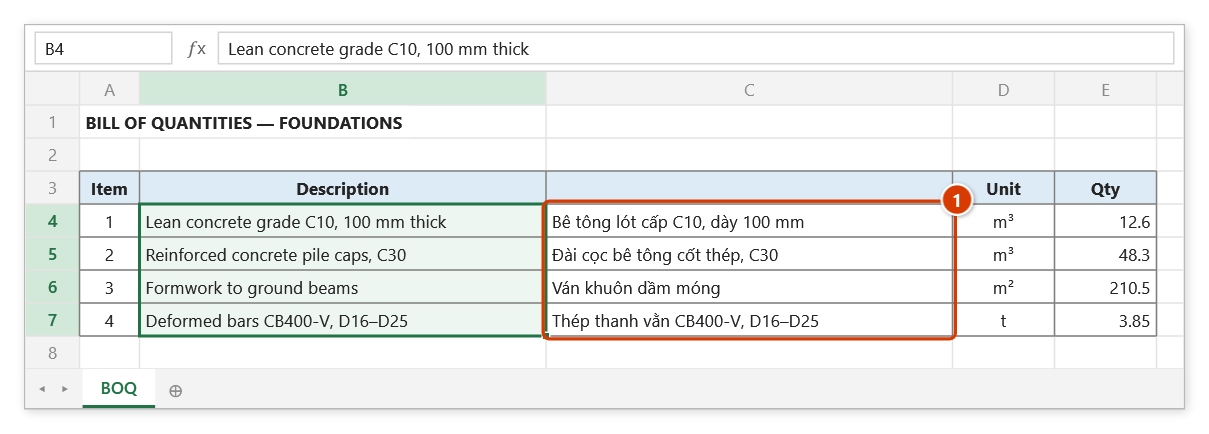
Step 5. The add-in sends the cells for translation and writes the result into the new column C right next to the source (1); Unit and Qty shift to the right and the source cells are untouched. An Internet connection is required; check technical terms by hand.
Example
A material schedule going to an overseas consultant: select the "Material name" column (A2:A40), open the window, set From = Vietnamese, To = English, OUTPUT FORMAT = Source / Target — new line, SERVICE = Google, WHERE TO WRITE = Overwrite the source cells, then click Translate (Apply). Each cell becomes:
Thép hình I200 mạ kẽm nhúng nóng
Hot-dip galvanized I200 steel section
The table stays searchable in Vietnamese while remaining readable for the foreign reviewer.
Notes
- An Internet connection is required — translations come from an online service, and a dropped connection is reported on the status line.
- With Overwrite the source cells, results overwrite the cells. The add-in backs the sheet up before translating, but the translation is written after the network round-trip, so Ctrl+Z cannot undo it — get the old version back from Restore data, or pick Insert new columns to the right / Into a new sheet (or a Source / Target output format) to keep the original.
- The Gemini and ChatGPT options (including Groq / NVIDIA) need an active DVDAddin license (Standard or PRO, or the Trial) and a valid API key configured in the add-in; without either, use Google (free, needs neither).
- Google is a public service with no contract. Since 2.8.5 the add-in sends a whole batch in one request (a 150-cell range is 2 requests instead of 150), but Google can still block automated access from some corporate networks or VPNs. The add-in then reports "blocking automated access from this network" — waiting or selecting fewer cells will not help; switch to Gemini/ChatGPT or change networks.
- For technical notation, use Gemini. Free Google Translate cannot read the terminology glossary, so
Ø10 a200may come back asØ10 to 200. For rebar notation, standard codes and work-item names, choose Gemini with the glossary. - A cell that fails to translate keeps its original text — never blank, and never another cell's translation.
- Large selections take time and may hit the service's rate limit — run them in batches of a few dozen rows.
- Construction terminology (concrete grades, element names, units of measure) must be checked by hand; machine translation is weakest exactly there.
Related
- AI Assistant — heavier text work than plain translation (summarising, rewriting to a document format).
- AI Grammar check — proofread the wording after translating.
- To Unicode — normalise the encoding first so you never send garbled legacy text out.
- Switch language — change the add-in's own interface language (Vietnamese/English).