
Disconnect
Location on ribbon: Tab DVD Cons → Group Connection
Command ID: btnDisconnect
What it does
The command leaves the running teamwork session: it closes every connection (LAN and MQTT), stops data and formatting sync, clears the teammate cursor shapes that were drawn on the sheet and unhides sheets hidden by permissions. On the session host it also stops the LAN server.
The Disconnect button is only enabled while you are in a session; when not connected it is greyed out.
Use it when the working session is over, when you want to edit a private copy that nobody else should see, or when the network is unstable and you would rather reconnect from scratch.
How to use
- Click DVD Cons → Connection → Disconnect.
- The add-in closes every LAN and Internet connection of your machine (on the session host the LAN server stops too).
- Teammate cursor shapes (
Cursor_…,Grp_Cursor_…) on the active sheet are deleted automatically. - A confirmation box "Disconnected!" appears — click to dismiss it.
Video tutorial
Narrated in Vietnamese, with Vietnamese subtitles. Làm việc nhóm qua mạng · 8 min 19 s · 16 cases · Download the video
Commands in this video: Connect · Admin · Disconnect · Send Format
Chapters (20)
- Giới thiệu
- Mở lệnh
- 1 · Kết nối lần đầu
- 2 · Máy chủ và thành viên
- 3 · Làm việc qua Internet
- 4 · Người vào sau
- 5 · Gõ dữ liệu
- 6 · Dán nhiều ô, chèn dòng
- 7 · Gửi định dạng
- 8 · Vùng lẫn nhiều kiểu
- 9 · Gộp ô và độ rộng cột
- 10 · Phân quyền, Kick, Ban
- 11 · Ngắt kết nối
- 12 · Mất mạng giữa chừng
- 13 · Hai người sửa cùng ô
- 14 · Sổ, sheet khác tên
- 15 · Bảo mật
- 16 · Bản quyền
- Mẹo
- Kết thúc
Illustrated walkthrough
The Disconnect button is only available while your machine is in a teamwork session (the Connect button reads Joined · …).
Step 1. On the ribbon, open the DVD Cons tab → Connection group → click Disconnect.
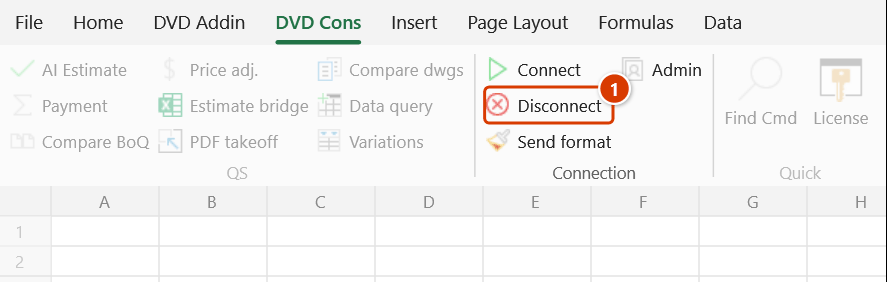
Step 2. The add-in closes all LAN and Internet connections of your machine, removes the members' cursor shapes (Cursor_…, Grp_Cursor_…) from the active sheet, unhides sheets that were hidden by permissions, and reports Disconnected!. The Connect button returns to its normal label; Disconnect, Send format and Admin are greyed out.
Step 3. Data already synchronised to your machine stays as it is. Clicking Disconnect on the host machine also stops the LAN server and the other machines lose the connection — warn the team first.
Example
The QS team has just finished reviewing the BoQ over a LAN session. Before everyone splits off to their own scope, each member clicks Disconnect: cells held by others stop flashing, the named cursor shapes disappear from the sheet, and from now on every edit stays local. The host clicks Disconnect last — the LAN server stops with it.
Notes
- On a member machine the command only disconnects your machine. On the session host, Disconnect also stops the LAN server and the other machines lose the connection — warn the team first.
- Cursor shapes are cleaned on the active sheet only — if
Cursor_…shapes remain on other sheets, delete them by hand (once disconnected, the Disconnect button is greyed out and cannot be clicked again). - Data already synced to your machine stays as it is; disconnecting does not roll back received changes.
- After disconnecting, the Disconnect, Send format and Admin buttons are greyed out until you join a session again.
- Run while not connected (e.g. from a shortcut), the command only says "You are not in a teamwork session." rather than "Disconnected!".
Related
- Connect — host or rejoin a teamwork session.
- Send Format — only works while a session is active.
- Admin — kick or ban members instead of disconnecting each machine manually.