
To TCVN3
Location on ribbon: Tab DVD Addin → Group Text and Number → arrow on Encoding
Command ID: btnConvertTCVN3
What it does
Converts Vietnamese text in the current selection to the TCVN3 (ABC) encoding and sets the font of the converted cells to .VnTime. Use it when a document has to be returned in the exact format of an old official template — estimate forms, quantity schedules or acceptance records issued years ago that still mandate the .VnTime font family.
How to use
- Select the cells to convert (Ctrl-click for several separate areas).
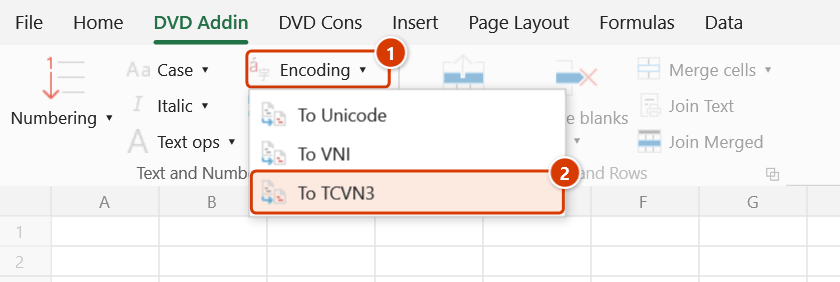
- Go to tab DVD Addin → group Text and Number → arrow on Encoding → choose To TCVN3.
- The add-in detects each cell's source encoding from the text content first, then from its font (
.Vn…suggests TCVN3,VNI…suggests VNI, anything else is Unicode) and rewrites the text as TCVN3. - Converted cells are switched to the
.VnTimefont. - The status bar reports
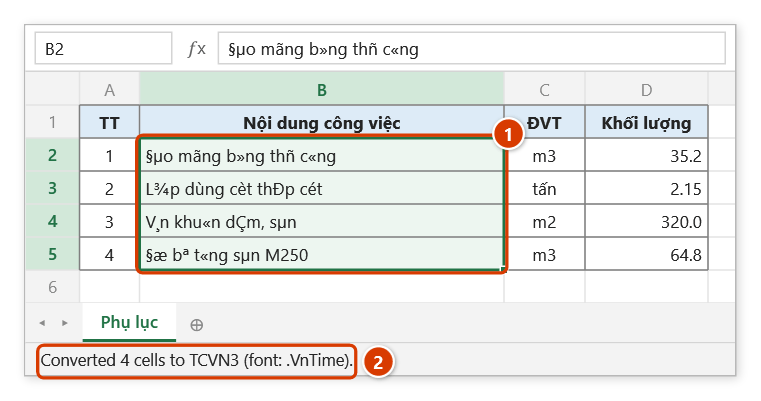
Converted N cells to TCVN3 (font: .VnTime)and clears after about 8 seconds. N includes only cells that actually changed.
Video tutorial
Narrated in Vietnamese, with Vietnamese subtitles. Chuyển mã · 6 min 05 s · 12 cases · Download the video · Practice workbook for the video
Commands in this video: Encoding · To TCVN3 · To Unicode · To VNI
Chapters (18)
- Giới thiệu
- Mở lệnh
- Cửa sổ Chuyển mã
- 1 · Bảng VNI-Times → Unicode
- 2 · Nút nhanh: TCVN3 → Unicode
- 3 · Sang VNI để nộp mẫu cũ
- 4 · Chữ HOA có dấu
- Tự nhận bảng mã
- 5 · Chữ đã là Unicode
- 6 · Ô ngắn mơ hồ
- 7 · Phông gốc bị đổi mất
- 8 · Ô công thức
- 9 · Cả sheet, cả tệp
- 10 · Dòng ẩn, danh sách lọc
- 11 · Ghi đè và hoàn tác
- 12 · Khi không có gì để chuyển
- Mẹo
- Kết thúc
Illustrated walkthrough
Practice
Download this command's sample workbook — the data matches the pictures below (sheet Phụ lục), so you can follow each step right away.
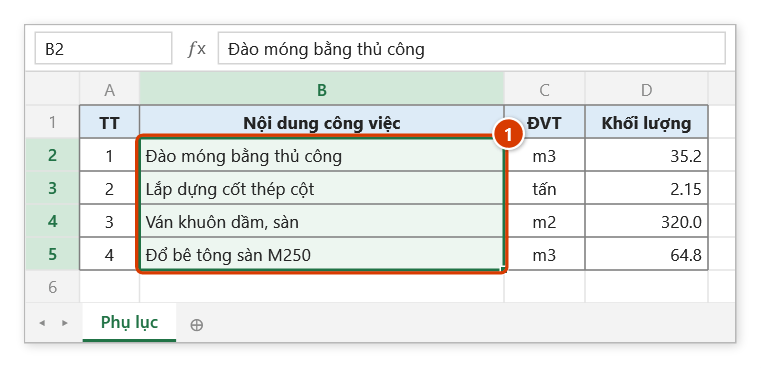
Step 1. Select the work-description column that goes into an old template using the .VnTime font (1).
Step 2. On the ribbon, open the DVD Addin tab → Text and Number group → open Encoding → choose To TCVN3.
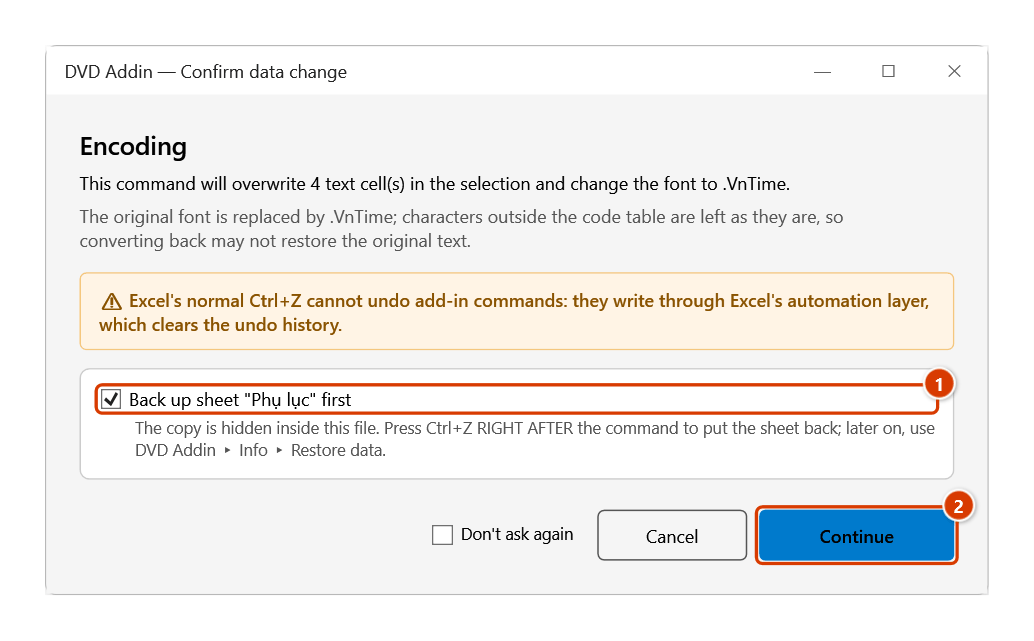
Step 3. There is no options window; the command only stops once to confirm the overwrite: keep the sheet backup ticked (1) and click Continue (2).
Step 4. The cells now hold TCVN3 codes in the .VnTime font (1). On a machine with the ABC fonts they read as normal Vietnamese; the picture shows the raw codes — what the formula bar shows, or what a machine without the font displays. The status bar reports the number of converted cells (2).
Example
An annex of quantities written in Unicode has to be pasted into a legacy .VnTime form. Select the description column and click To TCVN3:
| Before (Unicode) | After (TCVN3 bytes, .VnTime font) |
|---|---|
| Đào móng bằng thủ công | §µo mãng b»ng thñ c«ng |
| Trát tường trong dày 15mm | Tr¸t têng trong dµy 15mm |
| Lắp dựng cốt thép cột | L¾p dùng cèt thÐp cét |
Displayed with the .VnTime font these strings read as the original Vietnamese.
Notes
- TCVN3 has no full set of accented capitals; all-caps headings (for example "BẢNG TỔNG HỢP KHỐI LƯỢNG") usually need manual fixing with the
.VnTimeHfont after conversion. - Formula cells are skipped; only text values are re-encoded.
- Because content is checked before the font, Unicode text that still carries a
.Vn…font is correctly treated as Unicode, and VNI text under a Unicode font is recognized when it contains typical mark characters such asø,û,ï,ö,ñ. VNI text carrying only acute-type marks looks like valid Unicode, so it is treated as Unicode: it is not decoded from VNI but re-encoded to TCVN3 as it stands (still wrong) — set those cells' font back toVNI-Timesand convert. - The result overwrites the cells. Ctrl+Z right after the command puts the sheet back as it was (thanks to the backup); see Restore data.
- The machine opening the file must have the ABC (.VnTime) fonts installed, otherwise the text looks corrupted.
- With no range selected the add-in shows "Please select a data range." and stops.
Related
- To Unicode — bring TCVN3 documents up to Unicode for calculation, lookups and email.
- To VNI — the other legacy encoding still found in older estimate templates.
- Convert encoding — dialog version with scope selection and a skip-formula option.
- UPPERCASE — adjust letter case once the encoding is consistent.