
Data query
Ribbon location: DVD Cons tab → QS group
Command ID: btnSqlBuilder
What it does
A builder window for the dvdSQL function — read data from a closed Excel file without memorising SQL syntax or typing paths by hand.
The function already worked, but you had to write the statement yourself to use it. This window removes that barrier: pick the file, tick columns, set conditions — the statement appears and stays editable if you want to extend it.
How to use it
- If you will insert a formula, select the target cell first (once the window is open you cannot pick another cell), then click Data query.
- Browse… to the
.xlsx/.xlsfile. It is not opened, not locked and not modified. - Choose the sheet and the header row (default 1). The column list appears immediately.
- Tick the columns to return. Tick none and you get everything (
SELECT *). The box beside each column picks an aggregate:SUM,COUNT,AVG,MIN,MAX. - Set the filter conditions — up to three rows joined by
AND/OR. Operators include the comparisons,LIKE,IN, empty and has data. - Choose group by and order by if you need them.
- Click Preview to see the real data (first 200 rows) before committing.
- Take the result either way:
- Insert formula in cell — writes a live
dvdSQLformula into the selected cell (replacing what was there); change the source file and the result follows on recalculation. - Dump values to a sheet — static values on a new sheet, no longer tied to the source file.
- Insert formula in cell — writes a live
Video tutorial
Narrated in Vietnamese, with Vietnamese subtitles. Truy vấn dữ liệu · 6 min 23 s · 12 cases · Download the video · Practice workbook for the video
Chapters (17)
- Giới thiệu
- Mở lệnh
- Cửa sổ Truy vấn dữ liệu
- 1 · Tổng có điều kiện vào một ô
- 2 · Tiêu đề dòng 3, tổng theo tầng
- 3 · Bẫy: dòng Tổng cộng
- 4 · Bẫy: ô gộp ở cột Tầng
- 5 · Lọc chữ: có chứa, bằng
- 6 · Lớn hơn – cột lẫn số và chữ
- 7 · Lọc theo khoảng ngày
- 8 · Nhiều điều kiện AND, OR
- 9 · Sắp xếp, sửa tay câu lệnh
- 10 · Cập nhật khi file nguồn đổi
- 11 · Ghi đè và hoàn tác
- 12 · Khi có lỗi
- Mẹo
- Kết thúc
Illustrated walkthrough
Practice
Download this command's sample workbook — the data matches the pictures below (sheet Summary), so you can follow each step right away.
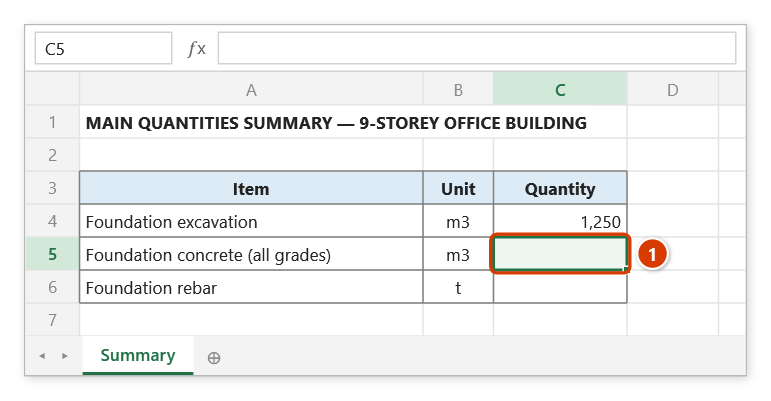
Step 1. Select the cell that will receive the result (1) — here the foundation concrete quantity in the summary table.
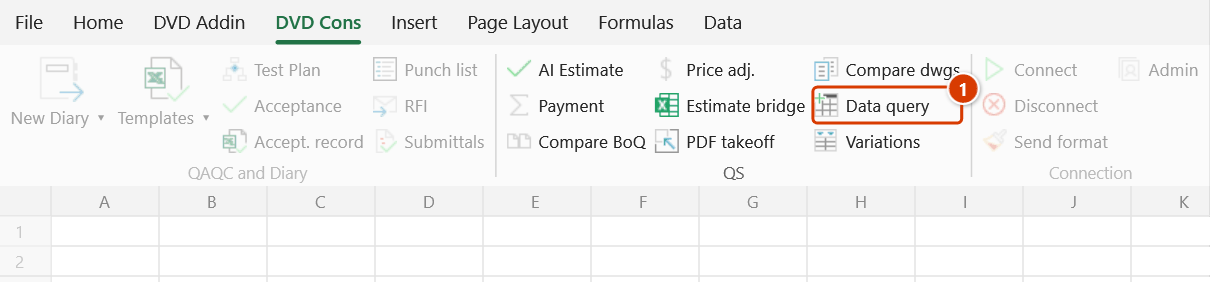
Step 2. On the ribbon, open the DVD Cons tab → QS group → click Data query.
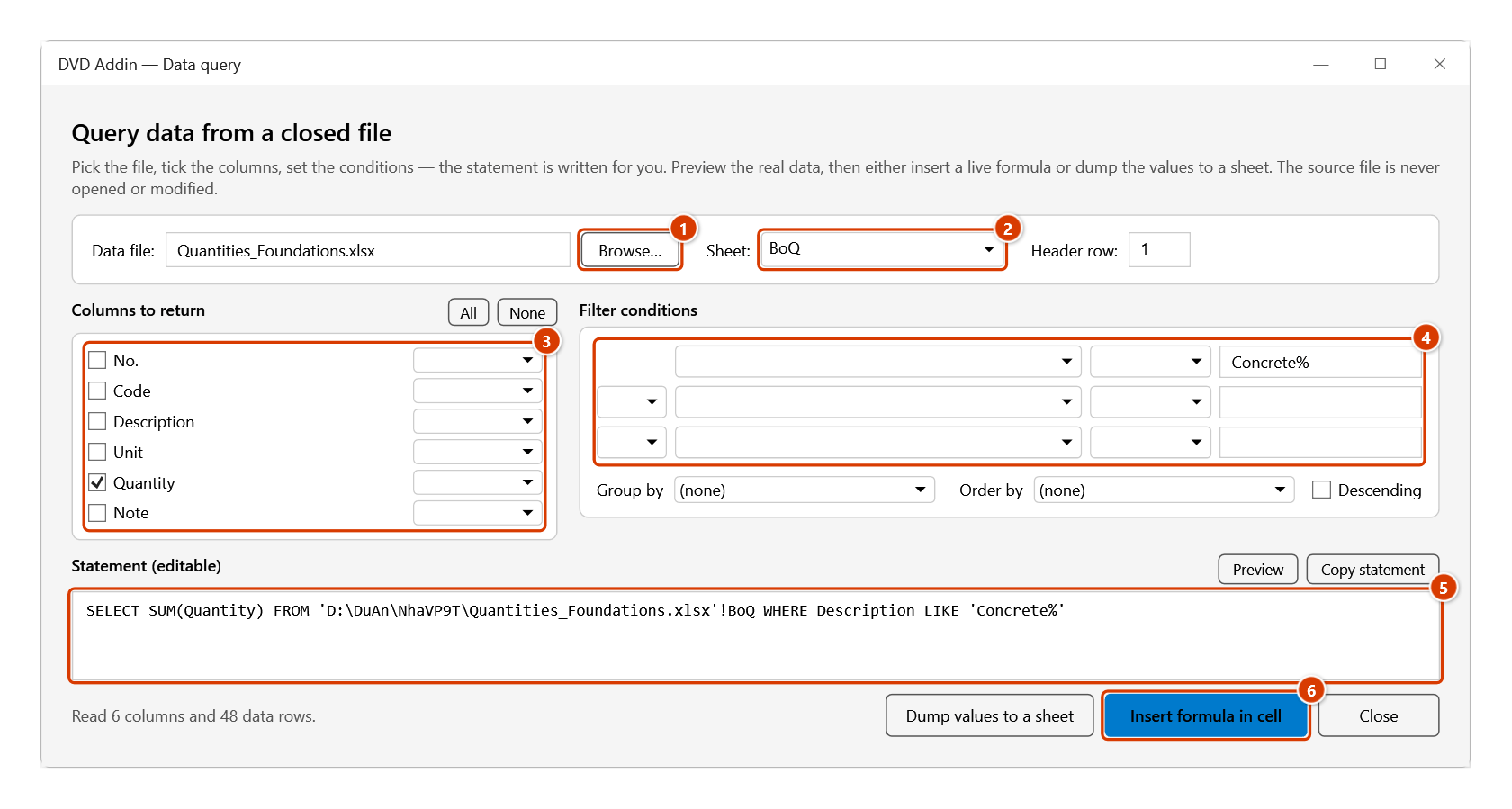
Step 3. Click Browse… (1) to pick the quantities file (it is neither opened nor locked) and choose the Sheet (2). Tick the Quantity column with SUM (3) and set the condition Description LIKE Concrete% (4). The statement is written for you and stays editable (5); click Preview to see the real data, then Insert formula in cell (6).
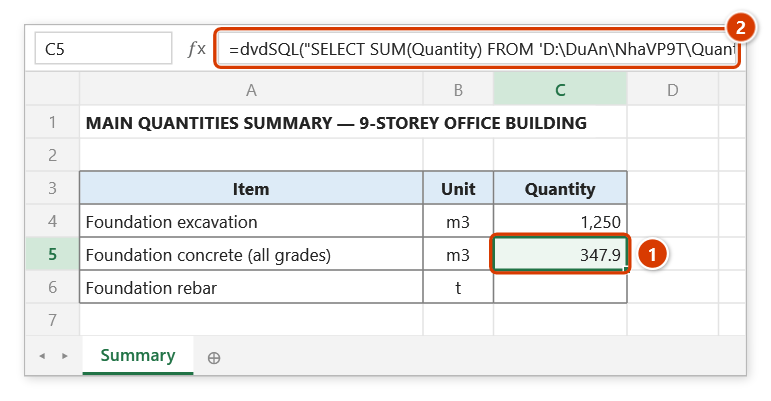
Step 4. The selected cell receives a live dvdSQL formula (1), (2): when the source file changes, the result updates on recalculation. For static values to send out, use Dump values to a sheet — the add-in writes the result to a new Query sheet.
Example
You need the total concrete quantity in a work package's BoQ file, which sits on a network drive and you would rather not open.
- Pick the file → sheet
Bảng khối lượng. - Tick the
Khối lượngcolumn and set its aggregate toSUM. - Condition:
Tên công tácLIKEBê tông%. - Preview → one row, value
144.25. - Insert formula in cell → the cell receives:
=dvdSQL("SELECT SUM([Khối lượng]) FROM 'Z:\HS\khoi luong.xlsx'![Bảng khối lượng] WHERE [Tên công tác] LIKE 'Bê tông%'",1)Formula or static values?
| Insert formula | Dump to sheet | |
|---|---|---|
| Source file changes | result updates itself | rerun the command |
| Sending the file to someone | they need access to the path | the data travels with it |
| Source deleted or renamed | the cell errors | no effect |
For documents leaving your office, dump to a sheet; for an internal tracker, insert the formula.
Notes
- The Statement box is editable. Once you edit it by hand the window stops regenerating it, so a click higher up cannot wipe what you wrote.
- Column names containing spaces or any character other than letters, digits and
_(e.g.Khối lượng,Unit price (VND)) are wrapped in[ ]automatically; text values are quoted, and an apostrophe inside is doubled. - Three condition rows cover nearly every need. For anything more complex (nested parentheses,
NOT), type it into the statement box — see the full syntax. - Preview is limited to 200 rows; inserting or dumping takes the full result.
- Password-protected files cannot be read, and the window says so.
See also
- Data query functions — full syntax for
dvdSQL,dvdSQLValue,dvdSheets. - Combine files — when you want to merge the files for real.
- Estimate bridge — import a BoQ from other estimating software.