
Interim Payment
Location on ribbon: Tab DVD Cons → Group QS
Command ID: btnPaymentValuation
License required
This command needs an active DVDAddin account (Standard or PRO). During the Trial period it is fully available.
What it does
The command builds the payment file for one period from your bill of quantities. Each run creates a "Period n" sheet (named "Kỳ n" in the Vietnamese UI) with three parts:
- Statement of completed work value. The layout follows Form 03.a/TT (Decree 254/2025/ND-CP). Quantity and Amount each get four columns: Per contract, Cumulative to previous period, This period, Cumulative to this period. The table is split into three groups:
- A. Contract works;
- B. Approved variations, taken from the Variation Register;
- C. Price adjustment, taken from Price Adjustment sheets.
- Amount claimed this period. This part works through, in order: completed value excl. VAT, VAT, value incl. VAT, less advance recovery, less retention, giving the amount claimed.
- Summary using the Form 03.a/TT items:
- Contract value;
- Outstanding advance;
- Paid to end of previous period;
- Cumulative value of work done;
- Advance recovery;
- Disbursement requested this period, split into advance and completed work;
- Cumulative disbursement.
Each period chains to the previous one. When you run the command again, the add-in finds the highest-numbered period sheet and takes from it:
- every row's cumulative quantity;
- the contract value, advance paid and rates;
- the recovered, paid and retained totals.
You only update progress in the BoQ and click the command.
The summary is made of formulas pointing at named cells. Edit a yellow cell on the sheet, such as the recovery rate, and the claim recalculates, so a reviewer can follow every step.
How to use
- Select the BoQ range (Item / Unit / Contract qty / Unit price / progress column). Without a selection the add-in prompts you and stops. If the range includes the header row, leave First selected row is a header (skip it) ticked (the default).
- Click DVD Cons → QS → Payment.
- Under BoQ columns, map the columns by letter (B, E…):
- Item — default
B; - Unit — default
D; - Contract qty — default
E; - Unit price (excl. VAT) — default
F; - Progress.
- Item — default
- Pick what the progress column holds:
- % complete, cumulative;
- % complete, this period;
- Quantity done, cumulative;
- Quantity done, this period.
- Prior cumulative is only for the first period, when payments were already made before you started using the command. It is a column of cumulative value paid. From the second period onwards the box is disabled.
- Under Period and contract parameters:
- Enter Payment No. (the next number is suggested), Date, Project, Contract No.
- Enter Contract value (incl. VAT), VAT (%), Advance paid (cumulative), Advance this period, Advance recovery (%), Retention per period (%).
- From the second period these are pre-filled from the previous one.
- Tick or untick Include … APPROVED variation rows and Include … price adjustments. The dialog shows the counts, the amounts and how many rows are still only proposed.
- Click Create.
- A missing required column or a mistyped number shows a red message and the dialog stays open.
- Afterwards a message reports this period's value, the amount claimed and which previous period was used.
Video tutorial
Narrated in Vietnamese, with Vietnamese subtitles. Sổ phát sinh, Bù giá và Thanh toán theo kỳ · 6 min 21 s · 16 cases · Download the video · Practice workbook for the video
Commands in this video: Interim Payment · Price adjustment · Variation Register
Chapters (21)
- Giới thiệu
- Mở lệnh
- Chuỗi hồ sơ
- 1 · Kỳ 1 từ bảng BoQ
- 2 · Bốn kiểu cột tiến độ
- 3 · Vượt khối lượng hợp đồng
- 4 · Lập Sổ phát sinh
- 5 · Duyệt, từ chối phát sinh
- 6 · Bù giá trực tiếp
- 7 · Bù giá theo chỉ số giá
- 8 · Tỉ trọng sai, hai sheet Bù giá
- 9 · Kỳ 2 lấy lũy kế kỳ 1
- 10 · Tạm ứng, giữ lại, VAT
- 11 · Đổi tên sheet, hạng mục
- 12 · Lập lại, sửa kỳ cũ
- 13 · Dòng chương, số dạng chữ
- 14 · Sheet đang bảo vệ
- 15 · Hoàn tác Ctrl+Z
- 16 · Khi nhập sai
- Mẹo
- Kết thúc
Illustrated walkthrough
Practice
Download this command's sample workbook — the data matches the pictures below (sheet BoQ), so you can follow each step right away.
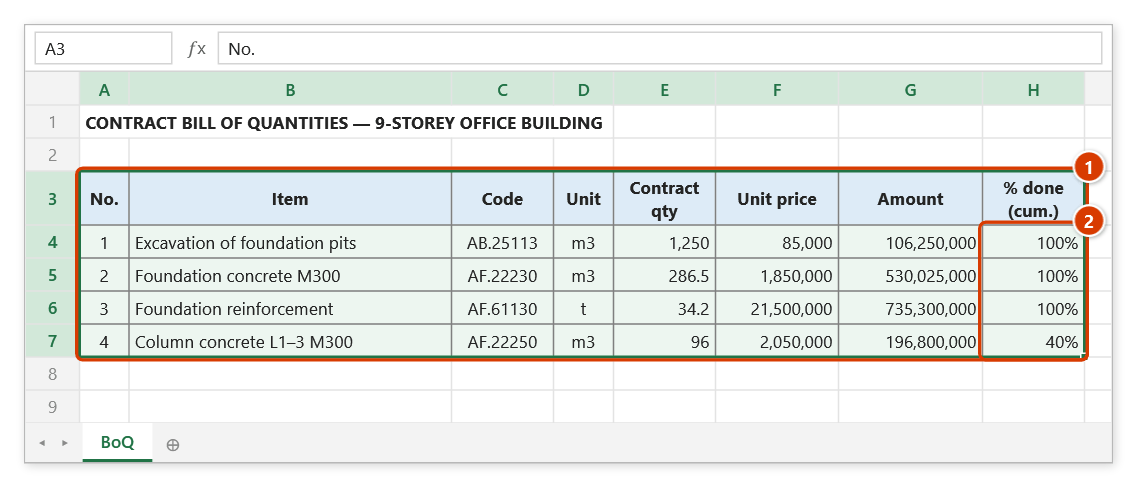
Step 1. Select the contract bill of quantities, including its header row (1). The % done (cum.) column (2) is the progress you update before each payment period.
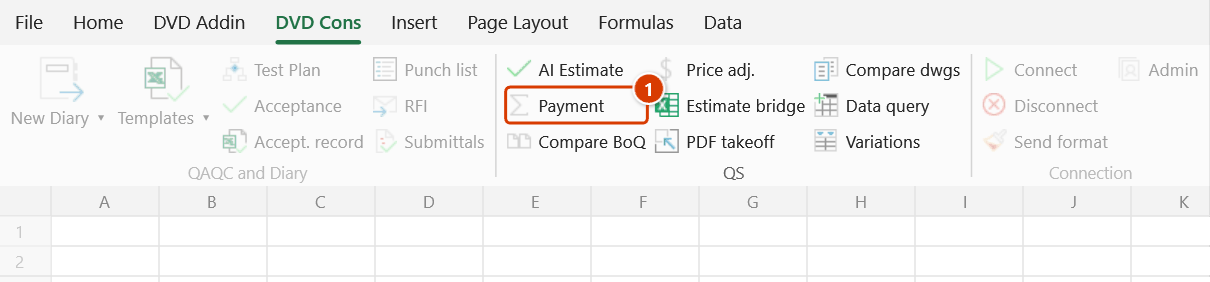
Step 2. On the ribbon, open the DVD Cons tab → QS group → click Payment.
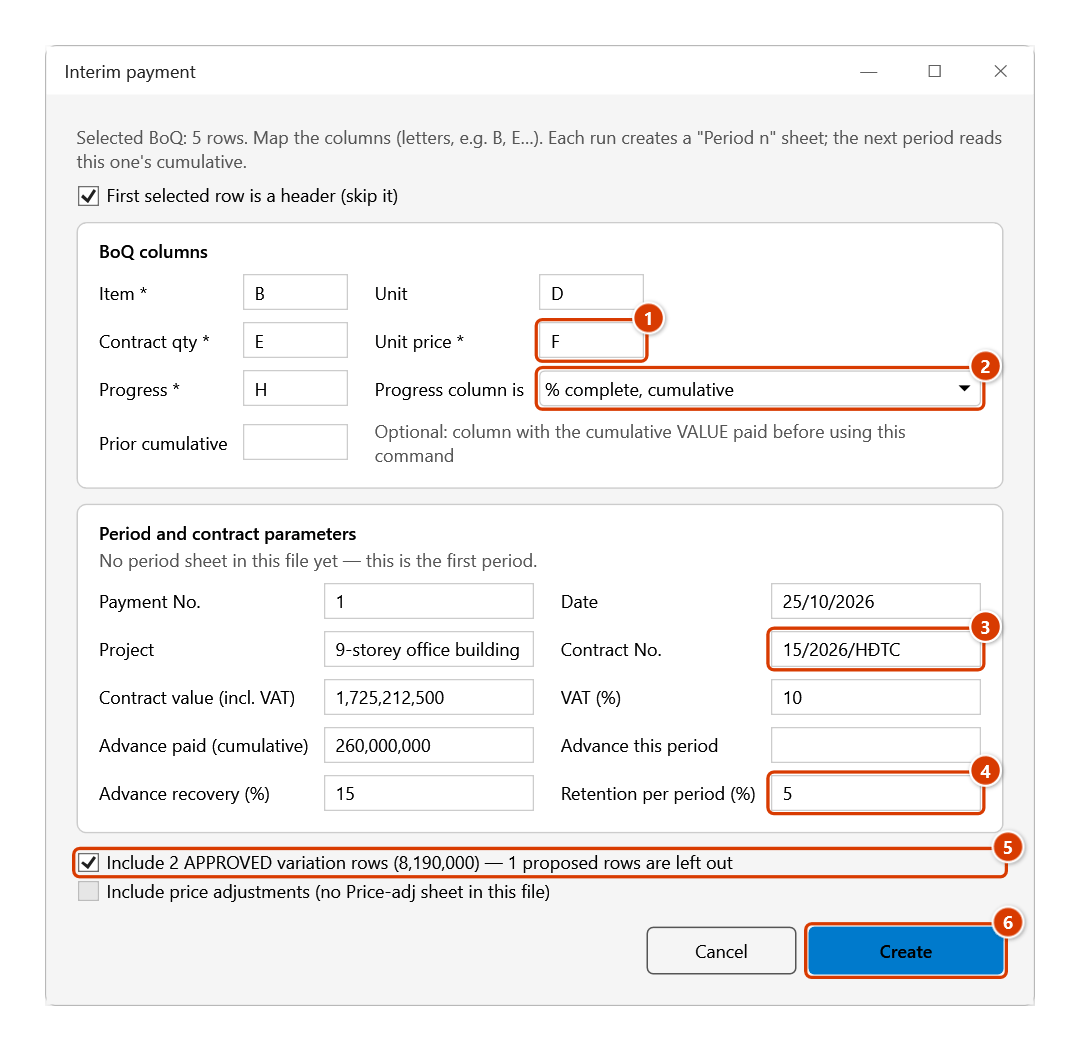
Step 3. Enter the BoQ column letters (1) and choose what the progress column holds (2). Fill in the period details: Project, Contract No. (3), Contract value (incl. VAT), the advance and the recovery / retention rates (4) — from the second period on these are prefilled from the previous one. Tick the approved variations (5) and click Create (6).
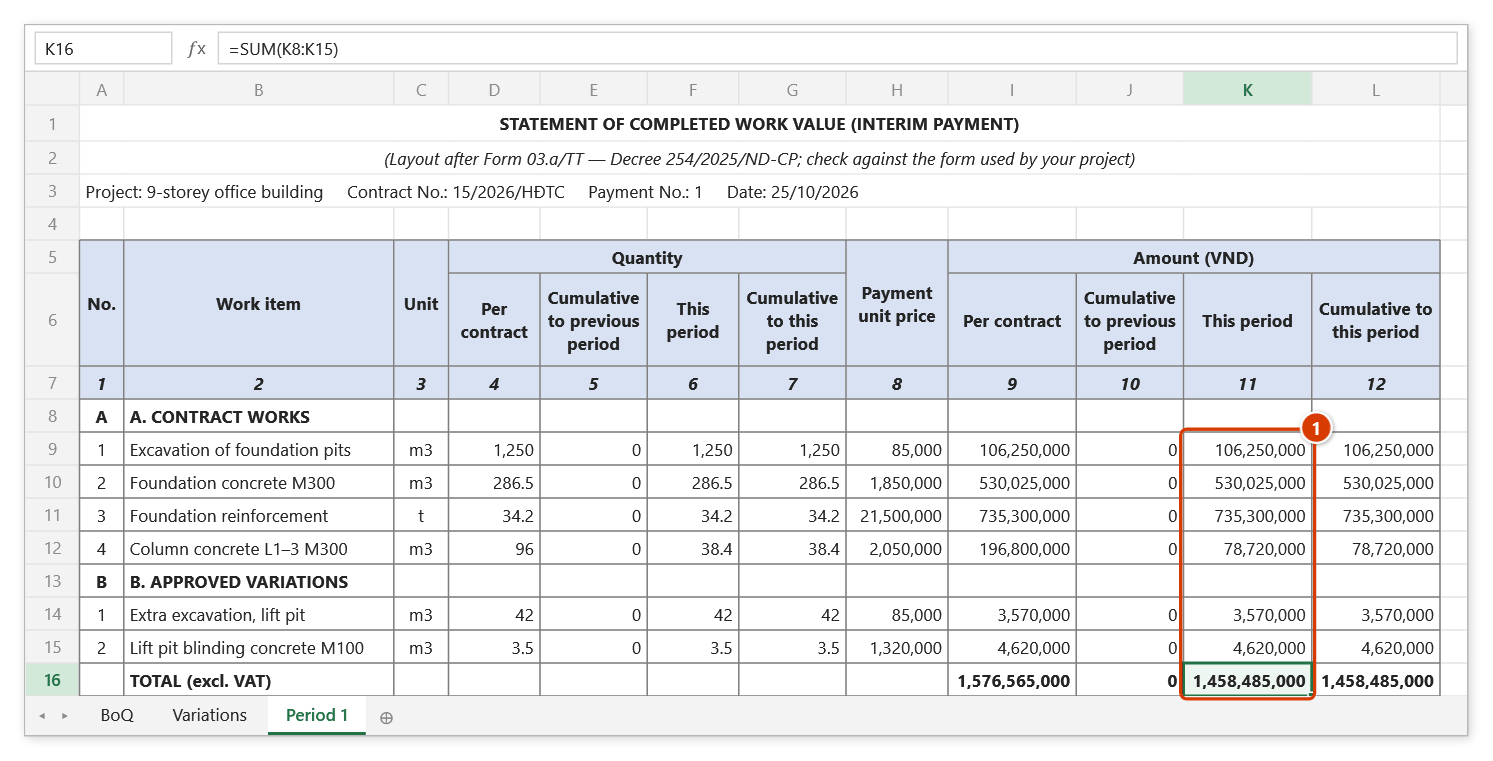
Step 4. The add-in creates a Period 1 sheet laid out after Form 03.a/TT: group A contract works, group B approved variations; quantity and amount each have four columns (per contract / cumulative to previous period / this period / cumulative) (1). Below it come the payment claim and the summary, all as formulas; the message reports this period's value of 1,458,485,000 (excl. VAT) and the claimed amount of 1,283,466,800.
Step 5. For the next period just update the progress column in the BoQ, reselect it and run the command again: the dialog proposes Payment No. 2 with the contract parameters prefilled, and the Period 2 sheet takes its prior cumulative from Period 1.
Example
The BoQ has 3 rows:
- Foundation concrete: 100 m3 × 1,000,000, 40% cumulative;
- Rebar: 10 t × 20,000,000, 50%;
- Foundation concrete (a second item with the same name): 50 m3 × 1,000,000, 100%.
The Variation Register has one approved row: Extra excavation 20 m3 × 100,000. There is one Price Adjustment sheet of 500.
Contract parameters:
- Contract value 400,000,000;
- Advance paid 60,000,000;
- Recovery 15%, retention 5%, VAT 10%.
| Period 1 | Value |
|---|---|
| Completed work this period, excl. VAT (A 190,000,000 + B 2,000,000 + C 500) | 192,000,500 |
| Incl. VAT | 211,200,550 |
| Advance recovery (15%) | 31,680,083 |
| Retention (5%) | 10,560,028 |
| Amount claimed for completed work | 168,960,439 |
In period 2, foundation concrete moves to 60% and an omission (tiling removed, −2,000,000) is approved. Run the command and the add-in takes the cumulative figures from the "Period 1" sheet:
- The variation already paid in full and the price adjustment are not charged again.
- The two same-named concrete rows still match in order.
Period 2 result:
- This period's value: 20,000,000 − 2,000,000 = 18,000,000;
- Amount claimed: 15,840,000;
- "Paid to end of previous period" carries over as 200,640,522.
Notes
- The sheet is a drafting aid. The layout follows Form 03.a/TT, but check it against the form your project uses and against your contract before submission.
- Advance recovery: each period deducts (value incl. VAT × recovery rate), never more than the outstanding advance.
- Leave the rate blank and the command uses advance / contract value.
- Recovery rates and stop points follow your contract; edit the yellow cells if they differ.
- Retention is a percentage of this period's value incl. VAT. A retention cap, if your contract has one, is not applied automatically; watch the "Retention held, cumulative" line.
- Detail unit prices and amounts are EXCLUDING VAT. The contract value you enter is INCLUDING VAT.
- Variations enter only when their status is Approved in the register. On first entry a variation row is taken as fully done.
- Price adjustments: each Price Adjustment sheet is one lump sum, paid once.
- Cumulative figures match by key (name + unit + order of appearance), stored in a hidden column of the period sheet.
- Renaming an item in the BoQ between periods loses its cumulative. The command warns how many previous-period rows no longer match.
- Cumulative quantities above the contract quantity are flagged in the Note column and in the message.
- Do not delete the previous period sheet, because the next period reads from it. Renaming it is fine: the command recognises period sheets by a hidden marker, not by name.
- The source BoQ is untouched. The new period sheet cannot be undone with Ctrl+Z; delete the sheet to discard it.
Related
- Variation Register — approve variations (status + document No.) so they flow into payment.
- Price Adjustment — create the adjustment sheet that feeds group C.
- Compare BoQ — find quantity changes and create a Variation Register from them.
- AI Construction Estimate — estimate rates for items that have no price yet.
- Acceptance Plan — tie payment back to the inspection register that certifies the work.