
Schedule (custom range)
Location on ribbon: Tab DVD Cons → Group Schedule → Menu Reports
Command ID: btnLookaheadRange
PRO feature
This command is part of the PRO plan. STANDARD accounts activated before 01/07/2026 keep access until their licence expires; other Standard accounts get an upgrade prompt when they click it.
What it does
Unlike the two Lookahead commands, which only colour a day grid, this one draws a real Gantt chart — task bars, milestone diamonds, dependency arrows and the full column set — but restricted to the date window you choose. Use it to lift one month, one quarter or one phase out of the master programme for an owner presentation or a document pack, without hand-trimming the master.
How to use
- Open the source schedule sheet (Code, Task name, Start, Finish columns present).
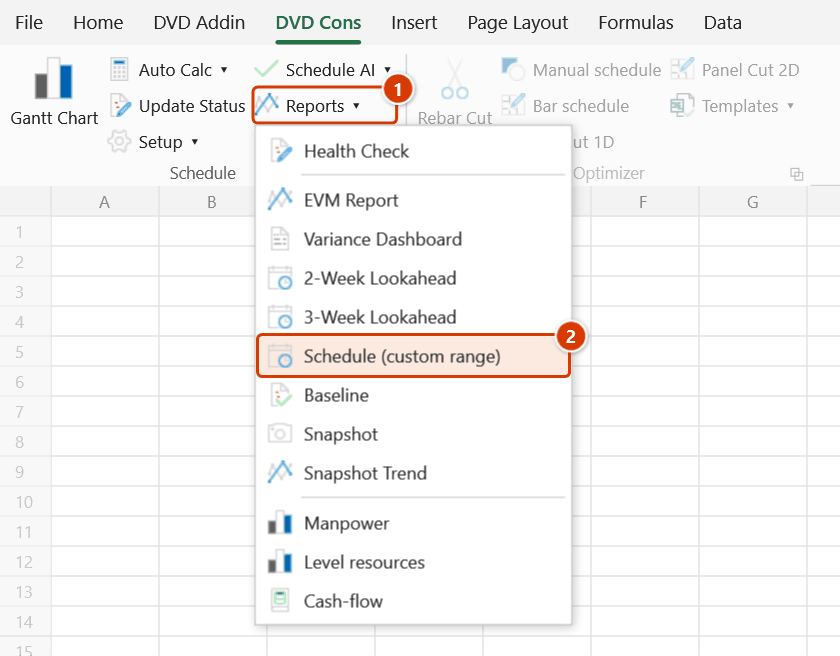
- Go to Tab DVD Cons → group Schedule → menu Reports → click Schedule (custom range).
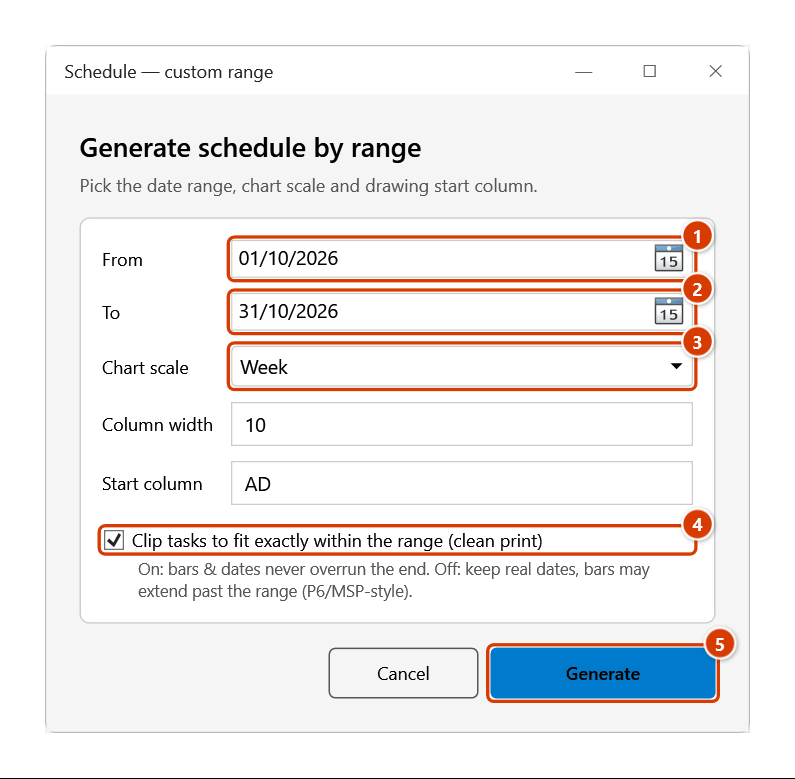
- The Generate schedule by range window gathers every choice at once: From / To (default today → +3 months), Chart scale (Month / Week / Day), Column width, Start column (default
AD) and the Clip tasks to fit exactly within the range (clean print) box. Click Generate. - The command creates a new sheet cloned from the GanttChart template, named
Tien do+ the date range (cut to 25 characters), containing only the activities that overlap that window. CPM is not re-run, and the critical path comes along if the source sheet has one. With Clip… ticked, dates of activities that overrun the window are clipped to its edges; unticked, the real dates are kept. - The Gantt is drawn straight away with the scale, column width and start column you chose — no further prompts; a message names the new sheet.
- Set the print area and export a PDF.
Video tutorial
Narrated in Vietnamese, with Vietnamese subtitles. Kế hoạch 2 tuần, 3 tuần và khoảng tùy chọn · 6 min 29 s · 12 cases · Download the video · Practice workbook for the video
Commands in this video: 3-Week Lookahead · 2-Week Lookahead · Schedule (custom range)
Chapters (16)
- Giới thiệu
- Mở lệnh
- 1 · Kế hoạch 2 tuần
- 2 · Kế hoạch 3 tuần, chạy lại
- 3 · Ngày dữ liệu giữa tuần
- 4 · Việc nào được đưa vào
- 5 · Ngày nghỉ, ngày lễ
- 6 · Thiếu cột thực tế
- 7 · In A3 và cột Ghi chú
- 8 · Khi không sinh được
- 9 · Khoảng tùy chọn: Gantt thật
- 10 · Giữ ngày thật, không cắt
- 11 · Sheet thiếu cột Cấp
- 12 · Khi nhập sai
- Mẹo
- Kết thúc
Illustrated walkthrough
Practice
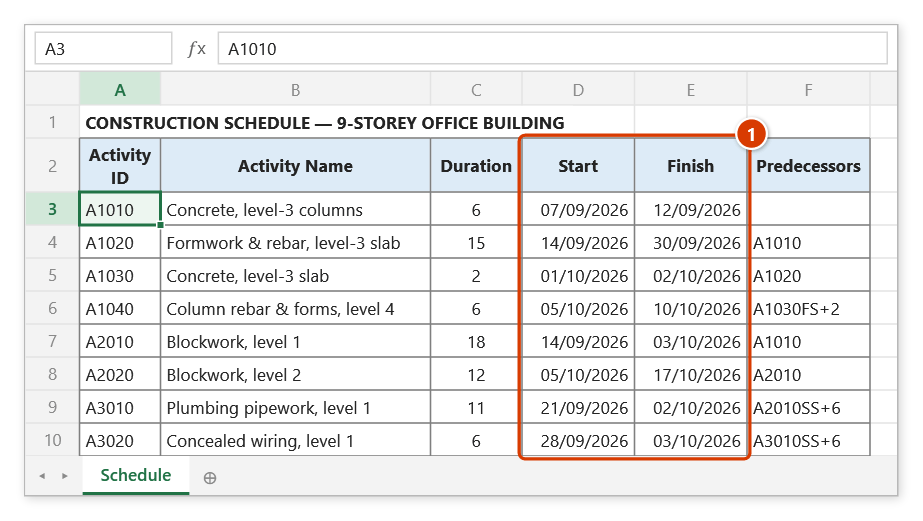
Download this command's sample workbook — the data matches the pictures below (sheet Schedule), so you can follow each step right away.
Step 1. Open the source schedule sheet with Activity ID / Name and the Start / Finish columns (1). The command does not re-run CPM, so run Auto Calc first if you just changed the logic.
Step 2. On the ribbon, open the DVD Cons tab → Schedule group → open Reports → choose Schedule (custom range).
Step 3. In the Generate schedule by range window, set From 01/10/2026 (1) and To 31/10/2026 (2), choose Week as the Chart scale (3) (the column width switches to 10; the start column defaults to AD). Tick Clip tasks to fit exactly within the range (clean print) (4) and click Generate (5).
Step 4. The add-in clones the GanttChart template into a new sheet Tien do 01-10-2026_31-10- (the name is cut to 25 characters) holding only the 6 activities that overlap October — A2010, A3010 and A3020 started in September and are clipped to 01/10 because the clip box is ticked — keeps the computed dates and draws a weekly Gantt from column AD without further prompts. A message box names the new sheet.
Example
A bridge project's master programme runs 26 months, but the September meeting only covers the mid-river pier works. The engineer clicks the command, enters From 01/09/2026 and To 30/11/2026 and picks the Week scale. The new sheet holds just the 34 Q4 activities, with bars and dependency arrows intact and the critical path still in red — one tidy A3 page instead of a six-page master print.
Notes
- CPM is not recalculated: dates come across exactly as they stand on the source sheet, so run Auto Calc first if you have just edited logic.
- Activities that only partly overlap the window are still included: with Clip tasks to fit exactly within the range ticked their dates and bars are clipped at the window edge; unticked, the real dates are kept and bars may run past the window (P6/MSP-style filter).
- The generated sheet is standalone — edits there do not flow back to the master, and rerunning creates a fresh sheet.
- The critical path only shows if the source sheet already carries a computed critical path.
- Choosing the Day scale for a multi-month window produces a very wide sheet; use Week or Month for long ranges.
Related
- Gantt Chart — the drawing step this command chains into, used for the whole schedule.
- 3-Week Lookahead — the day-grid version for the site, without bars or arrows.
- Gantt Tpl — the GanttChart template the new sheet is cloned from.
- Auto Calc — recompute dates and the critical path before extracting a window.