
Health Check
Location on ribbon: Tab DVD Cons → Group Schedule → Menu Reports
Command ID: btnHealthCheck
PRO feature
This command is part of the PRO plan. STANDARD accounts activated before 01/07/2026 keep access until their licence expires; other Standard accounts get an upgrade prompt when they click it.
What it does
Audits your schedule network against the DCMA metric set (about 12 checks) — the same yardstick owners and supervision consultants use before approving a programme. The command scans the data already on the sheet and produces a Health + source-sheet-name sheet (e.g. Health Schedule; Sức khỏe … when the add-in runs in Vietnamese) containing a scorecard plus the list of activities flagged by each check. Run it right before submitting a schedule, or after any major re-plan, to be sure the logic network has no open ends.
How to use
- Open the schedule sheet (a Gantt sheet with Code, Task name, Start, Finish and predecessor/successor columns).
- Run Auto Calc first so Total Float is populated — without it the negative-float and high-float checks cannot score correctly.
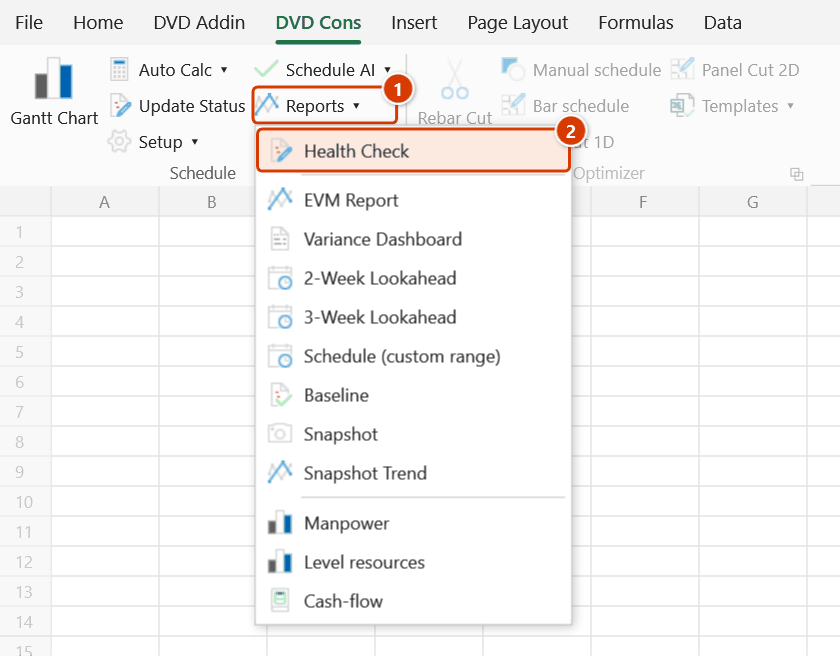
- Go to Tab DVD Cons → group Schedule → menu Reports → click Health Check.
- An Excel input box asks for the Data date (dd/mm/yyyy) (pre-filled with the data date stored in the workbook, today if none) → OK. No selection and no extra columns are needed — every metric is derived from existing data. When the report sheet already exists, the Confirm data change box appears before it is overwritten.
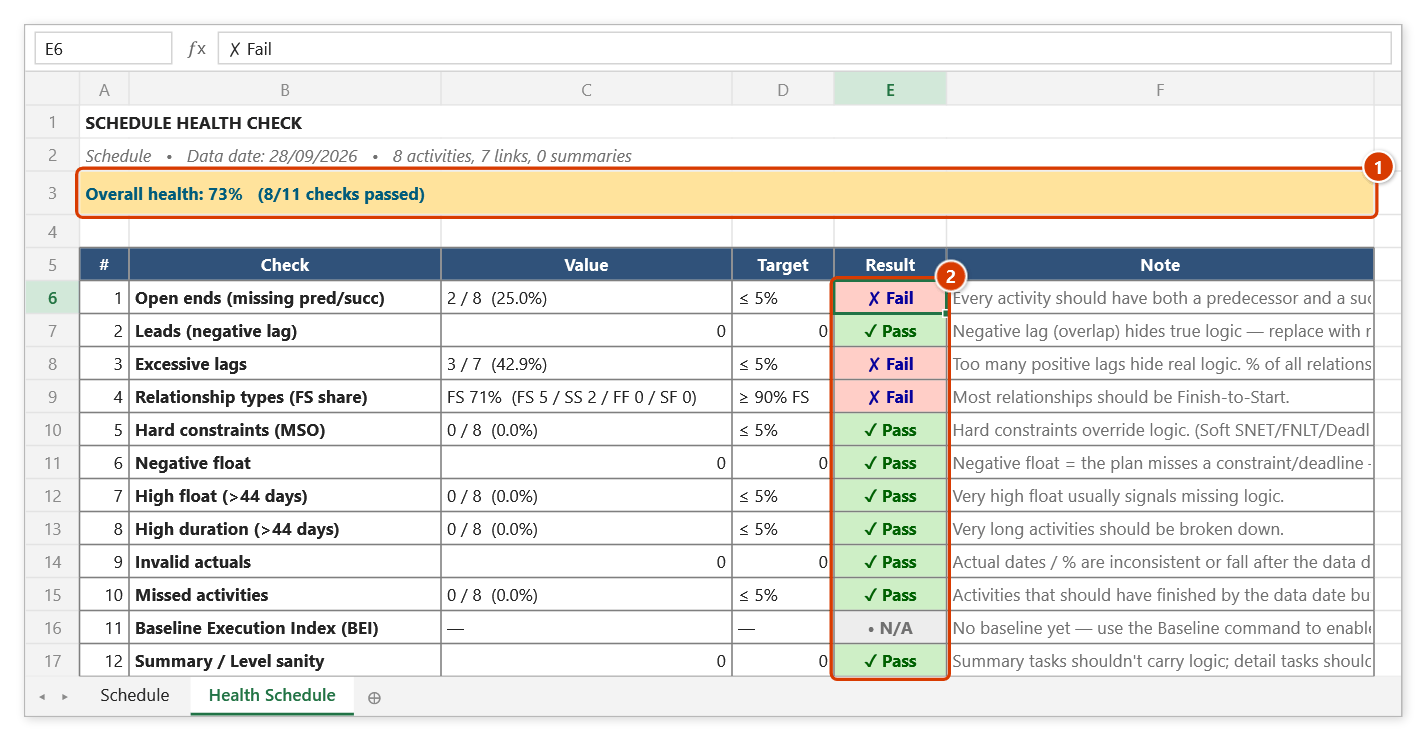
- Read the new Health … sheet: the overall health score sits just above the scorecard; each row of the table is one metric with its value, target and result (Pass / Warn / Fail).
- Scroll down to the flagged-activity lists to see exactly which activity IDs to fix, correct them on the schedule sheet, then run the check again.
Video tutorial
Narrated in Vietnamese, with Vietnamese subtitles. Kiểm tra chất lượng và Bảng chênh lệch tiến độ · 6 min 27 s · 11 cases · Download the video · Practice workbook for the video
Commands in this video: Health Check · Variance Dashboard
Chapters (18)
- Giới thiệu
- Mở lệnh
- Ngày dữ liệu
- 1 · Đọc bảng điểm
- Cách chấm
- 1 · Đọc bảng điểm
- 2 · Sửa logic hở, chạy lại
- 3 · Tiến độ có nhiều lỗi
- 4 · Cột Cấp, thiếu Tổng trôi
- 5 · Tuần sau – có Baseline
- Bảng chênh lệch tiến độ
- 6 · Bảng chênh lệch đầy đủ
- 7 · Chưa có cột BAC
- 8 · Có BAC, chưa nhập AC
- 9 · Bấm nhầm ở sheet Dashboard
- 10 · Khi lệnh không chạy
- Mẹo
- Kết thúc
Illustrated walkthrough
Practice
Download this command's sample workbook — the data matches the pictures below (sheet Schedule), so you can follow each step right away.
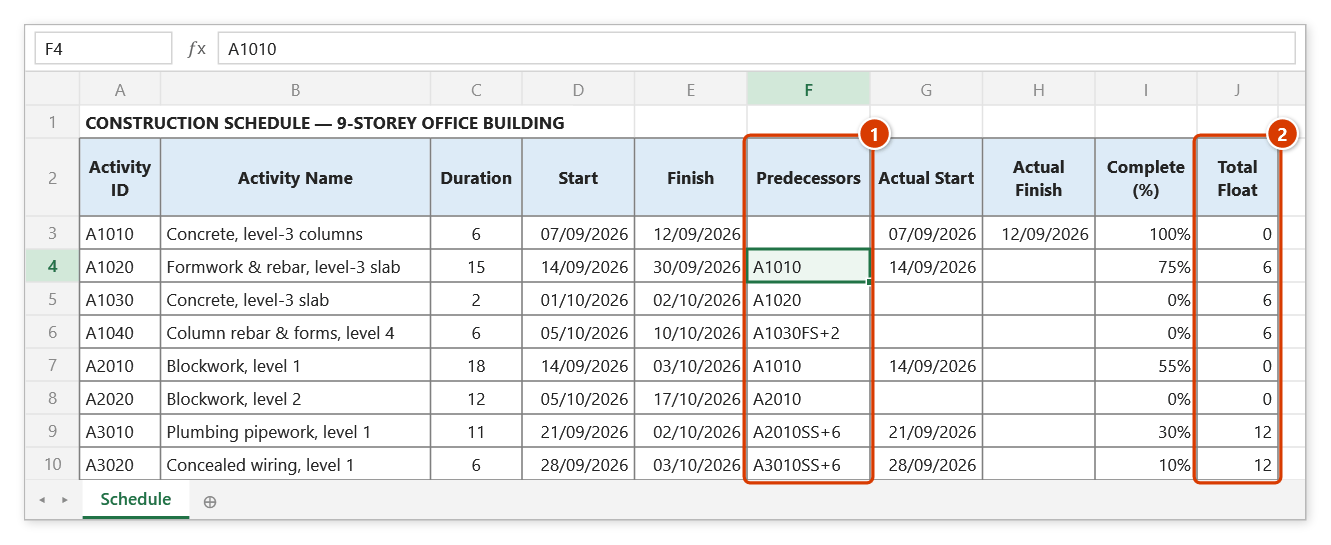
Step 1. Open the schedule to assess: it has Activity IDs, Predecessors links (1) and actual dates. Run Auto Calc first so the Total Float column (2) is filled — without it the Negative / High float checks are skipped.
Step 2. On the ribbon, open the DVD Cons tab → Schedule group → open Reports → choose Health Check.
Step 3. Excel asks for a date in the Kiểm tra chất lượng tiến độ box: Data date (dd/mm/yyyy): — the box is pre-filled with the data date stored in the file (today if none). Type 28/09/2026 and click OK; the date is saved as the shared data date for the other schedule reports.
Step 4. The add-in writes the Health Schedule sheet: the overall health score (1) and 12 checks with value, target and result (2). Below the table, FLAGGED ACTIVITIES lists the IDs caught by each check, e.g. A1040 (→), A2020 (→) with no successor — fix them on the schedule sheet and run again (you are asked before the old report sheet is overwritten).
Example
You are about to submit a 320-activity master programme for an apartment tower package. After clicking the command, the Health sheet shows a scorecard like this:
| Metric | Value | Target | Result |
|---|---|---|---|
| Open ends (missing pred./succ.) | 14 activities | ≤ 5% | Fail |
| Leads (negative lag) | 3 relationships | 0 | Fail |
| FS relationship share | 81% | ≥ 90% | Warn |
| Hard constraints (MSO) | 2 activities | ≤ 5% | Pass |
| Negative float | 6 activities | 0 | Fail |
| Long durations (> 44 days) | 9 activities | ≤ 5% | Warn |
The planner links the 14 dangling activities, removes the 3 negative lags and reruns — the overall health score rises and the programme clears the consultant's review.
Notes
- Shared data date: the date prompt is pre-filled with the data date stored in the workbook (name
dvdDataDate, today if none) and saves the date you pick — the other schedule reports (EVM, Variance, Health Check, Lookahead, Snapshot, Update Status, Recovery) share it, so weekly reports no longer drift apart. - The command is read-only: it never changes dates or logic on the schedule sheet.
- The Health … sheet is wiped and rewritten on every rerun; the Confirm data change box asks first and offers a backup — Ctrl+Z right after the command brings the previous report back.
- Skip Auto Calc and Total Float stays empty, which makes the float and critical-path checks report wrong values.
- BEI is only computed when the workbook already contains a saved Baseline; otherwise that row stays blank.
- This checks network logic quality only — quantities, norms and manpower still need a manual review.
Related
- Auto Calc — run it first so the float metrics have Total Float to work with.
- Baseline — save a baseline so the BEI metric has something to compare against.
- Constraints — where you fix the hard constraints this check flags.
- Variance Dashboard — the one-page management summary to produce once the schedule is clean.